StudyStream: 24/7 Video Study Rooms
studystream.live · checked 15 Oct 2026
24/7 video study rooms with timers, tasks, streaks and AI study tools.
How it plugs in
Signal on Virtual Study Room Apps6.7#1 of 37
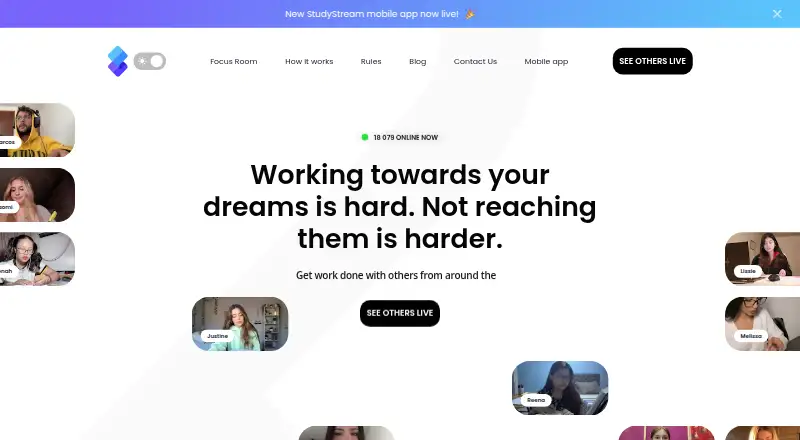
StudyStream is a 24/7 video platform and community for studying with people around the world. It offers public focus rooms, video accountability, a Pomodoro timer, task and streak tracking, AI note and quiz tools, and a social feed. Apps run on Android, iOS, macOS and the web, with a free plan and paid upgrades.
Review
In a line
StudyStream is an online community where students study together in live, public video rooms. Its rooms run continuously, so people can join study sessions at any time.
What it does
The service provides video focus rooms with shared study sessions and accountability. Its built-in Pomodoro timer defaults to 25 minutes, and the app tracks tasks and study streaks.
AI tools can make notes, generate quizzes and take notes. A social feed helps users connect with student groups, while filters sort potential study partners by country, subject and interests.
Users can book 30- or 60-minute sessions for up to 20 RSVPs. Bookings can be added to Apple, Google, Outlook or another calendar, but StudyStream does not send push or email reminders.
How it connects
StudyStream runs on Android, iOS, macOS and the web. It supports iOS 15 or newer, Android 8 or newer and current major browsers.
Premium web users can connect Spotify and show the currently playing song on their video tile. Web users on every plan can use blur and preset virtual backgrounds; the mobile app does not support virtual backgrounds.
Its terms mention an API for accessing a user's own StudyStream data, but no public SDK or standalone developer documentation is provided there. The software is not open source and does not include a self-hosting right.
Good fit
StudyStream suits students who want a public virtual room, visible video presence and a shared timer while working. It also targets people preparing for exams, handling professional projects or building skills.
The free plan supports one hour of focus-room time per day. Paid plans add longer access, more pins and chat features, while Premium adds streaming-quality choices and Spotify connection.
Watch for
Most rooms and events are public. Joining means consenting to others seeing your Zoom and WebApp display name, so check the room privacy before entering.
Free accounts show up to 12 video tiles, while subscribers can see up to 20. Pins reset when a room session ends, and limits vary by plan.
Users must be older than 16. The mobile interface has been criticized for making followed users hard to find.
Pricing
StudyStream has a free plan and no free trial. Free includes one hour of focus-room time each day, four pins and ads; it does not let you start new chats.
Basic Monthly costs $3.99 a month and includes four hours of daily room time, 20 pins, no ads, channels and new chats.
Premium Monthly costs $6.99 a month. Premium Annually costs $69.99 a year. Both provide unlimited room time, 40 pins, a premium tick, superboost, streaming-quality choice and Spotify integration.
Verdict
Choose StudyStream if studying alongside other people helps you stay accountable and you want timers, task tracking or AI note tools in the same service. Its always-open rooms and mobile apps make drop-in sessions straightforward.
Look elsewhere if you need private-by-default rooms, email reminders, mobile virtual backgrounds, open-source software or a documented developer platform. Review the public-room display rules and age requirement before signing up.
Our take
StudyStream is a practical choice for students who benefit from visible, shared study time rather than working alone. The free tier lets you try the core room experience, while paid plans increase daily or unlimited room access and add chat, pins and media options. Its public-room model may not suit people who want private study spaces, and calendar bookings lack automatic reminders. Buyers should also confirm that their device meets the supported operating-system or browser requirements and that they are over 16.
- 24/7 public video rooms for studying with others
- Built-in Pomodoro timer, tasks and streak tracking
- AI note maker, quiz generation and note taker
- Apps for Android, iOS, macOS and the web
- Free plan available
- Most rooms are public and show your display name
- Free plan limits focus-room time to one hour daily
- Mobile app lacks virtual backgrounds
- No push or email reminders for booked sessions
- No public SDK or standalone developer documentation
- Pick it ifStudents who want live video accountability; Exam, project or skill-building study sessions; People who like timers and study streaks
- Skip it ifYou need private-by-default rooms or automatic booking reminders; You require open-source code or a documented public developer platform; You need virtual backgrounds on mobile
Pricing
A free plan covers basic use with daily room and pin limits. Basic costs $3.99 a month; Premium costs $6.99 a month or $69.99 a year. There is no free trial.
- Free1 hour focus-room time per day · 4 pins · ads · cannot start new chatsFree
- Basic Monthlyin-app purchase · 4 hours focus-room time per day · 20 pins · no ads · channels · new chats$3.99/mo
- Premium Monthlyin-app purchase · Unlimited focus-room time · 40 pins · premium tick · superboost · streaming-quality choice · Spotify integration$6.99/mo
- Premium Annuallyin-app purchase · Unlimited focus-room time · 40 pins · premium tick · superboost · streaming-quality choice · Spotify integration$69.99/yr
As help.studystream.live lists them, checked 15 Oct 2026.
Questions
Is StudyStream free?
Yes. The Free plan costs nothing and includes one hour of focus-room time per day, four pins and ads. There is no free trial.
What devices support StudyStream?
StudyStream supports Android, iOS, macOS and the web. Support lists iOS 15 or newer, Android 8 or newer and current major browsers.
Are StudyStream rooms private?
Most focus rooms and events are public. Joining consents to others viewing your Zoom and WebApp display name.
Does StudyStream have a Pomodoro timer?
Yes. A Pomodoro timer is built into the focus rooms, with a default session length of 25 minutes.
Can StudyStream connect to calendars?
Booked 30- or 60-minute sessions can be added to Apple, Google, Outlook or another calendar. StudyStream sends no push or email reminders.
Does StudyStream offer an API?
Its terms mention an API for accessing your own StudyStream data. The terms do not provide a public SDK or standalone developer documentation.