
Integrated Development Environments
GeneXus: Features, Integrations and Pricing
genexus.com · checked 15 Oct 2026
AI-powered low-code platform that turns a shared model into business software for multiple platforms.
How it plugs in
Signal on Integrated Development Environments6.7#5 of 65
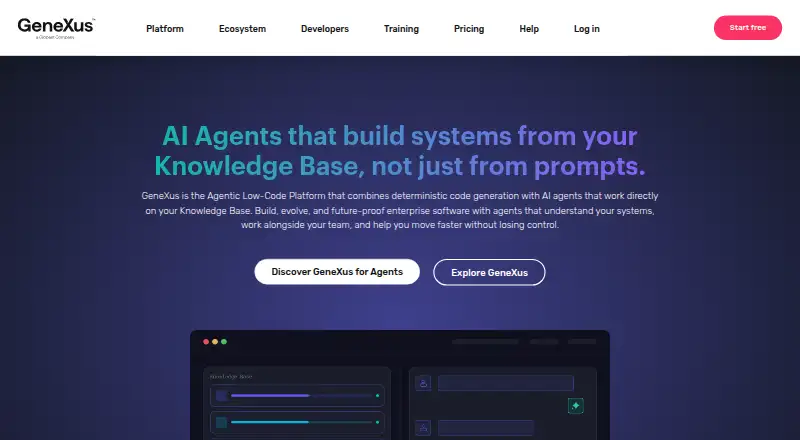
GeneXus is a proprietary low-code platform with AI for building and evolving business software from a Knowledge Base. It generates databases, application code and user interfaces for web, mobile and other targets. It connects to APIs, databases and cloud services, supports team version control, and offers free access alongside paid plans with some prices available only by request.
Review
In a line
Using AI and a shared Knowledge Base, GeneXus helps create and update mission-critical applications. It has been developed since 1988 and is headquartered in Montevideo, Uruguay.
What it does
You model business rules and processes, then GeneXus generates databases, front ends and application code. Its deterministic generators repeat the same results from the same model across supported technologies.
The platform can produce web, mobile, desktop, cloud and chatbot experiences. It includes native Android and iOS app generation, Angular for web and mobile interfaces, and .NET and Java generators for web applications and back ends.
Business-process tools model and automate workflows. Through skills, a command-line tool and an MCP Server, GeneXus for Agents enables AI agents to work with Knowledge Base objects; the GeneXus engine validates the resulting changes.
How it connects
GeneXus handles REST and SOAP APIs, including their creation, consumption and documentation, and can produce a YAML OpenAPI file for every exposed API. API objects can also expose gRPC services, but gRPC is beta in .NET and Java and does not work with .NET Framework.
The platform reaches external systems and databases through ready-made connectors or custom code. Its named connections include OpenAI, AWS, Azure, Google Cloud, Apache Kafka and Azure Service Bus. Supported security measures include OAuth, encryption and secure communication channels.
The cross-platform IDE is described for Mac, Windows and Linux environments. Applications can run on cloud, on-premises, at the edge or in hybrid setups. For an IDE category comparison, see Integrated Development Environments.
Good fit
GeneXus presents its platform for enterprise IT departments, software houses, startups and teams developing mission-critical business applications. It suits teams that want one model to serve several application types and platforms.
GeneXus Server supports simultaneous work, version control and change management. Its cloud and DevOps options include Docker, Kubernetes, AWS, Azure and Google Cloud. Native mobile work can be compared with Mobile Development IDEs.
Watch for
GeneXus is not open source. It uses a proprietary license, paid copies, license activation and annual upgrade and support terms.
Check the environment requirements before adopting it. GeneXus 18 IDE requires Microsoft Windows, at least 4 GB of RAM, 1.2 GB of installation space, .NET Framework and SQL Server or LocalDB.
User feedback cited in the facts includes high licensing costs, basic interfaces, performance problems on large projects, difficult interface customization, debugging generated code and friction when migrating versions.
Pricing
The Free plan is intended for building a first MVP with AI assistants and agents.
Pro and Enterprise are priced on request. Pro includes production solutions, team collaboration and priority support. Enterprise covers mission-critical systems with maximum security and compliance.
GeneXus Trial is free. GeneXus for Students costs $99 a year, billed per year plus IVA. GeneXus for Startups costs $129 a month, billed monthly during the first year plus IVA. GeneXus for ISV costs $329 a month on an annual plan, billed monthly plus IVA. GeneXus for Enterprise is quote-based and includes in-house training, Cobol/RPG generators, a technical kickoff and unlimited workflow users.
Verdict
Choose GeneXus if your team needs model-driven delivery across web, mobile and back-end targets, with workflow tools, API handling and several deployment choices. The free options allow an initial evaluation, while production and enterprise use may require a negotiated contract.
Look elsewhere if open-source licensing is required, or if your team cannot accommodate Windows-based GeneXus 18 IDE requirements and the listed database prerequisites. Teams focused only on mobile or web may also want to compare specialized IDE categories such as Web Development IDEs.
Our take
GeneXus fits organizations that want to maintain business applications from one model and generate versions for several platforms. It is especially relevant when APIs, workflow automation, team change control and hybrid deployment matter. The free plan and trial lower the barrier to exploration, but licensing terms and several paid plans require closer review. Its proprietary model, Windows requirements for the GeneXus 18 IDE and reported migration, customization and large-project concerns make a careful technical and budget check important before adoption.
- Generates web, mobile and backend code from one model
- Supports Android and iOS native applications
- Connects to REST, SOAP, databases and named cloud services
- Offers team version control and workflow automation
- Deploys to cloud, on-premises, edge or hybrid environments
- Proprietary software with paid licensing and annual support terms
- GeneXus 18 IDE requires Windows and specific prerequisites
- Some plans have no published price
- Reported issues include migration friction and large-project performance
- gRPC support is beta in some generators and unavailable in .NET Framework
- Pick it ifEnterprise IT teams building mission-critical systems; Teams needing web, mobile and backend generation; Organizations requiring APIs, workflows and hybrid deployment
- Skip it ifYou require open-source code or a fully published price list; Your team cannot meet the Windows, .NET and SQL Server prerequisites; You need a builder without generated-code and migration concerns
Pricing
GeneXus offers both a free plan and a free trial.
- FreeBuild your first MVP with AI assistants and agentsFree
- ProProduction solutions · Team collaboration · Priority supportOn request
- EnterpriseMission-critical systems · Maximum security and complianceOn request
- GeneXus TrialTrial access; duration not statedFree
- GeneXus for StudentsPer year + IVA · Web generators (.NET or Java) · native iOS and Android generator · unlimited applications$99/yr
- GeneXus for StartupsFirst year, monthly payment + IVA · Web generators (.NET or Java) · native iOS and Android generator · unlimited applications$129/mo
- GeneXus for ISVAnnual plan, monthly payment + IVA · All technologies · BPM Suite · Angular generator · chatbot · AI module · reporting$329/mo
- GeneXus for EnterpriseRequest quote · In-house training · Cobol/RPG generators · technical kickoff · unlimited workflow usersOn request
As genexus.com lists them, checked 4 Oct 2026.
Questions
What platforms can GeneXus target?
GeneXus supports Android, iOS, web, Linux, macOS, Windows, APIs and self-hosted deployments. Applications can run in cloud, on-premises, at the edge or in hybrid environments.
Can GeneXus create mobile apps?
Yes. Native apps can be generated for Android and iOS, while the Angular generator covers web and mobile front ends.
What APIs does GeneXus support?
The platform works with REST and SOAP APIs, documenting them and producing OpenAPI specifications. API objects can expose gRPC, with the stated beta and .NET Framework limits.
Is GeneXus open source?
No. GeneXus uses a proprietary intellectual-property license with paid copies, activation and annual upgrade and support terms.
How much does GeneXus for Startups cost?
GeneXus for Startups costs $129 a month, billed monthly during the first year plus IVA.
What does GeneXus connect to?
Named connections include OpenAI, AWS, Azure, Google Cloud, Apache Kafka and Azure Service Bus. Custom code can connect systems without a ready connector.