HeyGen AI Video Maker Review
heygen.com · checked 27 Sept 2026
Create AI videos from writing, pictures, sound, slides and digital presenters.
How it plugs in
Signal on AI video generators8.5#2 of 241
HeyGen provides cloud and mobile tools that turn text, images and audio into videos, with avatar creation included. Projects can run for as long as 60 minutes and export at up to 4K; dubbing and lip-sync support over 175 languages and dialects. Apps run on the web, Android and iOS, alongside API access and a ChatGPT plugin.
Review
In a line
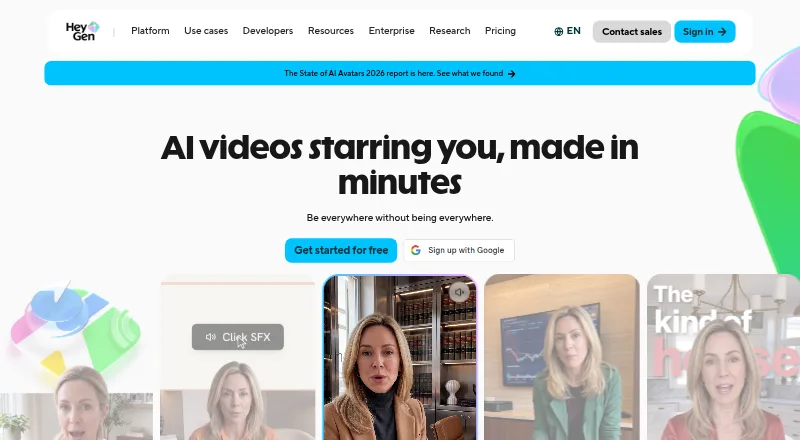
HeyGen turns writing, images, audio and PPT or PDF files into video. Digital presenters and avatar translation are available too.
What it does
Written prompts, pictures, sound files and presentations can all serve as starting points for a video. Available workflows cover text, image and audio conversion, avatars, and PPT/PDF imports.
Avatar translation and lip movement support over 175 languages and dialects. AI Studio keeps generated motion elements adjustable, including wording, colors, timing and positioning.
Depending on the subscription, output may be as long as 60 minutes and as sharp as 4K. HeyGen reports that simple jobs often arrive within a minute; more involved ones may need several minutes.
How it connects
HeyGen runs in a browser and on Android and iOS, with API access available. It also has a plugin for ChatGPT and supports cloud and mobile deployment.
Business plans link with n8n, Make, HubSpot, Zapier and learning-management systems. Listed integrations also include Vimeo, Salesforce, Slack, Google Drive, Notion and Vercel.
Comments, tagging, collaborative editing, shared workspaces and task management are available for teams. Business and Enterprise also bring centralized billing, role management, single sign-on and SCIM provisioning.
Good fit
HeyGen suits solo users, small businesses, mid-market teams and enterprises making presenter-style or translated video without recording every version.
Commercial use is allowed. Paid plans include live chat support; Enterprise adds priority support and customer success management.
For related categories, see AI Explainer Video Makers and AI Dubbing Software.
Watch for
On the Free plan, you get three videos per month and each can be no longer than one minute. Paid plans have different credit, duration and resolution limits.
Custom avatars use on-camera identity verification from the depicted person. Check the plan limits and seat costs before choosing a team plan.
HeyGen lists GDPR, SOC 2 Type II, CCPA, AI Act and DPF compliance markers, plus annual penetration testing, vulnerability management and continuous monitoring.
Pricing
The free tier includes three one-minute videos each month, 500-plus stock avatars and one custom video avatar. A credit card is not needed to test the service, though premium access is limited.
Creator costs $29 per month when billed monthly, or $24 per month on an annual subscription; the plan has 600 credits, 30-minute videos and 1080p output. Pro is $49 monthly with 1,000 credits, 30-minute videos and 4K output.
Business is $149 per month for 1,500 credits, videos up to 60 minutes and 4K output; each additional seat costs $20 monthly. Enterprise is quoted individually, with no duration ceiling and SCIM provisioning.
Canceling stops renewal, while paid features and credits stay available through the end of the current billing cycle.
Verdict
HeyGen fits workflows that call for avatar presentations, multilingual editions or converting documents into video, with API access available across its web and mobile service. Its free plan works for trying short clips, while paid tiers provide longer videos, more credits and higher export quality.
Look elsewhere if three short free videos are not enough for evaluation, or if your workflow needs a different tool set.
Our take
HeyGen is a practical option for teams and individuals producing avatar videos, translated content or videos from documents and images. The API, ChatGPT plugin and business integrations help it fit existing workflows. The free tier is capped at three one-minute videos per month, so regular production requires a paid plan. Creator and Pro cap videos at 30 minutes, while Business raises that to 60 minutes and adds extra seats. Enterprise removes the duration cap but requires a custom quote.
- Text, image, audio and PPT/PDF conversion tools
- Avatar translation and lip-sync for over 175 languages and dialects
- API, ChatGPT plugin and listed business integrations
- Pro and higher plans support output up to 4K
- Commercial use is allowed
- Only three one-minute videos are included each month on the free tier
- Creator and Pro plans stop at 30-minute videos
- Business charges $20 monthly for each extra seat
- Custom avatars use on-camera identity verification
- Enterprise pricing is available only on request
- Pick it ifAvatar-led and multilingual business videos; Turning presentations, images or text into video; Teams needing API and workflow integrations
- Skip it ifYou need more than three free videos each month; You require uncapped duration without an Enterprise quote; You do not want identity checks for custom avatars
Pricing
A free monthly tier supports three one-minute videos.
- Freebilled monthly · 3 videos per month · 1 minute maximum video length · 500+ stock video avatars · 1 custom video avatarFree
- Creatorbilled monthly · 600 credits per month · 30 minutes maximum video length · 1080p export · 175+ languages and dialects$29/mo
- Creator Annualbilled annually · 600 credits per month$24/mo
- Probilled monthly · 1,000 credits per month · 30 minutes maximum video length · 4K export$49/mo
- BusinessAdditional seats are $20 per seat per month · 1,500 credits per month · 60 minutes maximum video length · 4K export · $20 per additional seat per month$149/mo
- EnterpriseCustom pricing · No video duration maximum · 4K export · SCIM provisioning · Priority supportOn request
As heygen.com lists them, checked 27 Sept 2026.
Questions
Is there a no-cost HeyGen tier?
Yes. The free tier allows three monthly videos, each capped at one minute, plus 500-plus stock avatars and one custom video avatar.
Where can HeyGen be used?
It runs on the web, Android and iOS, and provides API access. Deployment is available through cloud and mobile.
What is the maximum HeyGen video length?
The overall limit is 60 minutes. Creator and Pro allow 30 minutes, Business allows 60, and Enterprise has no maximum duration.
Which languages are available for avatars?
Avatar translation and lip-sync support more than 175 languages and dialects.
Can HeyGen connect to other services?
Business plans link with n8n, Make, HubSpot, Zapier and learning-management systems. Other listed integrations include Vimeo, Salesforce, Slack, Google Drive, Notion and Vercel.
Is commercial publishing permitted?
Yes. Commercial use is allowed.
What remains after cancellation?
Cancellation stops the next renewal. Paid features and unused credits remain until the current billing cycle ends.