
Fliki: AI Video and Audio Creation
fliki.ai · checked 21 Oct 2026
Fliki turns text, images, blogs, URLs and presentations into narrated videos and audio with AI voices and avatars.
How it plugs in
Signal on Explainer Video Software7.8#1 of 40
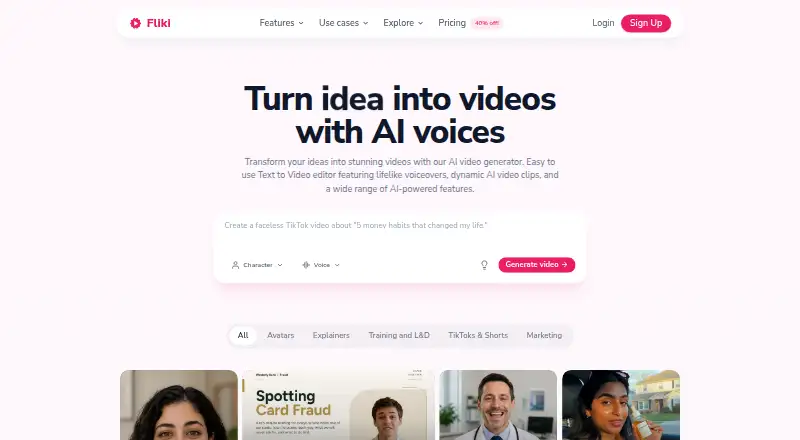
Fliki is a hosted AI tool for turning scripts, ideas, blog posts, URLs and PowerPoint files into narrated video or audio. It offers text- and image-to-video creation, AI voices, avatars, dubbing, editing, screen recording and publishing links. A free plan is available, with paid tiers adding longer exports, more credits, voice clones and API access.
Review
In a line
Fliki is a hosted service that creates narrated videos and audio from written content, images, web pages and presentations. It runs on the web, Android and iOS.
What it does
Enter an idea, script, blog article, URL or PowerPoint presentation and Fliki can turn it into a video with narration, visuals, captions and music. It can also summarize blog or URL content before making a video.
Its tools include text-to-video, image-to-video, AI avatars, generated images, thumbnails, clips and music. The editor handles scenes, timelines, subtitles, media, audio, scripts and voiceovers, with screen, camera and microphone recording built in.
Fliki supports videos up to 40 minutes and resolutions up to 4K. It can translate or dub videos into more than 80 languages, including translated captions, native voices and lip-synced mouth movement.
How it connects
Fliki can publish directly to YouTube and TikTok. Zapier and Make can start video or audio generation from events such as a new Google Sheets row or Notion post.
A public REST API covers video, templates, text-to-speech, long-form audio, voices, languages and brand-kit functions. API keys are made in the Automation tab, and API requests use the same credits as the app. Documentation includes a quickstart, tutorial, reference and curl examples. AI slideshow makers may also suit presentation-based projects.
It is not open source. Fliki is delivered as a hosted service, with no listed official language SDKs or self-hosting option. You need an internet-connected device and a browser, preferably Chrome, rather than a special download.
Good fit
Fliki suits people who need narrated social videos, explainers, repurposed articles, presentation videos or audio without recording every voice track themselves. Its multilingual voices, avatars and stock media support content made for different audiences.
Teams can connect automated workflows through Zapier, Make or the API. Direct publishing also helps creators sending finished videos to YouTube or TikTok. Social media video makers are another relevant category.
Watch for
The free plan adds a watermark, limits exports to five minutes and provides 720p output. Paid plans differ in credits, video length, voices, avatars and voice-clone allowances, so check the tier before committing.
API use draws from your plan credits. Fliki does not list official language SDK packages or a self-hosting choice. Support is by email, and there is no telephone support number.
Pricing
Fliki has a free plan billed free forever with 3 credits a month, 300 voices, 80-plus languages, 720p output, exports up to five minutes and a watermark. Paid plans start at $8 per user a month.
Standard costs $28 a month, or $21 a month when billed yearly. It includes 180 credits, 1,000 voices, 500 ultra-realistic voices, 1080p video, 15-minute videos, one voice clone, limited stock avatars and commercial rights.
Premium costs $88 a month, or $66 a month when billed yearly. It includes 600 credits, more than 2,000 voices, more than 1,000 ultra-realistic voices, 1080p video, 40-minute videos, AI video clips, all avatars, three voice clones and API access.
Enterprise pricing is on request and is billed yearly. It offers custom credits, bulk discounts, invoiced billing, personalized avatars, branded templates, team collaboration and a dedicated account manager. Presentation recording software can be considered when recording is the main need.
Verdict
Choose Fliki if you want one browser-based workspace for turning written material into narrated video or audio, adding multilingual voices or avatars, and automating production. The free tier lets you try the workflow, while Standard and Premium expand output limits and creative controls.
Look elsewhere if you need open-source software, self-hosting, official SDK packages or a phone support line. Also compare credit usage carefully when you plan regular API generation or long videos.
Our take
Fliki is a practical choice for creators, marketers and teams that need narrated videos from text, articles, URLs or presentations. Its combination of multilingual voices, avatars, dubbing, editing and workflow connections covers many common production tasks. The free tier is useful for short trials, but its watermark and five-minute limit narrow its use. Paid plans make more sense when you need longer exports, commercial rights, voice cloning or API access. Buyers wanting self-hosting or open-source control should choose another tool.
- Turns scripts, blogs, URLs and PowerPoint files into narrated video or audio
- More than 2,000 voices across more than 80 languages
- Includes AI avatars, dubbing, captions, music and media generation
- Public API plus Zapier, Make, YouTube and TikTok connections
- Free plan available for short, watermarked exports
- Free exports are limited to five minutes, 720p and include a watermark
- API requests use the same credits as app usage
- Not open source, with no listed official SDKs or self-hosting option
- Phone support is unavailable; support is by email
- Pick it ifNarrated videos made from scripts, articles, URLs or presentations; Multilingual content with AI voices, avatars or dubbing; Teams automating video creation through Zapier, Make or the API
- Skip it ifYou require open-source code, self-hosting or official language SDKs; You need phone support or unrestricted free exports; Your workflow depends on API volume beyond plan credits
Pricing
A free forever tier supports short, watermarked 720p exports. Enterprise pricing is on request.
- Freefree forever · 3 credits/month · 300 voices · 80+ languages · 720p · up to 5-minute exports · watermarkFree
- Standard$21/month when billed yearly · 180 credits/month · 1,000 voices · 500 ultra-realistic voices · 1080p · videos up to 15 minutes · 1 voice clone · limited stock avatars · commercial rights$28/mo
- Premium$66/month when billed yearly · 600 credits/month · 2,000+ voices · 1,000+ ultra-realistic voices · 1080p · videos up to 40 minutes · AI video clips · all avatars · 3 voice clones · API access$88/mo
- Enterpriseyearly · custom credits · bulk discounts · invoiced billing · personalized avatars · branded templates · team collaboration · dedicated account managerOn request
As fliki.ai lists them, checked 21 Oct 2026.
Questions
Does Fliki have a free plan?
Yes. The Free plan is billed free forever and includes 3 credits a month, 720p output, exports up to five minutes and a watermark.
What can Fliki turn into a video?
It can use ideas, scripts, blog posts, URLs, images and PowerPoint content. It adds narration, visuals, captions and music.
Does Fliki offer an API?
Yes. Its REST API supports video, templates, text-to-speech, long-form audio, voices, languages and brand-kit endpoints. API use consumes plan credits.
Can Fliki translate or dub videos?
Yes. It translates or dubs videos into more than 80 languages with translated captions, native voices and lip-synced mouth movement.
What platforms does Fliki run on?
Fliki is available on the web, Android and iOS. It requires an internet-connected device and a browser, preferably Google Chrome.
Is Fliki open source?
No. Fliki is a hosted service, and its developer materials do not list official language SDK packages or a self-hosting option.
Near it
All alternatives →- WWideo#2 on this board
- EEExplain Everything#3 on this board
- D
 Doratoon#4 on this board
- E
 Explideo#5 on this board
- RS
 Renderforest Slideshow Maker#6 on this board
- M
 mySimpleshow#7 on this board
- WV
 Whiteboard Video Maker#8 on this board
- AAnimaker#9 on this board
- P
 Powtoon#10 on this board
- SA
 Steve AI#11 on this board