
Kling AI: Video and Image Generator Review
kling.ai · checked 15 Oct 2026
AI studio for making and editing videos and images, with web, mobile apps, and an API.
How it plugs in
Signal on AI video generators8.6#1 of 241
Kling AI creates and edits videos and images from text or pictures. It supports AI avatars, motion control, native audio, lip-sync, and outputs up to 4K. A free plan is available, while paid memberships add credits, remove watermarks, and allow commercial use. Kling runs as a hosted service on web, Android, iOS, and through its API.
Review
In a line
Kling AI is a hosted creative studio for generating and editing videos and images with artificial intelligence. It is made by Kling AI, headquartered in Singapore.
What it does
You can turn text prompts or images into videos, create AI avatars, and edit visual content. Motion Control transfers movement and facial expressions from a reference video to a character image.
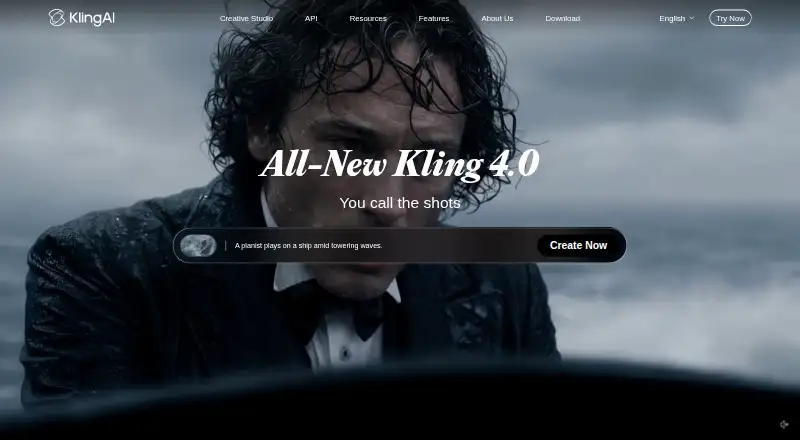
Kling Video 3.0 can make voices and synchronized lip movements for multiple languages and speakers. It supports continuous clips up to 15 seconds and multi-shot storyboards, and Kling 4.0, released in October 2026, extends a single generation to 30 seconds. Maximum output is 4K, while free generation is described as 1080p.
How it connects
Kling runs on the web, Android, and iOS. It also offers a hosted API, so it is not software you install on your own server. The API supports text-to-video requests, 720p, 1080p, or 4K output, 3–15 second clips, aspect ratios, native audio, multi-shot mode, and callbacks.
API access uses API-key bearer authentication or older AccessKey/SecretKey JWT authentication. Kling provides Python and Java examples, an official MCP plugin (OAuth sign-in to https://kling.ai/mcp/plugin, using your account credits), and a command-line tool that can work with Cursor, Claude, ComfyUI nodes, Makefiles, shell pipelines, and CI workflows. Official guides cover motion control, camera movement, start and end frames, motion brush, lip-sync, and virtual try-on.
Kling is closed-source and hosted. Its privacy policy says uploaded photos, images, audio, videos, and generated content are stored and processed on servers in Singapore. It says access is limited to designated personnel and that it does not collect, store, share, or analyze face data to identify people.
Good fit
Kling suits people making short AI videos, image animations, talking characters, and storyboards. It can fit commercial projects on paid plans that include commercial use.
Developers who need generated video inside another workflow can use the API, the MCP plugin, or the command-line tool. People comparing tools can also review other AI video generators.
Watch for
Free output has watermarks, and the Basic plan does not allow commercial use. Membership credits last one month; purchased credits last two years. The published purchase rate is 66 credits for one US dollar.
Complex prompts may produce inconsistent results, including ignored actions or changed characters. Apple reviewers reported repeated image-to-video failures even with paid subscriptions. Google Play reviewers reported missing monthly credits at renewal and charges for generations that disappeared.
Kling says its service is provided as-is and does not guarantee continuous, uninterrupted, or error-free operation. Check how uploaded media is handled before sending sensitive material.
Pricing
Kling uses a freemium model. Basic is free forever and includes 30 element creations, no monthly credits, and no commercial use.
Standard is $6.99 a month (billed $10 shown; next renewal $8.8; first-subscription discount only) with 660 credits per month, 50 element creations, 1080p, watermark removal, video extension, and commercial use. Pro is $25.99 a month (billed $37 shown; next renewal $32.56; first-subscription discount only) with 3,000 credits, 150 element creations, 1080p, watermark removal, video extension, priority features, and commercial use.
Premier is $64.99 a month (billed $92 shown; next renewal $80.96; first-subscription discount only) with 8,000 credits, 150 element creations, 1080p, watermark removal, video extension, priority features, and commercial use. Ultra is $127.99 a month (billed $180 shown; next renewal $159.99; first-subscription discount only) with 26,000 credits, 500 element creations, 1080p, watermark removal, video extension, priority features, possible beta invitations, and commercial use.
Verdict
Choose Kling AI if you want text-to-video or image-to-video creation, avatar and lip-sync tools, and an API that can plug into development workflows. The free tier is suitable for noncommercial trials, but watermarks and limited output apply.
Paid plans make more sense for commercial work because they remove watermarks and add credits. Before subscribing, weigh reported generation failures, prompt inconsistency, credit complaints, and the hosted service's data handling.
Our take
Kling AI is a reasonable option for creators who need short videos from text or images, motion transfer, talking characters, and synchronized audio. Its web, mobile, and API access cover both individual and workflow-based use. The free plan lets you try the service, but it has watermarks and no commercial rights. Paid tiers add monthly credits and commercial use, yet prices rise sharply and credits have validity rules. Consider another tool if you need dependable complex prompts, guaranteed uptime, self-hosting, or fewer concerns about failed generations and billing reports.
- Text-to-video and image-to-video generation
- AI avatars, motion control, native audio, and lip-sync
- Web, Android, iOS, and hosted API access
- Outputs up to 4K; paid plans remove watermarks
- Commercial use included on paid plans
- Free plan has watermarks and bans commercial use
- Complex prompts can produce inconsistent results
- Users reported generation failures and credit issues
- Hosted, closed-source service; uploads are processed in Singapore
- Membership credits expire after one month
- Pick it ifShort AI videos, image animation, and talking characters; Teams needing an API, MCP plugin, or command-line workflow; Commercial projects using paid plans
- Skip it ifYou need self-hosted or open-source video software; You require guaranteed uptime or highly reliable complex prompts; You cannot accept hosted processing of uploaded media
Pricing
A free Basic tier is available.
- Basicfree forever · 30 element creations · no monthly credits · commercial use not allowedFree
- Standard$10 shown; next renewal $8.8; first-subscription discount only · 660 credits/month · 50 element creations · 1080p · watermark removal · video extension · commercial use$6.99/mo
- Pro$37 shown; next renewal $32.56; first-subscription discount only · 3,000 credits/month · 150 element creations · 1080p · watermark removal · video extension · priority features · commercial use$25.99/mo
- Premier$92 shown; next renewal $80.96; first-subscription discount only · 8,000 credits/month · 150 element creations · 1080p · watermark removal · video extension · priority features · commercial use$64.99/mo
- Ultra$180 shown; next renewal $159.99; first-subscription discount only · 26,000 credits/month · 500 element creations · 1080p · watermark removal · video extension · priority features · beta invitations if applicable · commercial use$128/mo
As kling.ai lists them, checked 15 Oct 2026.
Questions
Does Kling AI have a free plan?
Yes. Basic is free forever, with 30 element creations, no monthly credits, and no commercial use.
What platforms support Kling AI?
Kling is available on the web, Android, and iOS. It also offers a hosted API.
Can Kling AI make 4K videos?
Yes. Maximum output is 4K, and Pro membership unlocks native 4K video output. Free generation is described as 1080p.
How long can Kling videos be?
Kling 4.0, released in October 2026, generates up to 30 seconds in one pass; Kling 3.0 supports continuous videos up to 15 seconds. Its API accepts durations from 3 to 15 seconds.
Does Kling AI allow commercial use?
Commercial use is included with Standard, Pro, Premier, and Ultra. Basic does not allow it.
Are Kling AI credits permanent?
Membership credits last one month. Purchased credits last two years, and failed generations are refunded according to the credits policy.
Is Kling AI open source?
No. Kling is a closed, hosted model accessed through its web app, mobile apps, or hosted API.