HubEngage: Employee Communication and Engagement Platform
hubengage.com · checked 14 Oct 2026
HubEngage brings employee communication, recognition, surveys, messaging and intranet tools into one platform.
How it plugs in
Signal on Intranet Software6.7#4 of 74
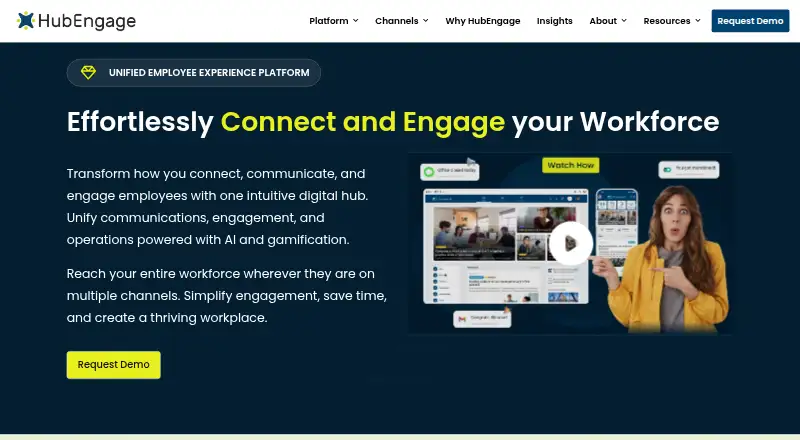
HubEngage is an employee-experience platform for publishing updates, recognizing achievements, running surveys, sharing social posts and sending messages. Employees can reach it via mobile and web apps, email, text messages, Microsoft Teams, Slack or digital signage. Starter is free for up to 200 users; Pro is priced at $1 a month, while other plans use requested quotes.
Review
In a line
HubEngage is proprietary employee-experience software that combines communications, recognition, social engagement, surveys, intranet resources, messaging and workforce tools.
What it does
Separate hubs handle announcements and policies, milestone recognition, internal social posts, pulse surveys and forms, real-time individual or group messaging, and an AI assistant. Organizations can add hubs as needs change.
Content is automatically adapted for mobile apps, web or intranet, email, text messaging and digital signage. AI assists with search, content creation, translation and analytics; points, badges, rankings and rewards promote participation.
How it connects
HubEngage lists connections for SharePoint, Microsoft Teams, ADP, UKG (Ultipro), Workday, single sign-on, HR information and payroll systems. It can take in and send data through APIs, and its team can scope custom integrations.
People can use iOS and Android apps, Windows, macOS and Linux desktop apps, or a responsive website. Microsoft Teams, Slack, email, text messaging and digital signage are additional publishing outlets. HubEngage is not open source.
Good fit
A single employee app covering communications, recognition, surveys, social interaction and messaging can suit organizations with those needs. Audience segmentation can cover employees, vendors, partners, suppliers, prospective workers and former employees, with access limited by group.
It supports targeted publishing, approvals, email publishing, mobile access and frontline channels. Broad channel coverage may help distributed teams that need more than simple announcements.
Watch for
Review summaries describe a learning curve, challenging setup and complicated navigation around advanced settings. Teams seeking only basic announcements may find the platform broader than necessary.
Messages are encrypted while moving and when stored, but HubEngage does not provide end-to-end message encryption. An internet connection is needed for full access, though some content may remain available from an offline cache. One Google Play review reported that notice attachments such as PDFs sometimes failed to open.
HubEngage says a branded messaging app can be configured and launched in 2–3 days; producing fully branded App Store and Google Play apps may take 5–7 business days.
Pricing
Communications, Social, Recognitions, Surveys and Instant Messaging are included in Starter, which is free for up to 200 users.
Pro costs $1 per month, raises the limits and adds scheduling, content calendars, dynamic targeting, unlimited administrators, advanced analytics, email campaigns, SMS text messaging and digital signage.
Custom proposals are available by request with monthly, annual or multi-year billing, and longer commitments receive discounts. Quotes are based on employee count and may include optional hubs or channels; SMS and digital signage can incur additional charges. Enterprise quotes are also requested and include Pro features, single sign-on, an SLA, security compliance, integrations and a dedicated account manager.
Verdict
Choose HubEngage if your organization needs one place for employee updates, recognition, surveys, social activity and messaging across many channels. Its API support and listed HR-system connections can help fit an existing setup, while audience controls cover mixed workforces.
Check the learning curve, internet requirement and encryption scope before rollout. Smaller teams that only publish occasional notices may prefer a simpler employee communication software option. If intranet resources are the main need, compare dedicated intranet software as well.
Our take
HubEngage makes sense for organizations coordinating a distributed or mixed workforce across several communication channels. Smaller groups can use the free Starter tier for core hubs, while Pro and custom options introduce campaign tools, targeting, analytics, SMS and signage. Plan for configuration and training, and confirm that your policy allows messaging without end-to-end encryption. A team needing only straightforward announcements may find the wider feature set unnecessary.
- Starter is free for up to 200 users.
- Channels include mobile, web, email, text messaging, Teams, Slack and signage.
- API data exchange and listed HR, payroll and workplace integrations.
- Audience targeting and content approvals support controlled publishing.
- AI search, writing, translation and analytics are included.
- Advanced settings may involve a learning curve and complex navigation.
- Messages lack end-to-end encryption.
- An internet connection is needed for full access.
- Custom plans may charge separately for SMS and digital signage.
- A reviewer reported occasional Android attachment-opening problems.
- Pick it ifOrganizations combining employee communication, recognition and surveys; Distributed teams needing several delivery channels; Workforces with employees and external audience groups
- Skip it ifYou only need simple announcement publishing.; End-to-end message encryption is required.; Your users often need full access without internet.
Pricing
Starter is free for up to 200 users. Pro is listed at $1 per month and adds higher limits plus campaign and analytics tools. Custom and Enterprise options require a price request; longer custom contracts receive discounts, and SMS or digital signage may add cost.
- Starterup to 200 users · Communications, Social, Recognitions, Surveys and Instant MessagingFree
- Proincreased limits · scheduling · content calendars · dynamic user targeting · unlimited admins · advanced analytics · Email Campaigns · SMS Text Messaging · Digital Signage$1/mo
- Custom proposalMonthly, annual and multi-year contracts are offered; longer commitments receive discounts. · Employee-count-based proposal · Optional hubs and channels · SMS and digital signage may cost extraOn request
- Enterpriseall Pro features · Single Sign On · SLA · security compliance · integrations · dedicated account managerOn request
As g2.com lists them, checked 1 Oct 2026.
Questions
Does HubEngage have a free plan?
Yes. Up to 200 users can use Starter without charge, with Communications, Social, Recognitions, Surveys and Instant Messaging included.
What does HubEngage Pro cost?
Pro is listed at $1 per month. It raises limits and adds scheduling, targeting, analytics, email campaigns, SMS text messaging and digital signage.
Which systems can HubEngage connect to?
Listed connections include SharePoint, Microsoft Teams, ADP, UKG (Ultipro), Workday, single sign-on, HR information systems and payroll systems. APIs support data import and export.
Where can people use HubEngage?
Users can access it through iOS and Android apps, Windows, macOS and Linux desktop apps, and a responsive website. Publishing can also use email, text messaging, Teams, Slack and digital signage.
Is HubEngage open source?
No. Its terms identify the platform as owned and operated by HubEngage, Inc., with restricted user rights.
Does HubEngage offer end-to-end encryption?
No. Messages are encrypted in transit and at rest, but HubEngage says it does not provide end-to-end message encryption.
What is the expected branded rollout time?
A branded messaging deployment may take 2–3 days, while a fully branded App Store and Google Play application may require 5–7 business days, according to HubEngage.