Keelstar: Document Workflows and Pricing
keelstar.com · checked 15 Oct 2026
Keelstar brings web and API tools to document workflows that keep business operations moving.
How it plugs in
Signal on Invoice Approval Software6.3#3 of 37
Keelstar helps teams collect and approve recurring business records, then follow their status and review their history. Examples include vendor paperwork, contracts, invoices, and policy acknowledgments. Its workflows span vendor compliance, contracts, HR, and finance. Free browser tools provide one-time results without an account; monitored workflows start at $49 per workflow each month. Business pricing is quoted individually, while Team is capped at 10 seats.
Review
In a line
Through its web app and API, Keelstar supports recurring document collection, approvals, monitoring, and audits. Its applications serve vendor, contract, HR, and finance operations.
What it does
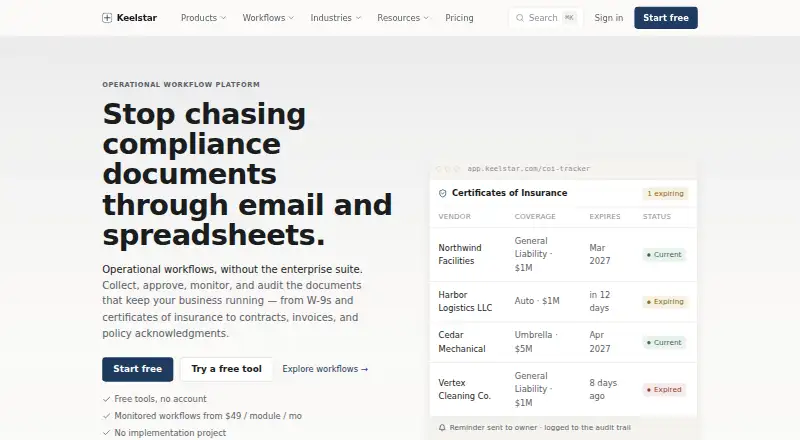
Teams can use it to collect W-9s and policy acknowledgments, track insurance certificates and contract renewals, review contract risks, and route invoice decisions. It also tracks training or certification expirations and vendor exclusion lists.
Workflows record who took an action and when. Documents retain comparable versions, deadline reminders are sent, and records can be exported with their histories. Invoice decisions have comments and an audit trail; approvals can be routed conditionally, but not in parallel.
How it connects
Keelstar runs on the web and has a public API. Its API describes document, parsed-field, workflow, monitor, notification, and webhook capabilities. For example, extracted certificate details can include expiration dates and liability limits.
The maker describes API access and webhooks; no third-party integrations are named on the API page. Workflows also support exporting records and histories.
Good fit
Keelstar may suit vendor compliance, contract, HR compliance, and finance teams seeking focused document workflows without a large enterprise implementation. Shared permissions, reminders, audit logs, and exports support work across these areas.
Teams can set it up themselves, with no implementation fee or rollout project, and Keelstar says they can be live the same day. Its free browser tools deliver one-time results without requiring an account, with an option to move to monitored workflows.
Watch for
Each Team workflow is priced separately, so using more applications increases the recurring cost. Team is capped at 10 seats, while Business includes unlimited seats.
Business requires a custom quote. Keelstar says it has no certifications it has not earned; formal attestations such as SOC 2 are planned for publication after completion and are not current claims.
Keelstar reports that data is encrypted both in transit and at rest, on managed infrastructure with access controls. Customers retain ownership, may export or request deletion of their data, and Keelstar does not sell it.
Pricing
The free tools offer one-time browser results and private signed share links without an account, and users can move up to monitoring.
Team is $49 monthly for each workflow. It comes with one monitored application, reminders, an audit trail and version history, role-based permissions, exports, and a maximum of 10 seats.
Business pricing is available on request. The plan includes every application, shared audit logging and permissions, priority support, volume pricing, security documentation on request, and unlimited seats.
Verdict
Consider Keelstar if your team handles recurring vendor, contract, HR, or invoice documents and needs reminders, an action history, and exportable records. Free tools let users try one-time browser results before moving to monitoring.
Work out how many workflows you expect to run: Team charges per workflow and has a 10-seat limit. For more seats or all applications, request a Business quote. Teams requiring a current formal certification should confirm its status before committing.
Our take
Keelstar may fit teams that repeatedly collect or review business documents and need reminders, permissions, and exportable action histories. The no-cost browser tools return one-time results; monitoring begins at $49 per workflow per month. Account for each Team workflow and the 10-seat limit. Business pricing is custom. Organizations requiring a current formal certification should confirm its status before choosing Keelstar.
- Vendor, contract, HR, and finance operations have dedicated applications.
- Actions are logged with an actor and timestamp.
- Records and histories can be exported.
- The public API describes webhooks and parsed document fields.
- The free browser tools work without an account.
- Team is priced separately for each workflow.
- Team has a 10-seat cap.
- Business pricing requires a custom quote.
- Formal attestations such as SOC 2 are not current claims.
- No third-party integrations are named on the API page.
- Pick it ifTeams managing recurring vendor, contract, HR, or invoice documents; Buyers who need reminders and exportable audit histories
- Skip it ifYou need more than 10 seats without custom Business pricing.; You require a current formal certification before adoption.; You need a named third-party integration rather than API access or webhooks.
Pricing
Free browser tools return one-time results without an account. Monitoring is $49 per workflow each month on Team, so adding applications raises the recurring bill; Team permits up to 10 seats. Business pricing is custom and has no seat limit.
- Free toolsforever · no account · one-time browser results · private signed share links · upgrade to monitoringFree
- Teamper workflow / month · one monitored application · reminders · audit trail and version history · role-based permissions · exports · up to 10 seats$49/mo
- Businesscustom platform pricing · every application · shared audit logging and permissions · priority support · volume pricing · security documentation on request · unlimited seatsOn request
As keelstar.com lists them, checked 15 Oct 2026.
Questions
Is Keelstar free?
The free browser tools need no account and include one-time results and private signed share links. Monitoring is available on Team, starting at $49 per workflow per month.
What documents and workflows does Keelstar cover?
Keelstar supports vendor compliance, contract work, HR compliance, and finance operations, with workflows such as W-9 collection, insurance certificate tracking, policy acknowledgments, contract renewals, and invoice approvals.
Does Keelstar connect to other software?
Keelstar provides an API and webhooks, but its API page does not list third-party integrations.
Can I export records from Keelstar?
Yes. Each workflow lets teams export records and their histories, including actions recorded with an actor and timestamp.
How much does Keelstar cost for a team?
Team is $49 per workflow per month and includes one monitored application and a limit of 10 seats. Business pricing is custom.
Does Keelstar have a SOC 2 certification?
Keelstar says it does not claim certifications it lacks and plans to publish formal attestations such as SOC 2 when complete.