Ledger: Free Command-Line Accounting Software
ledger-cli.org · checked 9 Oct 2026
Open-source double-entry bookkeeping driven by UNIX command-line tools.
How it plugs in
Signal on Bookkeeping Software6.6#20 of 75
Ledger is BSD-licensed accounting software for Linux, macOS, and Windows. You record transactions in a text file, then use commands for reports, balance checks, reconciliation, and multi-currency work. The project presents no flashy interface and lacks bank feeds, invoicing, receipt capture, inventory tracking, and accountant access.
Review
In a line
Ledger provides double-entry accounting through UNIX command-line access. It is available free of charge under the BSD license.
What it does
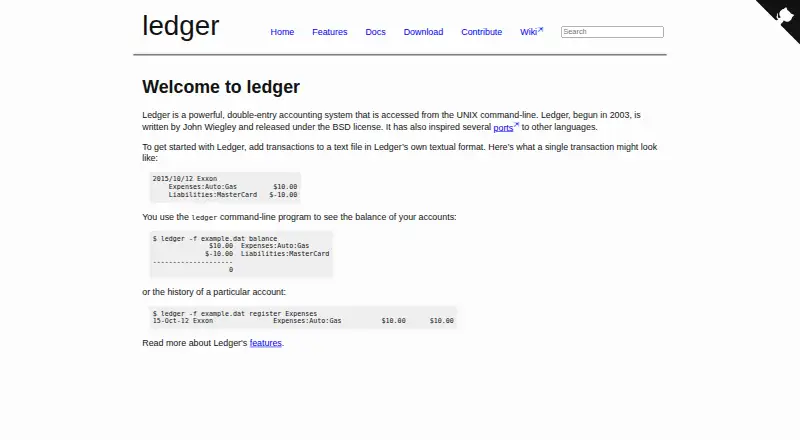
Ledger keeps transaction records in its own text-based format. Every entry has to balance; otherwise Ledger raises an error and withholds the report.
Its commands can create monthly and average reports, check balances, reconcile accounts, and track stock capital gains. Accounts may contain multiple currencies, with conversion between them supported.
How it connects
Ledger runs on Linux, macOS, and Windows; the download page additionally lists BSD packages or binaries.
Ledger leaves your data files untouched, so you maintain them yourself. Files can use UTF-8, ISO-format dates, and US or European decimal conventions. Documentation includes a Ledger 3 C++ API.
Good fit
Ledger suits people who want text-file accounting and are comfortable working in a UNIX command line. It can fit personal or organizational bookkeeping that needs balanced entries, reports, reconciliation, and currency conversion.
For a wider look at this category, see General Ledger Software.
Watch for
The maker characterizes Ledger as lacking a flashy user interface. It has no bank feeds, invoice creation, receipt capture, inventory tracking, or accountant access.
You are responsible for maintaining the text files, and every entry must balance. Check that a command-line workflow and these missing features match your needs before choosing it.
Pricing
Ledger is free to use, and the project offers no free trial. Its source is available under the BSD license.
Verdict
Choose Ledger if you want an open-source accounting tool built on plain text and command-line operations, with reporting, reconciliation, and multi-currency support.
If you depend on visual tools, bank connections, invoicing, receipt storage, inventory records, or accountant access, another product may fit better. Its text-file approach gives you direct control of your data, but it also makes file upkeep and balanced entries your responsibility.
Our take
Ledger is a sensible choice for users who prefer UNIX command-line tools and want accounting records kept in files they control. Its free BSD license, multi-currency handling, balance checks, and reporting cover core ledger work. The trade-off is a strict text workflow alongside missing business features such as bank feeds, invoices, receipts, inventory, or accountant access. Choose it for command-line bookkeeping; choose another tool if those conveniences are required.
- Free availability with BSD-licensed source
- Linux, macOS, and Windows support
- Multiple currencies with conversion
- Commands can reconcile accounts and check balances
- Users keep their own text data files
- No flashy user interface
- Bank feeds and invoice creation are unavailable
- Receipt capture and inventory tracking are unavailable
- No accountant access
- Unbalanced entries stop report generation
- Pick it ifCommand-line users who want text-file accounting; Bookkeeping with multiple currencies and reconciliation
- Skip it ifYou need visual tools or bank feeds; You require invoices, receipts, inventory, or accountant access
Pricing
Ledger costs nothing and its source uses the BSD license; there is no free trial.
- LedgerBSD-licensed command-line accounting softwareFree
As ledger-cli.org lists them, checked 9 Oct 2026.
Questions
Is Ledger free?
Yes. Ledger is available at no cost, with source released under the BSD license.
Which operating systems can run Ledger?
Ledger supports Linux, macOS, and Windows. The download page also lists packages or binaries for BSD.
What kind of user interface does Ledger provide?
The project presents Ledger as a UNIX command-line system and describes its interface as not flashy.
Where are Ledger’s accounting records kept?
Transactions are entered into a text file in Ledger’s textual format, and Ledger does not create or alter those data files.
Are multiple currencies supported?
Yes. Ledger supports multiple currencies in an account and can convert between them.
How does Ledger handle an unbalanced entry?
An unbalanced entry triggers an error, so Ledger does not generate the report until the entry is balanced.
Does Ledger offer an API?
Its documentation links to Ledger 3 API documentation and describes a C++ API.