Minecraft Backup Review
github.com · checked 3 Oct 2026
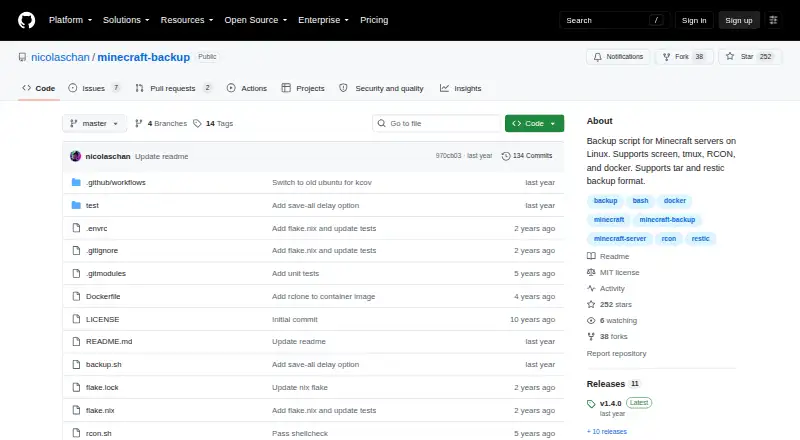
A Linux backup script that stores Minecraft server worlds as tar archives or through restic.
How it plugs in
Signal on Minecraft Backup Software6.3#7 of 30
Minecraft Backup runs as a self-hosted Linux script for backing up Minecraft servers. It saves world folders on a schedule and supports tar archives or the restic backend. Server access can use screen, tmux, RCON, or Docker RCON. Cleanup settings remove older copies, while player and world data may become unsynchronized.
Review
In a line
This shell script preserves Minecraft server world folders on Linux. It runs on your own server and stores backups locally.
What it does
The script creates full backups of Minecraft worlds. It can make tar archives or use the restic backup backend.
Cron can trigger scheduled runs; an hourly example appears in the project README. Backup status messages can appear in Minecraft chat.
Old backups can be handled in three ways: keep a thin history, delete the oldest one by one, or never delete them. With thin retention, 24 hourly and 30 daily copies remain, while leftover space holds weekly backups.
How it connects
Servers managed with screen or tmux are supported, as are servers with RCON enabled. Docker RCON also works, including with the itzg/docker-minecraft-server container and its RCON command-line tool.
Tar and the compression utility you select are required, with gzip used by default. RCON connections additionally need xxd. The repository uses the MIT license, and its README directs users to download backup.sh from the newest GitHub release.
Tar archives can be opened with tar. Restic backups are restored with the restic restore command.
Good fit
Linux server owners can use this for scheduled local copies without installing Minecraft plugins. It also fits vanilla servers and arrangements using screen, tmux, RCON, or Docker RCON.
Choose it if you need custom cleanup rules and full-world restores rather than a hosted backup service.
Watch for
Backups cover world folders, and restoration is at the full-backup level. The script does not provide a more selective restore option in these facts.
During a backup, player information may diverge from world data, potentially duplicating or losing items. RCON is identified in the README as the safest connection because it waits for confirmation that saving finished.
The README notes that Minecraft bug MC-217729 may save the world after save-off and can consequently cause a backup to fail. Check your available disk space, compression tool, and RCON requirements before setup.
Pricing
Minecraft Backup is free. It is offered on a free plan without a trial period. You run it on your own Linux host, with storage kept locally.
Verdict
This is a practical option for people comfortable maintaining a Linux Minecraft server and managing their own storage. Its cron scheduling, retention choices, and tar, restic, RCON, screen, tmux, and Docker RCON support cover common server setups.
It is less suitable if you need hosted storage, plugin-based setup, selective restores, or guarantees that player data and world data always match.
Our take
Choose Minecraft Backup if you operate a Linux Minecraft server and want a no-cost script under your control. It provides scheduled world saves, local storage, archive or restic output, and several server connection methods. Before relying on it, account for the player-data consistency warning, the MC-217729 save issue, and your own disk and restore procedures. Servers needing hosted copies, selective file recovery, or a simpler non-Linux setup should look elsewhere.
- Free and self-hosted on Linux
- Works with vanilla servers without plugins
- Creates tar archives or restic backups
- Cron scheduling and configurable retention
- Server access through screen, tmux, RCON, or Docker RCON
- Backups cover worlds only
- Player and world data may become inconsistent
- A Minecraft save bug can make backups fail
- Requires tar, compression tools, and xxd for RCON
- Recovery is performed as a complete backup rather than by selected files
- Pick it ifLinux owners running their own Minecraft backup process; Vanilla servers needing scheduled local world copies; Admins seeking tar or restic with custom retention
- Skip it ifYou need hosted backup storage or a non-Linux platform; You require selective restores or guaranteed player-data consistency; You prefer a plugin-based setup
Pricing
Free to use, with no trial period. You provide the Linux host and local storage.
- FreeBackup script for Minecraft servers on LinuxFree
As github.com lists them, checked 3 Oct 2026.
Questions
Which operating systems and hosting model apply?
Linux is required, and you host the script on your own server.
Which data is included in a backup?
Each backup contains the Minecraft world folders in full.
What output methods are available?
Backups can be written as tar files or handled by the restic backend.
What server connection methods are available?
Connections can use screen, tmux, RCON, or Docker RCON. The README also documents use with itzg/docker-minecraft-server.
Can backup jobs be automated?
Yes. An hourly scheduled-run example is provided in the README using cron.
What happens to older backup copies?
You may keep a thin history, remove the oldest sequentially, or turn deletion off. Thin mode retains 24 hourly and 30 daily copies, with weekly copies filling remaining space.
Does the project charge for use?
No. The plan is free and there is no free trial.
What limitations affect backup safety?
Player and world data can diverge during a backup, possibly duplicating or losing items. The README favors RCON, and MC-217729 may cause a backup to fail.
Near it
All alternatives →- IInstantBackup#6 on this board
- ABAdvanced Backups#8 on this board
- MMineBackup#5 on this board
- FFastBack#9 on this board
- DDriveBackupV2#4 on this board
- CCaCl2Backup#10 on this board
- FFolderRewind#3 on this board
- CBChronos Backups#11 on this board
- JEJust Enough Backups#2 on this board
- Mmcwrapper#12 on this board