
mitmproxy: A Free Proxy for Inspecting Web Traffic
mitmproxy.org · checked 15 Oct 2026
Inspect and modify web traffic with this free, open-source proxy toolkit.
How it plugs in
Signal on Forward Proxy Software7.7#1 of 25
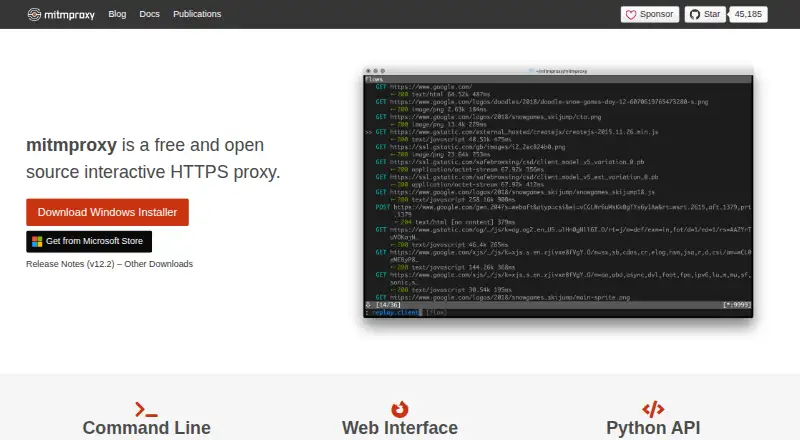
Use mitmproxy to intercept HTTP, HTTPS, and WebSocket exchanges, examine or alter requests and responses, and store conversations for later replay. Work through its console, browser UI, or terminal output, either locally or from official Docker images. Python addons can customize its behavior. The software costs nothing, yet streamed content is outside inspection or modification and HTTP/3 replay has a documented limitation.
Review
In a line
mitmproxy provides free, open-source tools for intercepting and examining web traffic. It can also change traffic as it passes through a proxy.
What it does
Traffic from HTTP/1, HTTP/2, and WebSocket protocols—including encrypted HTTPS—can be examined. Requests and responses are editable, pause rules can be configured, and conversations can be stored for later review or replay.
There are three ways to work with it: mitmproxy is an interactive console, mitmweb has a browser-based interface, and mitmdump sends output to a terminal without an interactive screen.
How it connects
The code is released under the MIT open-source licence. You can run it on your own machine or use official Docker images; installation instructions cover Windows, macOS, and Linux, and PyPI installation is available.
Its Python API lets addons log, redirect, change, or display traffic and add commands. It supports several proxy setups, including local capture, reverse, upstream, SOCKS5, and WireGuard. WireGuard mode can capture traffic from external devices or individual Android apps.
Mitmproxy creates certificates for intercepting encrypted connections. Some apps reject proxy certificates when they use certificate pinning, so check whether the apps you need to inspect will work with this approach.
Good fit
It suits people who need to inspect, edit, record, or replay web traffic for testing and analysis. The different interfaces support interactive work, browser-based viewing, and non-interactive terminal output.
It may also suit teams that want to tailor proxy behavior with Python addons or capture traffic from a device through WireGuard mode.
Watch for
Large bodies can pass through as a stream, but mitmproxy cannot inspect or modify the streamed body content. Sticky authentication can replay HTTP Basic authentication, but not HTTP Digest.
HTTP/3 client replay is currently broken, and the documentation says HTTP/3 support has been extensively tested only with cURL. Precompiled binaries and Docker images include dependencies that are not updated in place, so the project recommends updating regularly.
The project directs usage questions and bug reports to GitHub Discussions and its repository. Its security policy supports only the main branch and latest release for security fixes.
Pricing
mitmproxy is available at no cost and its code is open source. The listed plan is free, with no paid tier stated. There is no free trial.
Verdict
Choose mitmproxy if you need a no-cost tool to examine or alter HTTP, HTTPS, or WebSocket traffic, and value having console, browser, and terminal interfaces. Its local and Docker options avoid requiring a vendor-hosted service, while Python addons allow custom behavior.
Look elsewhere or check compatibility first if your work depends on inspecting streamed bodies, replaying HTTP/3 clients beyond the documented cURL testing, or intercepting apps that reject proxy certificates.
Our take
mitmproxy is a practical free choice for people who need to inspect, edit, record, or replay web traffic and are comfortable working with a proxy. Its three interfaces and Python addon support cover different ways to handle that work, and it can run locally or in Docker. Before adopting it, check the protocol and app limits: streamed bodies cannot be inspected or changed, HTTP/3 replay is currently broken, and certificate-pinning apps may reject interception certificates.
- The MIT-licensed project is free and open source
- Console, browser-based, and non-interactive terminal interfaces
- Can save and replay HTTP conversations
- Python addons can change traffic and add commands
- Runs locally or in official Docker images
- Streamed body content cannot be inspected or modified
- HTTP/3 client replay is currently broken
- HTTP Digest authentication replay is not supported
- Apps using certificate pinning may reject the proxy certificate
- Bundled dependencies in binaries and Docker images are not updated in place
- Pick it ifInspecting, editing, recording, or replaying web traffic; People who want a free proxy tool with Python addon support
- Skip it ifYou need to inspect or change large streamed bodies; You rely on HTTP/3 client replay or HTTP Digest authentication replay; The apps you need to inspect reject proxy certificates
Pricing
The software has no charge, is open source, and has no paid tier stated. There is no paid trial to evaluate.
- FreeOpen-source software · no paid tier statedFree
- mitmproxyFree and open source interactive HTTPS proxyFree
As mitmproxy.org lists them, checked 15 Oct 2026.
Questions
Is mitmproxy free?
Yes. It is open source and available without charge; no paid tier is stated.
Which operating systems can I install it on?
Installation guidance covers Windows, macOS, and Linux, with PyPI and official Docker image options as well.
Can mitmproxy inspect HTTPS traffic?
Yes. It can intercept encrypted HTTPS traffic and generates certificates for interception.
Can I use it with Android traffic?
WireGuard mode can capture traffic from external devices or individual Android apps.
Can mitmproxy replay recorded traffic?
Yes. Recorded client conversations and server responses can be replayed for testing and analysis.
Does it support HTTP/3?
HTTP/3 client replay is currently broken; the documentation reports extensive HTTP/3 testing only with cURL.
Can it inspect large streamed responses?
Large bodies may pass through as streams, but mitmproxy cannot inspect or modify the streamed content.