Moss: Corporate Cards, Expenses and Pricing
getmoss.com · checked 15 Oct 2026
Moss gives SMEs a single platform for corporate cards, expense claims, accounts payable and accounting automation.
How it plugs in
Signal on Spend Management Software6.6#2 of 29
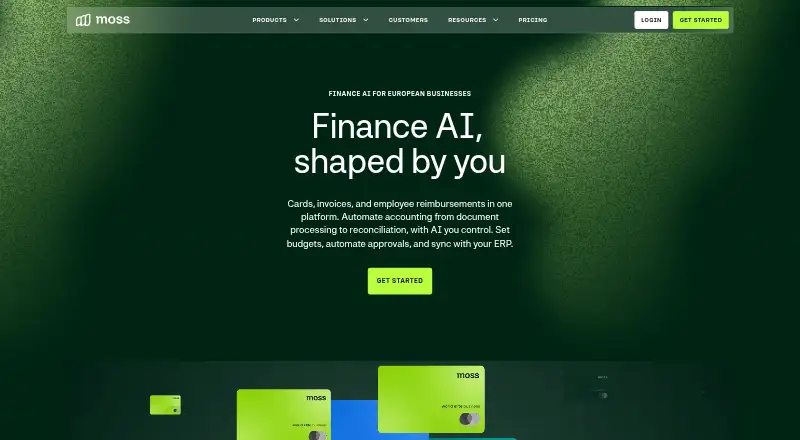
Moss brings card spending, reimbursements, invoice workflows and accounting automation together. Teams can set card limits, merchant rules, approvals and budget checks, while employees submit receipts and expense claims through the web or mobile app. It connects with accounting, HR and other business tools, with an API and scheduled exports. A free option is available for teams of up to three; paid pricing is provided on request.
Review
In a line
For SMEs, Moss combines company cards, employee expenses, bill payments, purchasing and accounting automation in one spend-management service.
What it does
Teams can issue physical and virtual Mastercard corporate cards, set card limits and merchant rules, and require approval for purchases. Budget checks and purchase requests help control spending before it happens.
Through Moss’s web and mobile apps, employees can attach receipts to transactions and enter cost centres and VAT rates. They can also claim mileage, per diems and other out-of-pocket expenses. AI can extract receipt details, and reimbursements can be paid through SEPA or a Moss balance.
For bills, Moss can capture invoices, match them with purchase orders, send them for approval and schedule payments. Optional procurement and advanced controls include budgets, purchase orders and spend insights.
How it connects
Accounting integrations named by Moss include Xero, QuickBooks Online, Oracle NetSuite, Microsoft Business Central, DATEV, AFAS, Exact and SAP Business One. HR, sign-in and productivity integrations are also listed. You can browse related spend management software.
Moss provides a public API for authorized applications to connect for automation, reporting and analytics. Customers may also arrange SFTP exports of card, invoice, reimbursement and purchase-request data, including attachments. Moss runs on the web, iOS and Android.
Good fit
Moss may suit European small and midsize businesses looking to manage cards, reimbursements and invoice approvals in one place. Its controls are intended for teams that need spending limits, purchase requests and approval steps before money is spent.
It may also work for businesses using a supported accounting integration or connecting custom tools through the API.
Watch for
The free option has a three-user limit and allows up to 20 invoices per month; the included Moss wallet supports debit only. Paid-plan prices are provided on request, and credit funding is subject to eligibility.
The web app needs an internet connection and a supported desktop browser. Mobile browsers are not officially supported, so teams need access to the iOS or Android app or a supported desktop browser.
Pricing
Moss Starter is the free option. It supports up to three users, unlimited cards and 20 invoices per month, with customizable approval and verification steps and a debit-only Moss wallet.
Moss provides paid-plan pricing on request. Paid plans allow unlimited users and cards; fees vary with the selected modules and monthly transaction volume. Available features include advanced approvals and budget controls, accounting and HR integrations, onboarding support, and debit or eligible credit funding.
Verdict
Consider Moss if your business wants to handle company cards, employee claims, invoice approvals and purchasing in one system, particularly if its accounting connections suit your setup. The free option may work for a small team, though its user and invoice limits may become restrictive as the business grows. Request a paid-plan quote and check which modules, integrations and funding options are included.
Our take
Moss is worth considering for businesses seeking one platform for card spending, reimbursements, invoice approvals and accounting tasks. Its free option may suit a team of up to three people with modest invoice volume; teams needing more users or advanced controls should request a quote. Check compatibility with your accounting and HR tools, and whether debit or credit funding subject to eligibility suits your needs.
- Combines company cards, expenses, invoices and purchasing.
- Free option includes unlimited cards for up to three users.
- Lists Xero, QuickBooks Online and other accounting integrations.
- Provides a public API and scheduled SFTP exports.
- Includes budgets, approval steps and pre-spend checks.
- Free option allows up to 20 invoices per month.
- Free option's Moss wallet is debit-only.
- Paid-plan pricing is provided on request.
- Mobile browsers are not officially supported.
- Credit funding is subject to eligibility.
- Pick it ifSmall and midsize businesses managing cards, bills and employee expenses; Teams that need spending approvals, budgets and accounting connections
- Skip it ifYou need more than three users or 20 monthly invoices on the free option; Your team requires mobile browser access or credit funding without eligibility checks
Pricing
The free option is for up to three users and 20 invoices per month, with unlimited cards and a debit-only Moss wallet. Paid-plan pricing is provided on request; fees vary by selected modules and monthly transaction volume.
- Free Plansup to 3 users · unlimited cards · up to 20 invoices per month · customisable approval and verification steps · debit-only Moss walletFree
- Moss Starterup to 3 users · unlimited cards · up to 20 invoices/month · Moss Wallet debit-onlyFree
- Paid Moss Platformunlimited users and cards · modular platform fee · variable fee based on monthly transaction volume · modules and add-ons selectableOn request
- Paid Plansunlimited users and cards · advanced approval flows and budget controls · accounting integrations and add-ons · HR software integrations · 1:1 onboarding support · debit or credit funding (eligibility applies)On request
As getmoss.com lists them, checked 1 Oct 2026.
Questions
Does Moss have a free plan?
Yes. Moss Starter is free for up to three users, with unlimited cards and up to 20 invoices per month. Its Moss wallet is debit-only.
What does Moss do?
Moss brings corporate cards, employee expense claims, accounts payable, procurement and accounting automation together.
Which accounting software does Moss connect to?
Moss lists Xero, Oracle NetSuite, QuickBooks Online, Microsoft Business Central, DATEV, AFAS, Exact, SAP Business One and other integrations.
Can Moss connect to custom tools?
Yes. Authorized applications can connect through Moss’s public API, and customers can schedule exports to their own SFTP server.
How much do paid Moss plans cost?
Pricing is available on request. Fees vary with selected modules and monthly transaction volume.
Can employees use Moss on a phone?
Moss has iOS and Android apps for tasks such as submitting receipts. Mobile browsers are not officially supported.