Open-Capture software review
open-capture.com · checked 15 Oct 2026
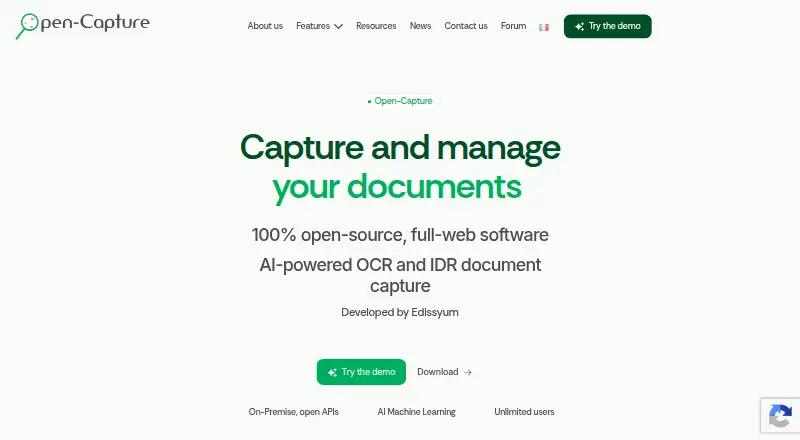
Open-source web document capture with OCR, AI extraction, verification, and exports.
How it plugs in
Signal on OCR software7.9#1 of 40
Open-Capture is a free, open-source document capture system for Linux and web use. It collects paper and digital files through scanners, email, uploads, forms, and services, then uses OCR, AI models, rules, and scripts to classify and extract data. Results can move into management software or standard file formats.
Review
In a line
Open-Capture is a self-hosted web application that captures documents, reads their contents, and sends data to other management systems. It is distributed under the GNU GPLv3 license.
What it does
Documents can arrive from scanners, copiers, file repositories, email, attachments, web forms, uploads, and web services. The system classifies documents, extracts fields, checks them, and exports the results.
Its extraction tools include Tesseract OCR, pre-trained AI models, machine-learning classification, key-value fields, reference-data matching, dictionaries, regular expressions, and barcode or QR-code reading. Rules, formats, reference data, and scripts can validate the extracted information.
Splitter prepares scanned batches by reorganizing pages, adding metadata, typing documents, and classifying them. Verifier handles structured or partly structured documents such as invoices, delivery notes, contracts, and purchase orders. MailCollect reads email content, identifies senders, and adds attachments to workflows.
How it connects
The maker lists connectors for MEM Courrier, CMIS, and OpenADS/Oxalis. It also lists OpenCRM, Alfresco, and SharePoint support.
Processed files and metadata can be exported as PDF, PDF/A, XML, CSV, plain text, or other configured outputs. MEM Courrier can process PDF or image files, split PDFs using QR codes, and create searchable PDFs.
Open-Capture provides open APIs, configurable XML schemas and masks, authentication-token generation, and scripts inside workflow settings. It runs on Linux through a web interface and can be hosted on-premises, in a public cloud, or in a private cloud.
Good fit
Open-Capture suits companies, professionals, local authorities, town halls, public administrations, and associations that need controlled document intake and data extraction.
It fits teams that want to keep hosting and infrastructure under their control, connect capture workflows to existing management software, and automate organization-specific processing with rules and scripts.
Watch for
The installation guide recommends Debian 12 or newer, Python 3.9 or newer, and Tesseract 5.2.0 or newer. Ubuntu or Ubuntu Server may be used, but the documentation says bug support is not provided there.
Deployment and workflow setup require technical administration. Edissyum offers audit, integration, configuration, training, support, and project services for organizations deploying the software.
Pricing
Open-Capture is free and open source. The listed plan has unlimited users, self-hosted or on-premises deployment, and open APIs.
Organizations still choose and operate their own hosting or infrastructure. Edissyum offers integration, training, support, and tailored project services.
Verdict
Choose Open-Capture if your organization needs a no-license-cost capture platform that can run on its own Linux infrastructure and feed several business systems. Its broad intake channels, validation rules, modules, and API options suit formal document workflows.
It is a weaker match for teams seeking a hosted service with minimal administration, or for Ubuntu users who need vendor bug support. Plan for setup work and decide who will maintain the server, OCR tools, workflows, and integrations.
Our take
Open-Capture makes sense for organizations that want to own document processing from intake through export without paying software license fees. It can handle paper scans, email, uploads, and digital files, while its rules and scripts support organization-specific checks. The tradeoff is responsibility: deployment, Linux maintenance, workflow design, and integration work remain part of the project. Debian is the documented choice, and Ubuntu carries no bug-support promise. Buyers should confirm their target management systems and assign technical resources before adopting it.
- Free plan with unlimited users
- Open-source GNU GPLv3 software
- Many document intake channels
- OCR, AI classification, validation, and QR reading
- Self-hosted, on-premises, public-cloud, or private-cloud options
- Ubuntu use has no documented bug support
- Requires Linux, Python, and Tesseract setup
- Self-hosting leaves infrastructure work to the organization
- Integration and support services are separate offerings
- Pick it ifOrganizations processing invoices, contracts, and other business documents; Teams needing self-hosted capture with open APIs; Public bodies and associations with controlled data hosting
- Skip it ifYou want a fully managed service without server administration; Your team requires vendor bug support for Ubuntu; You cannot maintain custom workflows and integrations
Pricing
The Open-Capture plan is free, open source, supports unlimited users, and includes self-hosted or on-premises use with open APIs. Organizations choose and operate their hosting or infrastructure, while Edissyum offers audit, integration, configuration, training, support, and tailored project services around Open-Capture.
- Open-CaptureFree and open-source download · Unlimited users · self-hosted/on-premise · open APIsFree
As open-capture.com lists them, checked 15 Oct 2026.
Questions
Is Open-Capture free?
Yes. The listed Open-Capture plan is free and open source, with unlimited users, self-hosted or on-premises deployment, and open APIs.
Where does Open-Capture run?
It is a web application that runs natively on Linux. The maker says it can be hosted on-premises, in a public cloud, or in a private cloud.
What can Open-Capture capture?
Documents can come from scanners, multifunction copiers, file repositories, email and attachments, web forms, uploads, and web services.
Which systems can it connect to?
Listed connections include MEM Courrier, CMIS, OpenADS/Oxalis, OpenCRM, Alfresco, and SharePoint. It also offers open APIs and configurable XML schemas.
Can it create searchable PDFs?
Yes. The MEM Courrier connector performs OCR and can generate searchable PDFs. Exports also include PDF/A, XML, CSV, and plain text.
What operating system is recommended?
The installation guide recommends Debian 12 or newer with Python 3.9 or newer and Tesseract 5.2.0 or newer. Ubuntu may be used, but bug support is not provided there.
Who provides help with deployment?
Edissyum offers audit, integration, configuration, training, support, and tailored project services around Open-Capture.