Openbook team workspace review
openbook.work · checked 20 Oct 2026
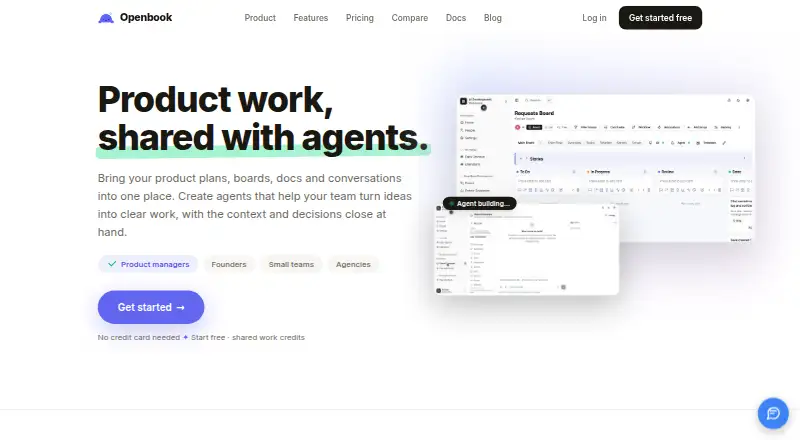
A team workspace with purpose-built rooms, boards, documents, chat and AI agents.
How it plugs in
Signal on Daily Standup Software6.3#4 of 24
Openbook combines planning, project boards, documents, conversations and AI agents in one workspace. It runs on the web, through an API or on a self-hosted deployment. GitHub, Slack, WordPress and Salesforce are among the services it can connect, while files can use several storage locations and the Board API offers read-only access with webhooks.
Review
In a line
The workspace uses organizations, spaces and rooms as its main structure. Each room is a focused app for work such as planning, writing, discussion or tracking, rather than a simple file folder.
What it does
The workspace brings together product plans, boards, documents, conversations and AI agents. Its catalog includes feeds, project status, kanban, Q&A, check-ins, docs, wikis, dashboards, whiteboards, Gantt schedules, retrospectives, chat, proofing, time off and town halls.
Kanban rooms include sprints, backlogs, story points and reference keys. Docs uses a block editor with tables, rich blocks, nested pages and inline search. Wiki rooms use Markdown with a side-by-side preview, while Chat supports channels and direct messages.
Feed rooms handle posts, files, polls, events, announcements, reactions, comments and mentions. Check-ins provide asynchronous standups, templates, mood tracking and team pulse analytics. Dashboards show live widgets, and Gantt rooms support draggable schedules and dependencies.
The in-room assistant can summarize activity and act on workspace content. Through GitHub or GitLab, the build agent can modify repository files, run builds and create pull requests; merging is not part of its job.
How it connects
Agent connectors are available for WordPress, Slack, Figma, Lovable, Shopify, Stripe, Google Calendar, Cal.com, Calendly, five helpdesks, HubSpot and Salesforce. The build agent connects to GitHub and GitLab.
Organizations may supply keys from OpenAI, Anthropic, DeepSeek, xAI, Google or Azure OpenAI, or choose models operated by the platform. Openbook says provider keys are held by the Vibeforce account service and do not reach Openbook or the browser.
Storage choices include Openbook's server, an S3-compatible bucket, Dropbox and Microsoft SharePoint/Teams. The server's default allowance is 30MB.
For Kanban data, the read-only Board API provides JSON via bearer tokens that can be revoked, and board changes can trigger webhooks. A Kanban MCP server can connect to Claude Desktop. Custom HTTP actions and remote HTTPS MCP servers add tools with human approval and per-tool controls.
Good fit
Openbook is aimed at product managers, founders, small teams and agencies that want plans, communication and operational work in one place. It can suit teams needing boards, documentation, async check-ins, creative approvals or time-off workflows.
Self-hosting is available through the API deployment. The web setup requires a browser, an Openbook account and a Vibeforce single-sign-on account; no native desktop installation is described.
Watch for
Integration writes are off by default. To make external changes, both explicit write enablement and a sufficiently permissive autonomy mode are needed; irreversible actions are restricted to auto mode. Connector credentials are encrypted, hidden from the integration panel and scoped to build rooms.
The build agent opens pull requests but does not merge them. Check the room and plan limits before moving a larger team: the Free plan allows up to 10 members with edit access and three spaces, while viewers and guests remain free.
Official pages describe the hosted product and self-hosting API behavior but do not state an open-source license.
Pricing
Openbook has a free plan and a trial. New organizations start with a 14-day Pro trial without a card. The Free plan is free forever, with up to 10 members who can edit, three spaces, 30-day chat and feed history, and viewers and guests always free.
The listed Pro plan is $15 a month per user, or $12 a month per user when billed annually. It adds unlimited members and spaces, full history, dashboards, proofing rooms and priority support. Business is $29 a month per user, or $23 a month per user billed annually, with advanced permissions and dedicated support.
Enterprise pricing is price on request and includes SCIM provisioning, custom contracts, a security review and a dedicated environment. A public pricing promotion also says the whole product is currently free at $0 per user per month, with no card or trial clock; Pro and Business are described there as future tiers.
Verdict
Choose Openbook if you want one web workspace that spans project planning, knowledge, team communication and specialized workflows, with optional AI agents and self-hosting. Its connectors, file destinations and Board API can fit teams that need to move information between tools.
Be cautious if you need a native desktop app, a stated open-source license, automatic external writes or a build agent that merges code. Confirm which pricing message applies to your organization, since the listed paid tiers and the current free promotion describe different billing situations.
Our take
Openbook suits small teams, product groups and agencies that want boards, documents, chat, check-ins and approvals together. It is also a fit for organizations that need GitHub or GitLab build work, configurable AI providers, self-hosting or a board feed for another system. The free entry point lowers the barrier, but team size and space limits matter. Review the write-action safeguards before enabling agents, and clarify whether the current free promotion or the listed Pro, Business and Enterprise plans govern your account.
- Combines planning, boards, docs, chat and AI agents
- Connects to GitHub, GitLab and many business services
- Offers web, API and self-hosted deployment options
- Free plan and 14-day Pro trial require no card
- Free plan limits editing members to 10 and spaces to three
- No native desktop installation is described
- Build agent cannot merge pull requests
- Official pages do not state an open-source license
- Pick it ifProduct teams needing plans, boards and documentation; Small teams and agencies combining communication and workflows; Organizations wanting AI agents or self-hosting
- Skip it ifYou need a native desktop client; You require an open-source license or automatic third-party writes; You need an agent that merges code changes
Pricing
Free forever covers up to 10 editing members and three spaces. Pro and Business have per-user monthly prices, with lower annual-billing rates. Enterprise is price on request. A current promotion says the whole product is free at $0 per user per month, so confirm which offer applies.
- EnterpriseSCIM provisioning · Custom contracts · Security review · Dedicated environmentOn request
- FreeFree forever · Up to 10 members with edit access · 3 spaces · all 18 room types · 30-day chat/feed history · viewers and guests always freeFree
- Pro$15/user/month; $12/user/month billed annually · Unlimited members and spaces · all 18 room types · full history · dashboards and proofing rooms · priority support$15/mo
- Business$29/user/month; $23/user/month billed annually · Unlimited members and spaces · all 18 room types · full history · advanced permissions · dedicated support$29/mo
As openbook.work lists them, checked 20 Sept 2026.
Questions
What is Openbook?
It is a team workspace whose organizations contain spaces and purpose-built rooms for planning, documents, conversations, boards and other work.
Can Openbook connect to GitHub?
Yes. The build agent works with GitHub or GitLab repositories, makes edits, runs builds and opens pull requests, but it does not merge them.
Which AI providers can organizations use?
Organizations can bring keys from OpenAI, Anthropic, DeepSeek, xAI, Google or Azure OpenAI, or use models run by the platform.
Does Openbook have an API?
Yes. Its read-only Board API serves Kanban board data as JSON through revocable bearer tokens and can send webhooks; a Kanban MCP server is also available.
Is there a free plan?
Yes. The Free tier costs nothing forever and includes 10 editing members, three spaces, 30-day chat and feed history, with viewers and guests free.
Can Openbook be self-hosted?
Yes. The API documentation describes self-hosted deployments that replace the hosted domain with your own host while keeping the same API path.