PhotoBoost: Photo Enhancement Across Devices
photoboost.ai · checked 14 Oct 2026
Use PhotoBoost in a browser, desktop app, or mobile app to enhance photos with AI.
How it plugs in
Signal on AI Photo Editors6.7#7 of 96
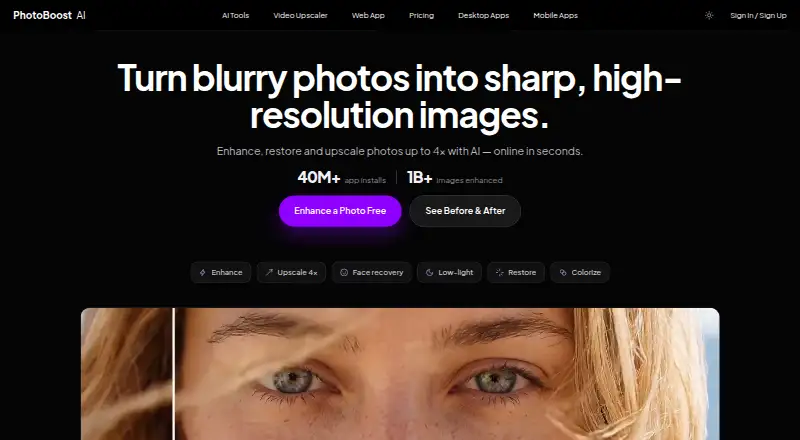
PhotoBoost sharpens blurry images, restores old photos, improves color and lighting, and enlarges images up to four times. It runs in a browser and has desktop and mobile apps. The free tier provides two introductory credits and caps cloud output at 3 MP. Subscriptions include weekly credits, higher output limits, and video upscaling; credit packs are sold separately.
Review
In a line
PhotoBoost uses AI to sharpen, restore, and enlarge photos. It is available through a browser editor and desktop and mobile apps.
What it does
PhotoBoost can bring out soft details, restore color and creases in aged pictures, enhance faces, and adjust color or lighting. Image enlargement supports up to 4× resolution. Tools also cover photographed text and dim scenes.
Mobile apps list one-tap enhancement, relighting, portrait blur, and color tools. Its video upscaler enlarges video frames and exports MP4 while preserving audio.
How it connects
PhotoBoost offers a browser editor, desktop software for macOS 11+, Windows 10+, and 64-bit Linux, and apps for iPhone, iPad, and Android. Browser uploads support JPG, JPEG, PNG, WebP, and HEIC files up to 45 MB, with orientation corrected automatically.
There is no listed third-party integration catalog or public API. The software is proprietary rather than open source. Desktop software supports full-resolution exports and is not subject to the browser upload limit.
Good fit
It may work for people looking to improve faded, dark, blurry, or older pictures on a phone, computer, or in a browser. A document tool is designed to make text in photographs easier to read, and batch processing is available.
Watch for
Cloud AI jobs draw from credits, with usage varying by enhancement and output size. Free cloud output tops out at 3 MP, while subscription tiers allow larger outputs. Check the file and output limits for the workflow you plan to use.
PhotoBoost cautions that enhanced images can look artificial or be inaccurate. They should not be used to establish identity or authenticity, or to support high-stakes decisions. Browser projects remain in local browser storage until deleted or the data is cleared; remote files are kept only as needed for service and legal purposes.
Pricing
The free tier comes with two starter credits, core editing tools, and no card requirement. Pro is $39.99 per year or $4.99 weekly, with 100 credits each week and output up to 20 MP. Max is $79.99 per year or $9.99 weekly, with 200 credits a week and output up to 32 MP.
Both subscriptions include desktop access, unlimited local tools, watermark-free output, and video upscaling. Pro handles clips up to 15 seconds and two jobs at once; Max allows clips up to 60 seconds and eight simultaneous jobs. Standalone credit bundles are $19.99 for 200, $49.99 for 700, $99.99 for 1,500, and $199.99 for 3,200 credits.
Verdict
PhotoBoost is worth considering if you want photo repair and enhancement tools on several types of device or occasional video upscaling. Use the free credits to judge whether the output works for your images. A subscription may suit regular cloud use or a need for larger images and longer video; a credit pack is an option without a recurring plan. Look elsewhere for a public API, open-source software, or image output suitable as reliable evidence.
Our take
PhotoBoost is a reasonable choice for sharpening, restoring, color-correcting, or enlarging pictures on a phone, computer, or browser. The free tier offers a way to try cloud processing; subscriptions and credit packs provide additional usage and larger output limits. Cloud jobs consume credits, and AI processing can alter details. Do not rely on enhanced output to establish identity, authenticity, or other high-stakes facts.
- Available through browser, desktop, and mobile apps.
- Image enlargement supports up to 4× resolution.
- Browser editor accepts five image formats up to 45 MB.
- Batch processing and non-subscription credit packs are available.
- Free cloud output is capped at 3 MP.
- Cloud jobs use credits, with amounts depending on the task and resolution.
- Enhanced output may be inaccurate or artificial.
- No public API or open-source license is listed.
- Pick it ifPeople repairing old or blurry photos on different devices; Users seeking image enlargement or occasional video upscaling
- Skip it ifYou require a public API, SDK, or open-source code.; You need AI-processed images as evidence or for high-stakes decisions.
Pricing
The free tier includes two introductory credits and 3 MP cloud output.
- Free2 introductory credits total · up to 3 MP cloud output · core editing tools · no credit cardFree
- Pro$39.99/year or $4.99/week; cancel anytime · desktop app · 100 credits each week · video upscaling up to 15 seconds · unlimited local tools · up to 20 MP · 2 concurrent jobs · no watermark$39.99/yr
- Max$79.99/year or $9.99/week; cancel anytime · desktop app · 200 credits each week · video upscaling up to 60 seconds · unlimited local tools · up to 32 MP · 8 concurrent jobs · no watermark$79.99/yr
- 200 creditsone-time payment · 200 credits · no subscription required$19.99 one-time
- 700 creditsone-time payment · 700 credits · no subscription required$49.99 one-time
- 1,500 creditsone-time payment · 1,500 credits · no subscription required$99.99 one-time
- 3,200 creditsone-time payment · 3,200 credits · no subscription required$200 one-time
As photoboost.ai lists them, checked 14 Oct 2026.
Questions
Does PhotoBoost have a free plan?
Yes. The free tier gives two introductory credits, core editing tools, and cloud output up to 3 MP, with no card required.
How much does PhotoBoost cost?
Pro costs $39.99 yearly or $4.99 weekly, and Max costs $79.99 yearly or $9.99 weekly. One-time bundles start at $19.99 for 200 credits and go up to $199.99 for 3,200.
What images can I upload in the browser?
The browser editor takes JPG, JPEG, PNG, WebP, and HEIC files up to 45 MB and corrects image orientation.
What devices does PhotoBoost support?
It offers a browser editor, desktop apps for macOS 11+, Windows 10+, and 64-bit Linux, as well as iPhone, iPad, and Android apps.
Does PhotoBoost use uploaded photos to train AI?
PhotoBoost says it does not train AI models on uploaded images unless it separately requests and receives explicit consent.
Can PhotoBoost's enhanced images prove who someone is?
No. The company warns that results may be inaccurate or artificial and should not be relied on for identity, authenticity, or high-stakes conclusions.
Near it
All alternatives →- P
 Picsart#6 on this board
- LALightX AI Cartoon Generator#8 on this board
- PPhotoPad#5 on this board
- P
 Photoroom#9 on this board
- C
 Claid#4 on this board
- AL
 Adobe Lightroom#10 on this board
- P
 Pixelcut#3 on this board
- AP
 Adobe Photoshop#11 on this board
- PBPhotoKit Background Remover#2 on this board
- P
 Photopea#12 on this board