Pixelcut: AI Product Photo Editing and Background Removal
pixelcut.ai · checked 15 Oct 2026
Product-photo editing with AI for cutouts, upscaling, retouching, and batch jobs.
How it plugs in
Signal on AI Mascot Generators7.8#1 of 40
Pixelcut provides AI tools for editing product photos and videos used by sellers, creators, and brands. Backgrounds can be removed or replaced, images enlarged, frames extended, products retouched, shadows generated, and files edited in batches. Apps are offered for iOS and Android alongside a web version, and an API supports external workflows. Users can choose a free tier, paid subscriptions, or API credits.
Review
In a line
Pixelcut combines AI product-photography tools with photo and video editing, image generation, and background cutouts. Sellers, creators, and brands are its stated audience.
What it does
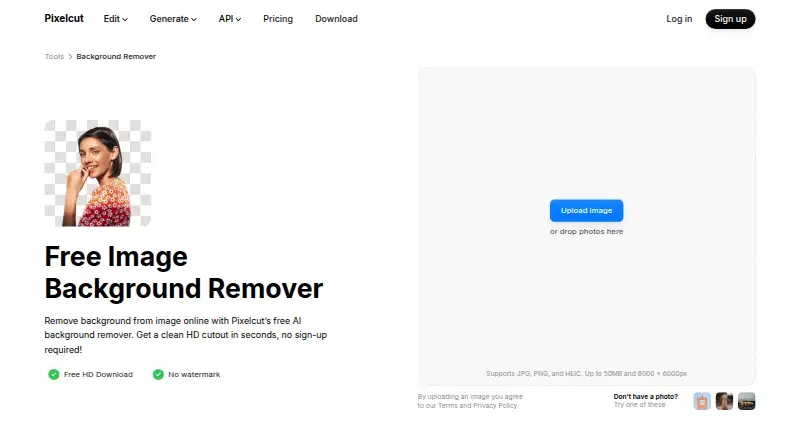
On the web, Pixelcut's remover handles JPG, PNG, and HEIC uploads measuring up to 50 MB and 6000 × 6000 pixels. It finds the subject automatically; a brush allows manual cleanup, and the result downloads as a transparent PNG. Free HD downloads do not require an account and have no watermark.
Available editing features include enlargement to 16×, frame extension through Expand, generative-fill retouching, and AI-created shadows. After a cutout, you can place the subject in an AI-generated scene or browse millions of backdrops.
A video feature removes backgrounds from MP4 frames without a green screen. Batch editing covers hundreds of files, and the background-removal page describes ZIP exports for batches as large as 10,000 images. Pixelcut says AI Actors preserve character and brand understanding across generated images and videos.
How it connects
The service is available through iOS, Android, and web apps. Claude and ComfyUI appear in its integration list, and Pixelcut offers a Claude MCP server for AI-assisted workflows.
Developers can use the public API in creative or image-processing software for background removal, upscaling, generated backgrounds, try-on, and outpaint. PNG and JPEG files are accepted; results may be transparent PNGs, alpha masks, or ZIP archives containing the foreground and mask. The API also accepts JPEG input and supports PNG export.
The API costs 5 credits per background-removal image, shown as $0.05 per image. Pixelcut says requests are encrypted in transit, images are deleted after processing, and API images are not retained for model training. AI background removers and AI image expanders cover related tool categories.
Good fit
Pixelcut suits online sellers, catalog teams, creators, and brands making product photos, ads, social content, or try-on imagery. It is useful when you need repeated cutouts, consistent generated product images, or edits across many files.
The free remover is a practical starting point for occasional HD cutouts. Paid plans add higher usage, all AI models, unlimited background removal and upscaling, team seats, batch exports, and commercial licensing.
Watch for
The free plan has limited background removal and limited upscaling. Web uploads are limited to 50 MB and 6000 × 6000 pixels.
Pixelcut is not open source. API customers may use it commercially, but the API terms prohibit creating training data for their own models. Check credit use before automating many operations, since each API operation consumes credits.
Project images are encrypted and kept private unless sharing is explicitly allowed. Subscriptions can be canceled at any time.
Pricing
Pixelcut offers a free tier with restricted background removal and upscaling, along with exports that carry no watermark. Yearly billing lists Pro at $8 per month and Business at $24 per month; the pricing page also shows $10 and $30 monthly figures for those plans.
Pro includes 600 AI credits each month, all AI models, unlimited background removal and upscaling, a three-person team, 1,000 batch exports each month, and a commercial license. Business includes 3,600 credits, a 10-person team, and 2,000 monthly batch exports with the same core AI and license benefits.
API credits cost $10 a month for 1,000 credits, with credits priced at $0.01 each. Background removal uses 5 credits; upscaling, generated backgrounds, try-on, and outpaint use 10 credits each. API Enterprise has price on request for volumes above 1 million credits monthly.
Verdict
Choose Pixelcut if product imagery is a regular task and you want mobile, web, and API access in one service. Its combination of cutouts, generated scenes, upscaling, retouching, video background removal, and large batch jobs covers a wide editing routine.
Look elsewhere if you need open-source software, unrestricted model-training rights, or a simple fixed-cost API for heavy automated volumes. For occasional background removal, the free web tool may be enough; for teams and recurring catalogs, compare the credit limits and batch allowances with your workload.
Our take
Pixelcut makes sense for sellers, creators, and brands that need product visuals across phones, browsers, and automated workflows. The free remover handles straightforward cutouts, while paid tiers add team access, commercial licensing, broader AI tools, and recurring batch capacity. Its API is useful for connecting image operations to other software, but credit-based billing requires planning. Buyers should also note the closed-source license and the API restriction against making training data. If your needs center on occasional edits, start free; if you need large catalogs or integrations, review the plan limits first.
- Free HD background cutouts without a watermark or account
- Background-removal batches can reach 10,000 images
- The API offers removal, upscaling, generated backgrounds, try-on, and outpaint
- Access is available on iOS, Android, and the web
- Pro and Business include commercial licensing
- The free tier restricts background removal and upscaling
- Web uploads max out at 50 MB and 6000 × 6000 pixels
- Not open source
- API usage consumes credits per operation
- The API cannot be used to create training data for your own models
- Pick it ifProduct sellers and e-commerce catalog teams; Creators making ads and social content; Workflows needing batch edits or an image-processing API
- Skip it ifYou need open-source software; You want unrestricted API use for training your own models; Your workload does not fit credit or batch limits
Pricing
A free tier covers limited removal and upscaling. Yearly billing lists Pro at $8 per month and Business at $24 per month. API credits cost $10 a month; Enterprise pricing is on request.
- Freeper month, billed yearly · Limited background removal · Limited upscale · Free export without watermarkFree
- Probilled yearly; page shows $10 and $8 · 600 AI credits monthly · All AI models · Unlimited background removal and upscale · 3-person team · 1,000 batch exports/month · Commercial license$8/mo
- Businessbilled yearly; page shows $30 and $24 · 3,600 AI credits monthly · All AI models · Unlimited background removal and upscale · 10-person team · 2,000 batch exports/month · Commercial license$24/mo
- API creditsflat monthly rate; $0.01 per credit · 1,000 credits · Background removal 5 credits/operation · Upscaler 10 credits/operation · Generate Background 10 credits/operation · Try-On 10 credits/operation · Outpaint 10 credits/operation$10/mo
- API EnterpriseVolume pricing for more than 1 million credits per monthOn request
As pixelcut.ai lists them, checked 15 Oct 2026.
Questions
Is Pixelcut free?
Yes. The Free plan includes limited background removal and upscaling, with free exports without a watermark. The web remover also offers free HD downloads without sign-up.
Which formats can the web remover handle?
JPG, PNG, and HEIC files are supported up to 50 MB and 6000 × 6000 pixels.
How many images can Pixelcut process in a batch?
The product page describes edits across hundreds of files. Its background-removal page says a batch can contain up to 10,000 images and export as a ZIP.
Does Pixelcut have an API?
Yes. The public API offers background removal, upscaling, generated backgrounds, try-on, and outpaint for external workflows.
What does Pixelcut API access cost?
The API credits plan is $10 a month for 1,000 credits. Background removal uses 5 credits per image; several other operations use 10 credits.
Can Pixelcut remove video backgrounds?
Yes. Its video tool removes backgrounds across MP4 frames without requiring a green screen.
Is Pixelcut open source?
No. Pixelcut reserves its software and related intellectual-property rights rather than granting an open-source license.