
Pixop Video Enhancement Review
pixop.com · checked 18 Nov 2026
Machine-learning video enhancement for broadcast, streaming, and media operations.
How it plugs in
Signal on AI Video Restoration Software6.0#8 of 25
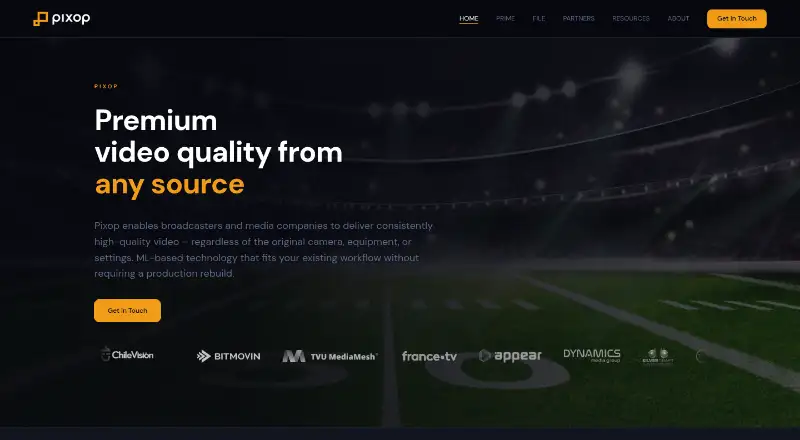
Pixop enhances video through a web platform or deployable software. FILE handles archive-scale upscaling, restoration, deinterlacing, frame-rate and color conversion, and SDR-to-HDR work. Prime brings live and file capabilities to infrastructure hosted by the customer or operated on premises. It supports many media formats, APIs, storage services, and media-asset systems, with usage-based pricing and a 14-day limited trial.
Review
In a line
Pixop delivers machine-learning video enhancement to broadcasters, streaming services, and media companies. FILE is provided as managed software; Prime is licensed for deployment in a customer cloud or on premises.
What it does
FILE can upscale and restore video, deinterlace footage, normalize frame rates, change color space, and convert standard dynamic range video to HDR10 or HLG. It supports archive-scale and batch processing, with output up to 8K and frame interpolation.
Prime handles both live and file-based jobs. Its live pipeline includes deinterlacing, restoration, super resolution, inverse tone mapping, and color conversion, with about 600 milliseconds of end-to-end latency. It accepts MPEG-TS over SRT and SDI-based input before the delivery encoder.
How it connects
FILE takes assets from its web app, REST API, HTTPS, S3, or media-asset-management (MAM) integrations. Results can go to S3, pre-signed download links, or a MAM system. Documented integrations include TVU MediaMesh, Mimir from Fonn Group, Fonn Group workflows, and Silverdraft hardware.
The REST API is available to Enterprise teams through API keys, and most endpoints have rate limits. Pixop publishes an OpenAPI specification, a GitHub specification repository, an official Java SDK, and OpenAPI Generator support for other languages. The Mimir integration can submit videos, start jobs, and send status or completion updates.
Pixop lists input containers such as MP4, MOV, MXF, MKV, AVI, MPEG, MTS, OGG, VOB, ASF, and FLV. Outputs include MOV, MXF, MP4, and MTS, with encoders including H.264, H.265, ProRes, MPEG-2, XDCAM, DNxHD, DNxHR, and FFV1. Pixop is proprietary, not open source.
Good fit
Pixop suits broadcasters, streaming services, and media companies handling large archives or live feeds. FILE is aimed at archive processing, while Prime is designed for live and file workloads in a customer's cloud or on premises.
It runs through the web, an API, or self-hosted Prime deployment. Processing, batch jobs, storage, and delivery can be combined with existing S3 and MAM workflows.
Watch for
The 14-day trial exposes limited app features, but you cannot upload, process, or download video until billing is configured. Direct billing requires at least a $10 credit purchase, and credits are generally non-refundable; failed jobs are not charged.
All members of a Pixop Studio team have administrator-level access to that team's projects, videos, presets, and settings. Source, clip, and processed videos stay stored until deleted.
Pixop says media is encrypted in transit and at rest, stored in encrypted Amazon S3, and processed in AWS Ireland. Its security documentation describes GDPR controls but says it has no independent ISO 27001 or SOC 2 certification.
Pricing
Pixop has no free plan, but it offers a 14-day trial with the limits described above. Usage can be bought through AWS Marketplace or direct billing. The AWS Marketplace credit plan is free to start, with one Pixop credit billed at $0.001; private offers may differ.
Direct utility prices include storage at $0.02 a month, Super Resolution at $0.08 one-time, download at $0.09 one-time, Denoiser at $0.41 one-time, and Deep Restoration 2 at $0.49 one-time. These are metered by gigabyte or gigapixel as applicable, and volume discounts may apply.
FILE through AWS Marketplace, FILE direct billing, and Prime are price on request. FILE usage covers processing, encoding, storage, and downloads; direct processing credits require a $10 minimum purchase and prices exclude VAT.
Verdict
Pixop is a focused option for media teams that need automated restoration, upscaling, HDR conversion, or live enhancement across large video libraries. Its web, API, S3, and MAM paths can fit established media operations, while Prime offers customer-controlled cloud or on-premises deployment.
It is less suitable for casual editors or buyers seeking a free plan, because video work is usage-metered and the trial blocks actual processing until billing is set up. Teams should also review administrator access, retention, AWS Ireland hosting, and the lack of independent ISO 27001 or SOC 2 certification before committing.
Our take
Choose Pixop when your organization handles broadcast, streaming, or archive video and needs machine-learning enhancement in repeatable workflows. FILE covers managed archive processing, while Prime adds live and self-hosted options. The API, S3, MAM links, and broad media-format support help it fit existing operations. Budget for metered processing, storage, and downloads rather than a simple subscription. Smaller teams should weigh the $10 direct credit minimum, restricted trial, team-wide administrator access, and stated security-certification limits.
- Archive-scale upscaling, restoration, deinterlacing, and HDR conversion
- Prime offers live processing with roughly 600 ms end-to-end latency
- Web, REST API, S3, HTTPS, and MAM workflow options
- Supports output up to 8K and batch processing
- Runs on web, API, Linux, and self-hosted deployments
- No free plan; trial blocks uploads and processing until billing is set up
- Direct billing requires a minimum $10 credit purchase
- All Studio team members have administrator-level project access
- No independent ISO 27001 or SOC 2 certification
- Usage-based costs vary by processing, storage, and downloads
- Pick it ifBroadcasters and streamers processing large video archives; Media companies needing live and file-based enhancement
- Skip it ifYou need a free plan or unrestricted trial processing; Your team requires ISO 27001 or SOC 2 certification; You want project permissions below team-wide administrator access
Pricing
No free plan. A 14-day limited trial is available. AWS Marketplace credits cost $0.001 each; direct utility charges include $0.02 a month for storage, $0.08 one-time for Super Resolution, $0.09 one-time for downloads, $0.41 one-time for Denoiser, and $0.49 one-time for Deep Restoration 2. FILE and Prime pricing is on request.
- AWS Marketplaceper Pixop credit · Credits consumed for processing, encoding, storage and downloadsFree
- AWS Marketplace Pixop credit1 Pixop credit = USD 0.001 · public AWS Marketplace offer · private offers may differFree
- Storage$0.023 / gigabyte / month · direct Pixop utility charge$0.02/mo
- Pixop Super Resolution$0.079 / gigapixel · processing filter · direct Pixop billing · up to 62% volume discount$0.08 one-time
- Direct Pixop usageper gigapixel processed; filter-dependent · Super Resolution rate; volume discounts available$0.08 one-time
- Download$0.090 / gigabyte · direct Pixop utility charge$0.09 one-time
- Pixop Denoiser$0.413 / gigapixel · processing filter · direct Pixop billing · up to 10% volume discount$0.41 one-time
- Pixop Deep Restoration 2$0.486 / gigapixel · processing filter · direct Pixop billing · up to 58% volume discount$0.49 one-time
As docs.pixop.com lists them, checked 18 Nov 2026.
Questions
Does Pixop have a free plan?
No. Pixop offers a 14-day trial, but new accounts cannot upload, process, or download video until billing is configured.
What is the difference between Pixop FILE and Prime?
FILE is a managed SaaS platform for archive-scale processing. Prime is licensed software that runs in a customer cloud or on premises for live and file workflows.
Can Pixop connect to storage or media systems?
Yes. FILE accepts web uploads, REST API, HTTPS, S3, and MAM integrations. Outputs can go to S3, pre-signed links, or a MAM system.
Which video formats does Pixop support?
Inputs include MP4, MOV, MXF, MKV, AVI, MPEG, MTS, OGG, VOB, ASF, and FLV. Outputs include MOV, MXF, MP4, and MTS, with several listed encoders.
Is Pixop open source?
No. Pixop's core service is proprietary. It publishes API specifications and SDK resources, but not open-source core software.
Where is Pixop data processed?
Pixop says video is encrypted in transit and at rest, stored in encrypted Amazon S3, and processed and stored in AWS Ireland.
What does the REST API require?
An Enterprise team and API keys are needed for the REST API. Most endpoints have rate limits; AWS Marketplace teams are automatically configured as Enterprise.
Near it
All alternatives →- AV
 Aiarty Video Enhancer#7 on this board
- AVAVCLabs Video Enhancer AI#9 on this board
- PUPhoenix Upscaler#6 on this board
- RRestoraX#10 on this board
- R
 Refocused#5 on this board
- DNDRS Nova#11 on this board
- V
 Vapourkit#4 on this board
- SFSurveillant Forensic Video Enhancement#12 on this board
- SSeedVR2#3 on this board
- KKlarity#13 on this board