Pixso software review
pixso.net · checked 15 Oct 2026
Pixso is a collaborative workspace for UI design, prototypes, whiteboards, and developer handoff.
How it plugs in
Signal on Game UI Design Software6.7#4 of 32
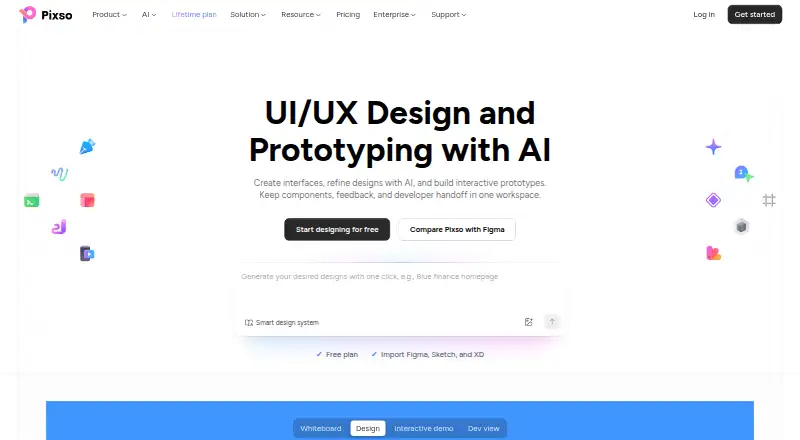
Pixso puts interface design, prototyping, whiteboarding, feedback, design systems, and developer handoff in one workspace. Teams can comment and edit together in real time. It imports files from Figma, Sketch, Adobe XD, Axure, and SVG, supports Figma plugins, and offers web, desktop, mobile, API, and private-deployment options.
Review
In a line
Pixso is a shared workspace for designing digital products. It combines UI and UX design, interactive prototypes, whiteboards, feedback, design systems, and developer handoff.
What it does
The editor includes vector and pen tools, auto layout, grids, variable fonts, text on a path, two-way text, and visual effects. You can connect frames into prototypes with triggers, transitions, mobile preview, video or GIF embeds, and comments.
Whiteboards support mood boards, research organization, brainstorming, flowcharts, mind maps, visual Kanban boards, and roadmaps. Design systems can use components, variants, design tokens, shared styles, team libraries, and a Pixso DSM workspace.
Design-editor AI helps with design editing. Whiteboard AI can create mind maps, brainstorming sessions, and information summaries.
How it connects
Pixso imports Figma, Sketch, Adobe XD, Axure, and SVG files. Its Dev view lets developers inspect specifications, copy code references, and export supported code and assets. It also provides design tokens, code snippets, asset handoff, and version history.
Pixso works with Figma plugins and can import plugin code to run. Community developers can build JavaScript plugins through a restricted plugin API. An OpenAPI offers public-cloud and private-deployment endpoints, while documented MCP connections can link supported IDEs and agents.
It runs on web, Windows, macOS, Android, and iOS, with self-hosted deployment options. Desktop support starts at Windows 10 64-bit and macOS 12 Monterey. The editor uses WebGL; Chrome with hardware acceleration is recommended.
Good fit
Pixso suits designers, developers, product managers, and other teammates working on digital products together. Real-time collaboration, comments, and design and prototype work in one file support shared reviews.
It can fit teams looking for design collaboration software or developer handoff software in one workspace. Private deployments add consulting, deployment help, and online training.
Watch for
The free plan limits each team to one project, with three design files and three pages per design file, plus three whiteboard files per project. AI credits are separate pools for personal, team, and enterprise use, and availability depends on seat type and editing permissions.
Pixso is proprietary rather than open source. A reviewer noted that it is beginner-friendly but may lack advanced capability for complex work. Check browser hardware acceleration and desktop requirements before installing.
Pixso announced that from June 1, 2026, its website and desktop client would temporarily sell only annual subscriptions.
Pricing
Pixso has a free plan and a free trial. Free includes unlimited viewer seats, unlimited draft files, three free design files, three free whiteboard files, and limited-time free MCP.
Team seats are billed monthly: Collaborator $4 a month, Developer $8 a month, and Creator $12 a month. Each includes unlimited projects, files, pages, version history, team resource libraries, team font libraries, and private files.
Enterprise seats are billed yearly: Collaborator $90 a year, Developer $120 a year, and Creator $280 a year. They add advanced permissions, seat management, collaboration logs, enterprise libraries and security, custom domains, private files, SSO, and on-premise deployment.
Lifetime purchases cost $240 one-time for one team member or $720 one-time for three. They include one professional workspace, unlimited projects and folders, unlimited editable design and whiteboard files, and 500 or 1,500 total AI credits. On-premise pricing is available on request.
Verdict
Choose Pixso if your team wants design, prototypes, whiteboards, shared libraries, and handoff together, especially when importing existing design files or running private deployments matters. Its plugin support, OpenAPI, and MCP documentation give technical teams extension options.
The free tier can cover small experiments, but its project and file caps matter quickly. Teams needing complex advanced workflows should verify the editor against their requirements. Buyers should also confirm which seat type supplies the AI access they need and whether annual billing fits their plans.
Our take
Pixso is a sensible choice for teams that want one place for interface design, prototypes, whiteboards, design systems, and developer handoff. File import from several design tools and Figma plugin compatibility can ease a move from another workflow. The free tier is useful for trying the product, though its caps are strict. Team seats include unlimited projects, files, and pages, while enterprise plans add security and private deployment. Before committing, check advanced-work needs, AI seat rules, desktop requirements, and the announced annual-only sales period.
- Combines design, prototyping, whiteboarding, and handoff
- Imports Figma, Sketch, Adobe XD, Axure, and SVG files
- Supports Figma plugins, OpenAPI, and MCP connections
- Free plan and free trial available
- Private-cloud, public-cloud, and on-premise deployment options
- Free plan limits projects, design files, pages, and whiteboards
- AI credits are separate by account group and seat permissions
- Proprietary software, not open source
- Advanced capability may be limited for complex work
- Browser editing can slow when hardware acceleration is off
- Pick it ifTeams combining UI design, prototypes, and whiteboards; Groups needing design handoff and shared libraries; Organizations considering private or on-premise deployment
- Skip it ifYou need open-source software; You require advanced complex-work features without checking fit; The free plan's project and file limits are too restrictive
Pricing
A free tier and trial let you start without payment. Team seats cost $4, $8, or $12 per seat monthly. Enterprise seats cost $90, $120, or $280 per seat yearly. Lifetime options cost $240 one-time for one member or $720 for three; on-premise pricing is by request.
- FreeUnlimited viewer seats · Unlimited draft files · 3 free design files · 3 free whiteboard files · Limited-time free MCPFree
- Team Collaborator seat$4/month/seat · Unlimited projects · Unlimited files · Unlimited pages · Unlimited version history · Team resource libraries · Team font libraries · Private files$4/mo
- Team Developer seat$8/month/seat · Unlimited projects · Unlimited files · Unlimited pages · Unlimited version history · Team resource libraries · Team font libraries · Private files$8/mo
- Team Creator seat$12/month/seat · Unlimited projects · Unlimited files · Unlimited pages · Unlimited version history · Team resource libraries · Team font libraries · Private files$12/mo
- Enterprise Collaborator seat$90 /year/seat · Advanced permissions · Member seat management · Collaboration logs · Enterprise resource libraries · Enterprise font libraries · Enterprise security · Custom domain · Private files · SSO · On-premise$90/yr
- Enterprise Developer seat$120 /year/seat · Advanced permissions · Member seat management · Collaboration logs · Enterprise resource libraries · Enterprise font libraries · Enterprise security · Custom domain · Private files · SSO · On-premise$120/yr
- Lifetime purchase (1 team member)1 professional team workspace · unlimited projects and folders · unlimited editable design files · unlimited editable whiteboard files · 500 total AI credits$240 one-time
- Enterprise Creator seat$280 /year/seat · Advanced permissions · Member seat management · Collaboration logs · Enterprise resource libraries · Enterprise font libraries · Enterprise security · Custom domain · Private files · SSO · On-premise$280/yr
As pixso.net lists them, checked 15 Oct 2026.
Questions
Does Pixso have a free plan?
Yes. The Free plan includes unlimited viewer seats and draft files, three free design files, three free whiteboard files, and limited-time free MCP.
What files can Pixso import?
Pixso supports importing Figma, Sketch, Adobe XD, Axure, and SVG files.
Does Pixso offer developer handoff?
Yes. Dev view shows design specifications, lets users copy code references, and exports supported code and assets.
Can Pixso run privately?
Yes. It supports single-node and clustered intranet, private-cloud, and public-cloud deployments, plus on-premise enterprise options.
What platforms does Pixso support?
Pixso runs on web, Windows, macOS, Android, and iOS. Its desktop app supports Windows 10 64-bit or later and macOS 12 Monterey or later.
Is Pixso open source?
No. Pixso uses a proprietary end-user licence. It does provide a plugin API and documented OpenAPI for extensions.