QMedia: Open-Source Multimedia Search
github.com · checked 15 Oct 2026
Multimedia AI search and question answering for creators, covering text, images, and short videos.
How it plugs in
Signal on AI Video Search Tools7.3#3 of 24
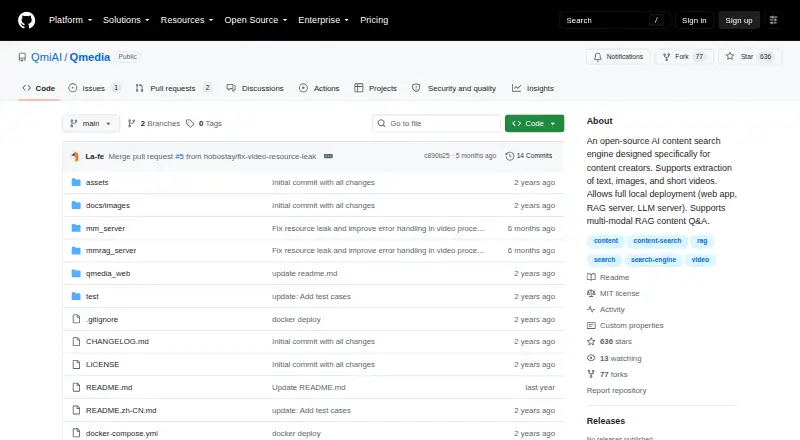
QMedia is an open-source engine for finding and querying multimedia content. It pulls information from text, images, and short videos, then applies multimodal retrieval to answer questions. You can run its web, retrieval, and model services locally, use private data offline, or call the model services through an API.
Review
In a line
QMedia is an open-source multimedia AI tool built for content creators. It lets users find material across text, images, and short videos and ask questions about what it retrieves.
What it does
QMedia gathers details from text, images, and short videos to support search and question answering. Its multimodal system can use image style, text layout, video transcripts, and summaries when forming answers.
The web service presents content and its sources as cards, including breakdowns of image, text, and short-video information. Search results can be adjusted to match a user's interests and needs.
How it connects
QMedia has three separable parts: a web frontend, a retrieval and question-answering service, and a multimodal model service. They can run on different hardware and be embedded into other systems.
Through its API, the model service handles image and text encoding, video transcription, and image OCR. Both model and retrieval services provide interactive documentation at local /docs endpoints.
Google content search is supported in the retrieval service, but it is configurable and turned off by default. Video service use can likewise be enabled or disabled, and the RAG server leaves it off by default.
QMedia is open source under the MIT License. The documentation also describes switching among local Ollama models, including llama3 8B and 70B.
Good fit
QMedia suits creators who want a unified way to find and question material across text, images, and short videos. It also suits teams that want to keep private media on local infrastructure.
Its separate services let you choose where the model, retrieval, and web components run. The project supports visual, audio, and multimodal search, plus API access for its model services.
Watch for
The model and retrieval services need separate Python 3.11 Conda environments and package installation. The web frontend needs Node.js, pnpm, dependencies, and an environment file.
Running the retrieval service requires the separate mm_server service. Local deployment can support offline work with private data, but the project does not state a security certification or compliance status.
The documentation is split between a main README and separate installation and configuration guides.
Pricing
QMedia is free open-source software under the MIT License. There is a free plan, and the project does not list a paid tier.
Verdict
Choose QMedia if you need an open-source, locally deployable system for finding and questioning text, images, and short videos, with model tasks available through an API. Its separate services can help when you need to place components on different machines or reuse them in another system.
Look elsewhere if you need a hosted product with a simpler setup, or if you require stated security certifications or compliance details. Be ready to install and maintain its Python and web-service dependencies.
Our take
QMedia makes sense for creators and technical teams that want multimedia search to run on their own infrastructure. It handles text, images, and short videos, shows content and source details in cards, and makes model functions available through an API. The MIT license and free price remove subscription cost. The tradeoff is setup: several services, separate environments, and a required supporting model server. Buyers should also confirm that its documented privacy approach meets their requirements, since no certification or compliance status is provided.
- Free and open source under the MIT License
- Works across text, images, and short videos
- Local offline use for private data
- Separate services can run on different hardware
- API for encoding, transcription, and OCR
- Requires several services and separate environments
- Retrieval service depends on mm_server
- Video processing is off by default
- No stated security certification or compliance status
- Frontend setup needs Node.js, pnpm, and configuration
- Pick it ifCreators searching across mixed media; Teams keeping media search on local infrastructure; Developers embedding multimodal services through an API
- Skip it ifYou need a ready-to-use hosted service with little setup; You require documented security certifications or compliance; You do not want to maintain Python and web dependencies
Pricing
QMedia costs nothing to use and is released as MIT-licensed open-source software. The facts list no paid plans.
- QMediaOpen-source software · MIT licenseFree
As github.com lists them, checked 8 Oct 2026.
Questions
What kinds of content can QMedia search?
It finds and extracts information from text, images, and short videos.
Can QMedia answer questions about media?
Yes. Its multimodal retrieval system brings together information from text, images, and short videos to answer questions.
Can QMedia run without sending private data to a hosted service?
The project supports local deployment for offline search and question answering over private data.
Does QMedia have an API?
Yes. The model service handles image and text encoding, video transcription, and image OCR through an API. Local /docs endpoints document the services.
Does QMedia connect to Google search?
Its retrieval service supports Google content search. The setting is configurable and disabled by default.
What does QMedia cost?
QMedia is free, open-source software under the MIT License. No paid tier is listed.
What setup does QMedia need?
The model and retrieval services need separate Python 3.11 Conda environments. The web frontend needs Node.js, pnpm, installed dependencies, and an environment file.