
QSave Game Save Backup Review
qsave.app · checked 8 Oct 2026
Open-source game-save backup for Windows and macOS that stores copies in your Google Drive.
How it plugs in
Signal on Game Save Managers6.4#3 of 27
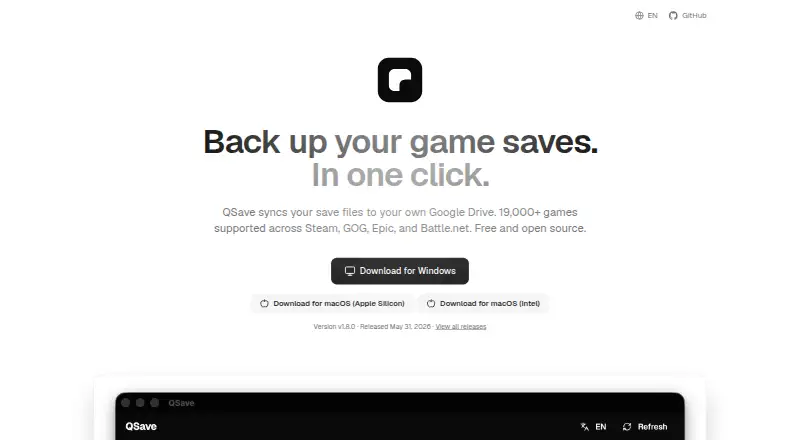
With QSave, video-game save files are copied into your personal Google Drive. The app runs on Windows and macOS, recognizes Steam, GOG, Epic, and Battle.net titles, and its database covers over 19,000 games. One-click restores, path remapping between computers, five-version histories, and manual save-folder selection are included.
Review
In a line
This free, open-source utility sends video-game save files to Google Drive for safekeeping.
Windows and macOS are supported, with distinct downloads for Intel and Apple Silicon Macs.
What it does
QSave scans installed titles and a database containing over 19,000 entries. Results can be narrowed to Steam, GOG, Epic, or Battle.net, and games absent from the list can be added by pointing to their save folder.
The program may stay in the system tray and launch when your computer starts. It avoids re-uploading unchanged saves and retains a maximum of five versions for each game.
Pick a Google Drive backup and restore it with a single click. Path remapping is designed to carry saves between different computers. Cloud-only titles can also be restored, while you may choose another restore directory or remove individual cloud versions.
How it connects
Save data remains in your personal Google Drive, while the listed platforms are Steam, GOG, Epic, and Battle.net.
The app includes cloud synchronization and version history. It flags potential restore or sync conflicts before they cause problems.
QSave is open source. Its developer instructions call for storing Google OAuth credentials in the operating system's secure credential storage.
Good fit
Players on Windows or macOS who want their game saves copied into their own Google Drive may find QSave suitable.
It fits households or individuals moving saves between computers, keeping several backup versions, or managing games from the listed stores.
Manual game setup also helps when a title is not in the detection database, as long as you know its save folder.
Watch for
Because Google Drive provides the cloud storage, make sure that arrangement suits your backup plans.
During installation, Windows and macOS can display a warning because QSave's code-signing certificates require yearly payment. Ko-fi contributions are requested to help pay for those certificates.
Potential restore or synchronization conflicts are flagged by QSave. Review those warnings before restoring, especially when saves differ between computers.
Pricing
QSave costs nothing and is open-source software. Its free plan backs up saves to your personal Google Drive.
Verdict
For a no-cost, open-source backup that places game saves in your own Google Drive on Windows or macOS, QSave is an option.
Its large detection database, manual folder support, five-version history, and cross-platform restore address common backup tasks. Check that Google Drive suits you and that you can accept a possible installation warning.
Skip it if you need a different cloud service or do not want to review conflict warnings during restores.
Our take
QSave offers players a no-cost way to keep game-save copies without shifting them to another storage provider. It covers the major listed PC stores, recognizes many games, and accepts manually chosen folders for unsupported titles. Google Drive is required, and restore conflicts still warrant attention. Windows and macOS can also display installation warnings because the signing certificates are not renewed each year. If those conditions fit, QSave provides backups, version history, and save transfers between computers.
- No-cost, open-source software
- Stores backups in your personal Google Drive
- Runs on Windows and macOS
- Database covers over 19,000 games
- Retains as many as five versions per game
- Google Drive is needed for cloud backups
- Windows and macOS can display installation warnings
- Restore and sync conflicts require review
- Listed store support is limited to Steam, GOG, Epic, and Battle.net
- Pick it ifPlayers saving game copies to their own Google Drive; People moving saves between Windows and macOS; Users needing manual folders for unsupported games
- Skip it ifYou want a cloud service other than Google Drive; You prefer not to deal with possible restore or sync conflicts; Installation warnings are a deal-breaker
Pricing
QSave costs nothing and is open source; the free plan covers backups to your own Google Drive.
- FreeFree and open source · backs up game saves to your own Google DriveFree
As qsave.app lists them, checked 8 Oct 2026.
Questions
Does QSave cost anything?
No. It is presented as free, open-source software with a free plan.
What operating systems are supported?
Downloads are provided for Windows and macOS, including separate Intel and Apple Silicon Mac versions.
Where does QSave keep save data?
Save files are copied into your personal Google Drive.
Which game storefronts are supported?
Steam, GOG, Epic, and Battle.net appear on its supported-platform list. A game can also be added by choosing its save folder manually.
What is the backup-version limit?
Up to five backup versions are retained for each game.
Can saves be moved to a different computer?
Yes. One-click restoration uses cross-platform path remapping to help keep saves usable on another computer.
What causes an installation warning?
Windows and macOS may show one because QSave lacks code-signing certificates renewed every year.