Quemsi: Database Backups, Restores, and Pricing
quemsi.com · checked 21 Oct 2026
Quemsi combines a local database agent with tagged snapshots, restore workflows, and browser-based management.
How it plugs in
Signal on Database Backup Software7.7#1 of 27
Through its web console, Quemsi organizes database backups and restores with tags and a timeline of saved states. Database work runs through a local agent, while cloud components coordinate metadata. Support covers MySQL, PostgreSQL, SQL Server, and MongoDB; Solo is free for one user, while Enterprise pricing is request-based.
Review
In a line
Quemsi combines database backup and restoration in a hybrid service. A locally deployed agent works with a web console for handling snapshots and flows.
What it does
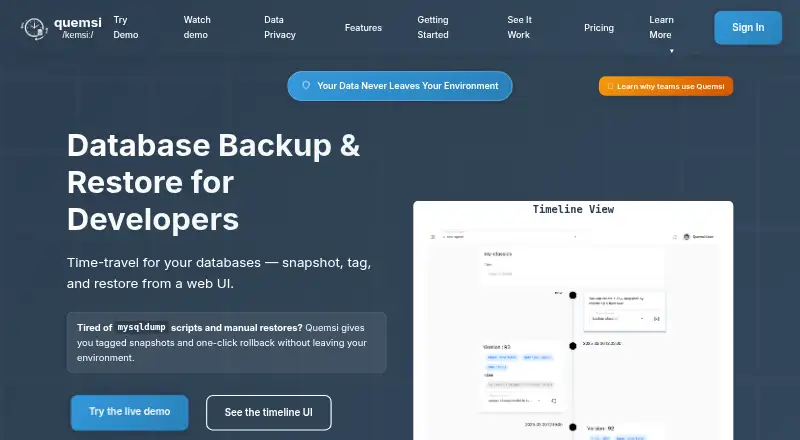
Quemsi creates tagged database snapshots and shows saved states on a timeline. You can return to a selected point on that timeline, while labels such as “pre-migration” make later retrieval easier.
Backup flows pair a source with a destination and can add steps such as compression, validation, or scripts. To restore, choose a tagged backup version and target database, then apply ClearTables or DropTables as needed. Recurring flows may run on timers or be triggered through the web console, CLI, or API.
Its database list includes MySQL, PostgreSQL, SQL Server, and MongoDB. Snapshots can move between development, testing, and production environments while remaining in customer-controlled infrastructure.
How it connects
Backups can go to local paths, NAS or SAN storage, AWS S3, or Azure Blob Storage. The agent supports Windows, Linux, and macOS, as well as Docker and Java JAR deployments. Quemsi also publishes a CLI for Linux, Windows, and Java 21 JAR execution.
Quemsi provides API and CLI tooling for jobs such as capturing a snapshot before deployment or restoring one before tests. Its integration material lists endpoints for snapshots, restores, execution checks, and restore-action discovery; full API documentation is slated for a later release.
The public quemsi-agent repository is licensed under LGPL-2.1. Within the customer's infrastructure, the agent performs database work while the cloud service manages metadata, authentication, and coordination.
Good fit
The free Solo plan is aimed at individual developers who want to manage backups across databases and environments. Teams can use customizable flows for routine backups, restore tasks, and deployment or testing workflows.
Enterprise is described for companies and adds detailed authorization, CI/CD integration, organizational features, extra functionality, and priority support.
Watch for
The Solo plan is limited to one user and includes community support. Company features and priority support are part of Enterprise, with pricing supplied on request.
The API documentation is not yet complete. Check whether the published contract and examples cover the automation you need before relying on it.
The agent operates inside your infrastructure, with database access remaining on the local network. The cloud receives metadata rather than database contents or backups.
Pricing
Solo has no time limit and is free. Its allowance covers unlimited databases, environments, and flows, core features, one user, and community support. A free trial is also offered.
Enterprise pricing is provided on request. It includes Solo features plus detailed authorization, CI/CD integration, extra functionality, priority support, and organizational features.
Verdict
Quemsi is worth considering if you need tagged snapshots and restore flows across supported databases, and want backup data to stay within your infrastructure. The free Solo plan gives individual users unlimited databases, environments, and flows, but is single-user and comes with community support. Companies that need organizational features, priority support, or CI/CD integration should ask about Enterprise pricing. Before deciding, verify that the available API documentation meets your needs.
Our take
Quemsi may suit individual developers who need a free way to organize database snapshots and restore them across several environments. Its local agent keeps database operations and backup contents in the customer’s infrastructure, while the web console manages metadata and coordination. Companies can consider Enterprise for organizational features, detailed authorization, and priority support, but must request its price. Users relying heavily on automation should review the available integration material because the full API reference is still forthcoming.
- Solo has no time limit and permits unlimited databases, environments, and flows.
- MySQL, PostgreSQL, SQL Server, and MongoDB are among the supported databases.
- Backups can use local drives, NAS or SAN, AWS S3, and Azure Blob.
- Database operations run through an agent inside the customer's infrastructure.
- Flows may run on schedules or be triggered from the UI, CLI, or API.
- Solo is limited to a single user.
- Enterprise pricing is supplied on request.
- The full API reference is planned for a future release.
- Solo support is community support.
- Pick it ifIndividual developers managing database snapshots and restores.; Companies that need workflow customization and organizational features.
- Skip it ifYou need a complete API reference before selecting an automation tool.; You need multiple users or priority support on a free plan.
Pricing
Solo is free without an expiration and covers unlimited databases, environments, and flows, but is restricted to one user with community support. Enterprise adds company-focused features and priority support, with pricing supplied on request. A free trial is also offered.
- SoloUnlimited databases · Unlimited environments · Unlimited flows · Core functionality · Single user · Community supportFree
- EnterpriseEverything in Solo · Detailed authorization · CI/CD integration · Extra functionality · Priority support · Organizational featuresOn request
As quemsi.com lists them, checked 21 Oct 2026.
Questions
Where are backups stored?
Backup destinations can be local paths, NAS or SAN storage, AWS S3, or Azure Blob Storage.
Does Quemsi send database contents to its cloud service?
Quemsi says its agent performs database operations inside your infrastructure. Database contents and backups stay there, while the cloud manages metadata, authentication, and coordination.
Are backup and restore jobs automatable?
Yes. Timers can run recurring flows, and the web console, CLI, or API can trigger them. Snapshot-before-deploy and restore-before-tests workflows are supported through the CLI and API.
Is Quemsi open source?
The public quemsi-agent repository is licensed under LGPL-2.1. The repository says its JAR, Windows executable, and Linux binary are built from its source.
What does Quemsi cost?
Solo is free without a time limit. Enterprise pricing is supplied on request. A free trial is also offered.
Where can the agent run?
The agent supports Windows, Linux, and macOS, with Docker-container and Java JAR deployment options.