snapnedit AI Photo Colorizer
snapnedit.com · checked 15 Oct 2026
Browser and API tool that turns black-and-white photos into plausible color.
How it plugs in
Signal on AI Image Colorizers6.6#4 of 26
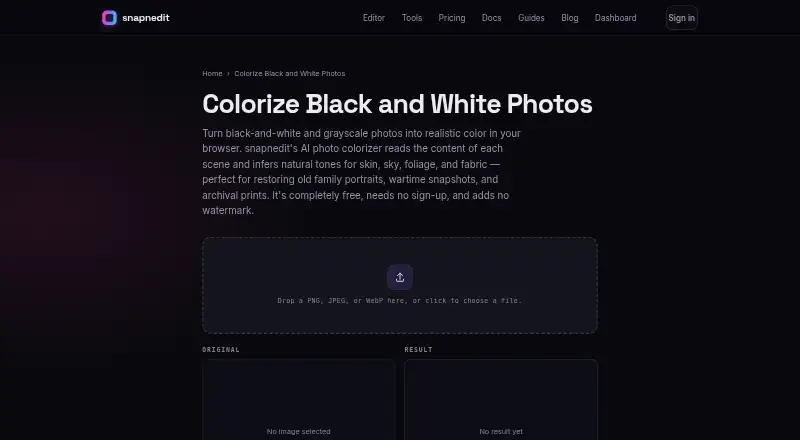
The snapnedit colorizer infers tones for monochrome and grayscale photographs. It is available through browsers on desktop and mobile devices, along with Android, iOS, web, and API access. Submit PNG, JPEG, or WebP images and receive PNG output. Browser processing costs nothing, needs no account, has no stated daily limit, and carries no watermark; API credit packs begin at $5.
Review
In a line
snapnedit AI Photo Colorizer gives black-and-white and grayscale images an inferred color treatment. It is aimed at family archives, genealogy projects, and heritage restoration.
What it does
For every pixel, the model estimates a color from grayscale content while retaining the source brightness and detail. Training used millions of color photographs, so the result represents an interpretation instead of a verified record of the original hues.
PNG, JPEG, and WebP files are accepted when their longest edge is no more than 4096 pixels. Inputs above that size are resized to fit, while the source file remains untouched. Downloads from the colorizer are full-resolution PNGs.
You can send the result to the editor for white balance, warmth, saturation, and painted local adjustments. Because the model colors visible texture, marks such as creases, dust, tape, and tears can pick up unusual hues. For faded color photographs, the editor's color controls are the intended option instead.
How it connects
Phones, tablets, and desktops can use the browser service without installing an app-store application. Processing takes place on the maker's servers, and the maker describes the colorizer AI as self-hosted.
A keyed HTTP API exposes the same image operations for programs. Automation can also use the zero-dependency SDK, MCP server, and signed completion webhooks. API calls consume credits, although an identical cached rerun costs nothing.
The editor imports JPEG, PNG, WebP, and RAW files and exports JPEG, PNG, WebP, or AVIF with selectable quality. No open-source license is stated.
Good fit
This suits people restoring scanned family portraits, wartime snapshots, archival prints, and other black-and-white images. It also fits teams that need to call colorization from their own software through an API.
The browser tools include a layered editor with masks, selections, curves, levels, HSL, cloning, healing, and other adjustments. All 14 listed AI tools are available on the free browser plan.
Watch for
Inferred hues are plausible estimates, not evidence of an object's historical color. The maker does not promise a particular AI result's quality or accuracy, nor uninterrupted operation.
The service is hosted; no self-hosting package is documented. Check the 4096-pixel limit, supported upload types, and PNG-only output from the colorizer before starting a batch.
Uploaded photos are used to perform requested operations, are not used to train models or sold, and are deleted on a routine schedule after service needs end. API keys are stored as one-way hashes, and data uses HTTPS/TLS.
Pricing
The browser plan remains free. No account is needed, no daily cap is stated, and downloads contain no watermark. A separate free trial is not offered because browser access is already free.
API credits are available as one-time packs: 50 for $5, 200 for $15, or 600 for $35. Each colorization consumes one credit, and purchased credits do not expire. Commercial use is supported.
Verdict
Choose snapnedit if you need quick color estimates for monochrome family or archive images, or if you want the same operation available through an API. Its free browser access removes sign-up and watermark hurdles, while the editor offers ways to correct the result.
Do not treat the output as historically verified color. People processing damaged originals should inspect dust, tears, and tape closely, and API buyers should budget for credit packs. For a broader comparison, see AI Image Colorizers.
Our take
snapnedit is a practical choice for personal archives and genealogy work when an interpreted color version is enough. The browser plan costs nothing and works without an account, which makes occasional use simple. Its editor and API add room for manual fixes and automation. The main limitation is certainty: the model cannot know true historical colors, and damaged textures can be colored oddly. Review sensitive images carefully, and check the resolution, format, and credit rules before larger jobs.
- Free browser access without registration, a stated daily limit, or watermark
- Available on phones, tablets, and desktops
- Accepts PNG, JPEG, and WebP files with a 4096-pixel longest-edge limit
- Editor includes white balance, warmth, saturation, and painted local adjustments
- Automation is supported through the API, SDK, MCP server, and webhooks
- Colors are plausible guesses rather than historically verified
- Dust, tears, tape, and creases may receive odd tints
- Colorizer downloads are PNG only
- Larger-than-4096-pixel inputs are scaled down
- API automation requires paid, metered credits
- Pick it ifGenealogy and heritage restoration; Colorizing scanned family and archival photos; Teams calling image operations through an API
- Skip it ifYou need factual original colors rather than artistic inference; You need documented self-hosting or an open-source license; You require colorizer output in formats other than PNG
Pricing
The browser plan is free.
- FreeFree forever · All 14 AI tools · full layered editor · PNG/JPG/WebP/AVIF export · no account · no watermarkFree
- 50 creditsOne-time purchase · 50 credits · 1 credit per colorization · credits do not expire$5 one-time
- 200 creditsOne-time purchase · 200 credits · 1 credit per colorization · credits do not expire$15 one-time
- 600 creditsOne-time purchase · 600 credits · 1 credit per colorization · credits do not expire$35 one-time
As snapnedit.com lists them, checked 15 Oct 2026.
Questions
Can I use snapnedit AI Photo Colorizer at no cost?
Yes. Browser colorization remains free, requires no sign-up, has no stated daily cap, and produces downloads without a watermark.
Which image formats are supported?
PNG, JPEG, and WebP files are accepted up to 4096 pixels along the longest edge. Bigger files are resized to fit.
How many credits does an API colorization consume?
A metered colorization consumes one credit. Packs are $5 for 50, $15 for 200, or $35 for 600 credits, and the credits do not expire.
Can the output colors be treated as historically exact?
No guarantee is made. The model estimates plausible hues from grayscale content, making the result an artistic restoration rather than evidence of an object's original color.
Can I make adjustments after colorization?
Yes. Open the image in the editor to change white balance, warmth, saturation, or painted local corrections. The source black-and-white file remains unchanged.
Is the editor available on phones and tablets?
The browser editor runs on phones and tablets as well as desktops, without requiring an app-store installation.
Are uploaded images used for AI training?
The privacy policy says uploads are used to perform requested operations, are not used to train models or sold, and are deleted on a routine schedule after service needs end.
Near it
All alternatives →- I
 ImageColorizer#3 on this board
- CB
 Colorize by Photomyne#5 on this board
- PPPicWish Photo Colorizer#2 on this board
- P
 Palette#6 on this board
- CI
 Colorize Images#1 on this board
- HA
 Hotpot AI Photo Colorizer#7 on this board
- MPMolyin Photo Colorizer#8 on this board
- TTrueColorizer#9 on this board
- PCPicture Colorizer#10 on this board
- VP
 VanceAI Photo Colorizer#11 on this board