
Reviewing Hotpot AI Photo Colorizer
hotpot.ai · checked 21 Oct 2026
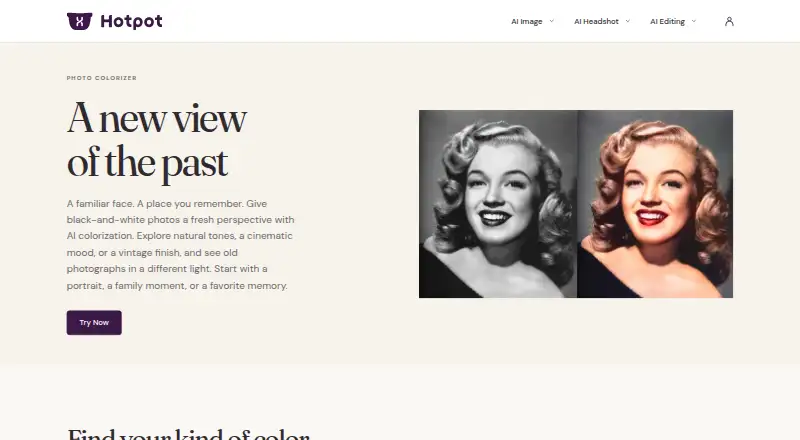
Give monochrome photos a new color interpretation with AI and selectable looks.
How it plugs in
Signal on AI Image Colorizers6.3#7 of 26
Using AI, Hotpot Photo Colorizer interprets black-and-white images in color. Upload JPG, JPEG, PNG, or WebP images, pick a style or describe the desired look, review the generated result, and download it. It runs in a browser, with paid API access and Docker-based self-hosting also offered. Two images per day are included on the free plan.
Review
In a line
Artificial intelligence creates color interpretations of monochrome photographs in Hotpot AI Photo Colorizer. Preset treatments and a custom-description option are available.
What it does
Start with a JPG, JPEG, PNG, or WebP image, choose a treatment, review the generated picture, then save the result. Styles include General, Polaroid, Natural, Cinematic, Vintage, modern black-and-white, and custom options.
Users can set colorization factors of 12, 15, 18, 20, or 25. Batch processing is available, and the service supports both regular use and automated processing.
How it connects
The browser interface takes image uploads and provides a download for the edited file. Hotpot does not list named third-party integrations, and its code is not open source.
Hotpot offers a paid software API, with access arranged through the company. Its POST /colorize-picture route takes an image plus a renderFactor between 0 and 50 and sends back a binary edited image. Calls use an API key, while the response includes remaining credits. GitHub examples are also available.
Docker containers for self-hosting mirror the SaaS API specification and change only the hostname. Hotpot says this arrangement can support deployments in which company data does not reach its systems.
Good fit
People wanting uncomplicated photo coloring and professionals automating routine creative tasks may find it suitable. Presets provide a starting point, while a custom description lets you specify the intended look.
Teams that need automated workflows can use the API or self-hosted option. Batch processing may help with multiple images.
Watch for
The model estimates plausible hues rather than recovering the originals. Hotpot cautions that the current tool may not work well when a group photo contains more than two people. For scratches or faded details, Hotpot suggests running Photo Restorer before colorizing.
The free plan covers two images each day, and prominent attribution is required for free or discounted use. Commercial usage requires credits. Hotpot's privacy policy says it collects account, payment, device, and usage data, uses commercially acceptable safeguards, and cannot guarantee absolute security.
Some content is filtered, including legitimate adult-content images, and the terms prohibit unlawful or harmful use, exploitation of minors, and building competing services.
Pricing
Hotpot offers a free plan with two images each day, but no free trial. Paid use begins at $0.02, with credit charges varying by tool and settings.
One-time bundles are available in amounts of 1,000 credits for $12, 2,500 for $30, 5,000 for $60, 10,000 for $120, and 20,000 for $240. Those credits can be used across Hotpot tools.
Commercial projects and advanced settings consume credits. Team, high-volume, and self-hosted plans require a pricing request. Self-hosted containers start at twice SaaS pricing, require annual upfront commitment, and carry support fees of 15%–20% of the annual license.
Verdict
Hotpot may suit quick photo coloring with selectable treatments, occasional free use, or API and self-hosted options for larger workflows. Its upload-to-download path is simple, and the range of styles covers common visual treatments.
Consider alternatives if historically exact hues are essential, group photos regularly contain more than two people, or you need named integrations from many vendors. Plan for credits on commercial projects, and check attribution and privacy terms before adopting it publicly or for business use.
Our take
Hotpot AI Photo Colorizer offers a simple way to color individual photos without installing software. Its daily free allowance supports exploration, while paid credits cover commercial usage and advanced settings. API and Docker deployments support automated or private workflows but require contacting Hotpot and can cost more. Colors are interpretations rather than recovered originals, and larger groups may produce unreliable results. Review attribution, content, and data-handling terms before regular use.
- Adds color with several preset styles and custom descriptions
- The upload form accepts JPG, JPEG, PNG, and WebP images
- The free plan allows two images per day
- Hotpot offers paid API access and Docker self-hosting
- Supports batch processing
- AI cannot know the original colors
- Results may be unreliable with more than two people
- Commercial usage requires credits
- No named third-party integrations are specified
- Self-hosting starts at twice SaaS pricing
- Pick it ifCasual photo colorization; Professionals automating routine image work; Teams needing API or self-hosted processing
- Skip it ifYou need verified historical colors rather than AI predictions; You often colorize photos with more than two people; You require named third-party integrations
Pricing
Free access includes two images per day. Commercial use and advanced settings consume credits; team, high-volume, and self-hosted plans are priced on request.
- Free accessMost products offer free access for exploration; product prices vary by settings; commercial use and advanced settings require creditsFree
- 1,000 creditsone-time payment · credits usable across Hotpot tools · credit costs vary by tool/settings$12 one-time
- 2,500 creditsone-time payment · credits usable across Hotpot tools · credit costs vary by tool/settings$30 one-time
- 5,000 creditsone-time payment · credits usable across Hotpot tools · credit costs vary by tool/settings$60 one-time
- 10,000 creditsone-time payment · credits usable across Hotpot tools · credit costs vary by tool/settings$120 one-time
- 20,000 creditsone-time payment · credits usable across Hotpot tools · credit costs vary by tool/settings$240 one-time
- CreditsOne-time credits available; specific prices appear in the product as settings change · Credits required for commercial usage and advanced settings; specific Photo Colorizer price not stated on opened pagesOn request
- Team, high-volume, or self-hostedContact Hotpot for pricing · For team, high-volume, or self-hosted useOn request
As hotpot.ai lists them, checked 4 Oct 2026.
Questions
Which upload formats are supported?
The upload form accepts JPG, JPEG, PNG, and WebP files.
Is an API available from Hotpot?
Yes. Hotpot's paid API exposes POST /colorize-picture, accepts an image and renderFactor from 0 to 50, and returns an edited image. Contact Hotpot for access.
What is the daily free allowance?
The colorizer page provides two free images each day and does not offer a free trial.
Can Hotpot be self-hosted?
Yes. Docker containers follow the same API specification, and self-hosted pricing begins at twice SaaS pricing.
Will the output match the original historical colors?
There is no such guarantee. Hotpot says its AI estimates plausible hues and cannot determine the originals from a monochrome photo alone.
Are commercial projects permitted?
Commercial usage requires credits, while free or discounted use requires prominent attribution.
Near it
All alternatives →- P
 Palette#6 on this board
- MPMolyin Photo Colorizer#8 on this board
- CB
 Colorize by Photomyne#5 on this board
- TTrueColorizer#9 on this board
- SAsnapnedit AI Photo Colorizer#4 on this board
- PCPicture Colorizer#10 on this board
- I
 ImageColorizer#3 on this board
- VP
 VanceAI Photo Colorizer#11 on this board
- PPPicWish Photo Colorizer#2 on this board
- RRetroFix#12 on this board