
SpinOne Review: SaaS Backup and Security
spin.ai · checked 14 Oct 2026
Protection, backup, and recovery for data in Google Workspace, Microsoft 365, Slack, Salesforce, and Jira.
How it plugs in
Signal on Email Backup Software6.3#1 of 29
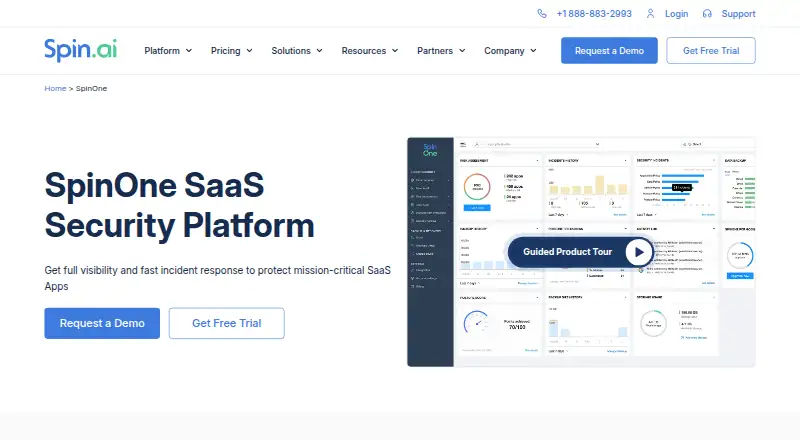
SpinOne protects data in several business software services. It combines backup and recovery with security checks, leak prevention, ransomware detection, and policy controls. Connections are cloud-based and agentless, work across multiple operating systems, and come with a 15-day trial that needs no card details. Paid plans start at $3 a month per user.
Review
In a line
SpinOne is a cloud service for protecting data in Google Workspace, Microsoft 365, Slack, Salesforce, and Jira. It combines backups with security monitoring and recovery tools.
What it does
SpinOne backs up supported services once or three times a day, depending on the plan. Administrators can recover single items, handle batches, or return data to the most recent clean backup when ransomware is detected.
Its security tools review service settings, connected apps, browser extensions, sharing, downloads, transfers, accounts, and other activity. Policies can automate allowlists, blocklists, permission changes, sensitive-data checks, malware checks, and account controls.
More than 15 built-in classifiers are available for data discovery, covering areas such as personal and health information; custom regular-expression patterns are supported too. It also offers incident response with a stated two-hour response service level.
How it connects
SpinOne uses cloud-to-cloud, agentless connections through service APIs, so it does not require endpoint agents. Supported services include Google Workspace, Microsoft 365, Salesforce, Slack, and Jira, while listed integrations also cover ServiceNow, Splunk, Microsoft Teams, Okta, email, and APIs.
A public Google Workspace API lets administrators list, filter, and update entities. SpinOne also supports backup storage in AWS, Google Cloud, Azure, or customer-owned storage. An MCP connection documented in September 2026 gives selected AI tools read-only access to incident and activity information.
It runs through the web and has API and browser-extension support, with Windows, Linux, and macOS deployment options. There is no mobile application.
Good fit
SpinOne suits organizations that need one protection service across several cloud business apps. It is designed for administrators who want scheduled backups, item-level recovery, security posture checks, data-loss controls, and ransomware response.
Its audit logs, reports, policy controls, app and extension reviews, and compliance support can help teams managing regulated data or large SaaS environments.
Watch for
Licensing is charged per user, and reviewers have reported that costs for licenses and storage can rise as an organization grows. Some plans also require a minimum annual commitment.
Large restores and large Google file or email migrations have been reported as difficult by some reviewers. Check restore performance, storage needs, and support requirements before signing a contract.
To start a Google Workspace, Microsoft 365, Salesforce, or Slack trial, an administrator account for that service is required. Extensions are unavailable, and cancellation must be submitted in the dashboard; Spin.AI then removes the data from its servers, while charges continue through the agreed contract period.
Pricing
SpinOne is paid software with no free plan. SpinBackup costs $3 a month and includes daily backup, 30GB per license, a 99.9% recovery service level, and AWS, Google Cloud, Azure, or customer-owned storage.
SpinOne and SpinSPM have price on request. SpinOne adds SpinSPM features, ransomware protection, data-loss controls, daily or three-times-daily backup, and 50GB per license. SpinSPM covers posture management, user audits, app and extension risk checks, incident response, approval workflows, and API integrations.
There is also a minimum subscription of $5,000 a year. The free trial runs for 15 days with all platform features, requires no payment card, and cannot be extended.
Verdict
Choose SpinOne if your organization needs backup and security controls across multiple SaaS services, along with API access and several storage choices. It is a practical fit for teams that want policy automation, audit records, and ransomware recovery in one platform.
Look elsewhere if you need a free plan, mobile software, or a simple fixed price for a small deployment. Ask for a detailed quote and test large restores during the trial, especially when migration workloads or fast recovery are central to your plans.
Our take
SpinOne is suited to organizations protecting several cloud services at once and needing both backup and security oversight. Its agentless setup, API, storage choices, policy automation, and ransomware rollback cover a broad administrative workload. The main concerns are per-user pricing, possible storage growth, minimum annual commitments, and reports of trouble with very large restores or migrations. Teams should use the 15-day trial to verify administrator access, restore speed, storage requirements, and the support process before committing.
- Automated protection for several leading SaaS applications, running once or three times each day.
- Combines security monitoring, data-loss controls, backup, and ransomware recovery.
- Supports AWS, Google Cloud, Azure, or customer-owned backup storage.
- Offers a public Google Workspace API and policy automation.
- Provides a 15-day trial with complete access and no card on file.
- No free plan and some plans require a $5,000 annual minimum.
- Per-user and storage costs may rise as organizations scale.
- No mobile application is available.
- Some reviewers report issues with large restores or migrations.
- The trial requires administrator sign-in for connected services.
- Pick it ifOrganizations protecting multiple SaaS applications; Administrators needing backup plus security policy controls; Teams with compliance and ransomware-recovery requirements
- Skip it ifYou need free software or mobile apps.; You want simple pricing without a per-user model or annual minimum.; Large migrations require proven bulk-restore performance.
Pricing
SpinBackup costs $3 a month; SpinOne and SpinSPM are price on request. A $5,000-a-year minimum subscription is also listed. The 15-day trial has full access and requires no credit card.
- SpinBackup$3 usd user / month · 1x/day backup · 99.9% SLA recovery · 30GB per license · AWS, GCP, Azure or BYOS storage · basic support$3/mo
- Minimum SubscriptionMinimum Subscription $5,000/year · minimum annual commitment$5,000/yr
- SpinOneContact Sales · SpinBackup and SpinSPM features · ransomware protection with 2-hour response SLA · DSPM/DLP · 1x or 3x daily backup · 50GB per license · AWS, GCP, Azure or BYOS storageOn request
- SpinSPMContact Sales · posture management · user audit · app and extension risk assessment · incident response · approval process · API integrationsOn request
As spin.ai lists them, checked 14 Oct 2026.
Questions
Which services does SpinOne protect?
Coverage includes Google Workspace, Microsoft 365, Salesforce, Slack, and Jira.
How frequently are SpinOne backups made?
Depending on the plan, automated copies run once or three times per day; SpinBackup specifies a daily schedule.
Does SpinOne have a free plan?
No. It offers a 15-day free trial with full access and no credit card requirement.
Does SpinOne need software installed on devices?
No. SpinOne is described as agentless and cloud-to-cloud, using service APIs instead of endpoint agents.
Where can backups be stored?
Storage can use AWS, Google Cloud, Azure, or customer-owned storage. Standard SpinOne lists 50GB per license; enterprise lists unlimited storage.
What does SpinOne cost?
SpinBackup costs $3 a month. SpinOne and SpinSPM are price on request, and a minimum subscription of $5,000 a year is listed.
Can SpinOne recover individual files or records?
Yes. It supports item-level restores, bulk restores, and rollback to the last clean backup after ransomware.
Near it
All alternatives →- AE
 Aryson Email Backup Wizard#2 on this board
- GGMvault#3 on this board
- SESysTools Email Backup Wizard#4 on this board
- SA
 Synology Active Backup for SaaS#5 on this board
- DSDRS Softech Microsoft 365 Backup Tool#6 on this board
- CDCove Data Protection#7 on this board
- SBSpanning Backup#8 on this board
- BM
 BitRecover Microsoft 365 Backup Tool#9 on this board
- SBSysCloud Backup#10 on this board
- AE
 Advik Email Backup Wizard#11 on this board