
Taskbar Customization Software
TaskbarX Review
taskbarx.app · checked 15 Oct 2026
A free, open-source Windows utility for centering and styling taskbar icons.
How it plugs in
Signal on Taskbar Customization Software7.3#1 of 34
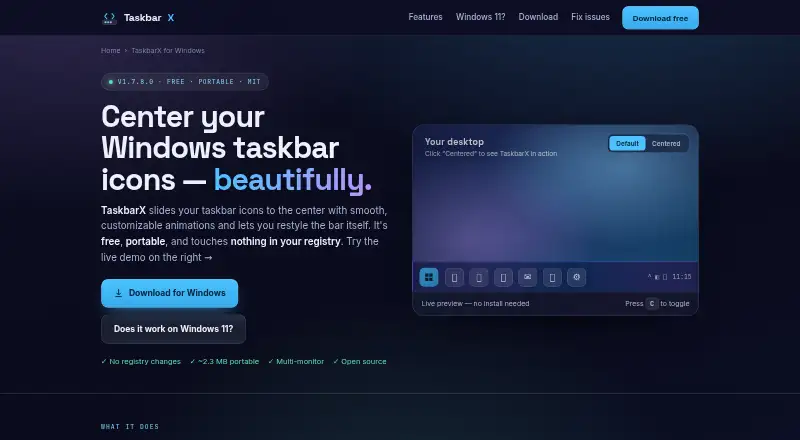
TaskbarX repositions Windows taskbar icons and adds adjustable transparency, blur, acrylic, opaque, and color settings. It supports multiple monitors, vertical taskbars, icon spacing, sizing, animations, and Start button changes. The portable app needs no installer or background service. Windows 10 is the supported target; newer Windows 11 builds do not support centering.
Review
In a line
TaskbarX is a free, open-source Windows utility that moves taskbar icons toward the center or another position. It also changes the taskbar’s appearance.
What it does
You can place icons at the exact center, offset them left or right, or position them between taskbar areas. The alignment stays centered when icons are added or removed.
TaskbarX offers fade, slide, and other easing animations, or no animation. You can adjust icon spacing and size, hide the Start button, or use a custom one.
Background options include transparent, blur, acrylic, and opaque styles, with color and transparency controls. Unlimited taskbars and monitors are supported, including vertical taskbars.
How it connects
TaskbarX runs as a local Windows executable. Its portable ZIP is extracted and launched without an installer, registry edits, or background services. Startup can be enabled from its Configurator.
The project is open source under the MIT license and documents command-line switches for styles, offsets, animations, refresh rates, and taskbar elements. It does not document integrations with outside services or a server component.
For related tools, see Taskbar Customization Software.
Good fit
TaskbarX suits Windows users who want centered or custom-positioned taskbar icons without installing a conventional program. It is useful for adjusting taskbar colors, transparency, spacing, and icon size.
It can fit multi-monitor setups because each monitor can have independent taskbar settings. Vertical taskbar layouts are also covered.
Watch for
Windows 10 is the project’s supported target. On Windows 11, centering works only through build 22621.1265; newer builds are unsupported for centering.
The latest stable version listed is 1.7.8.0, and the GitHub repository has been archived and is read-only since June 12, 2025. Some reports describe startup flicker, icons returning to the left, or black and opaque redraws that require a manual refresh.
The site recommends downloading from its linked GitHub releases or the Microsoft Store because repackaged mirror copies may contain adware.
Pricing
The portable build is free and includes all features. There is no free trial because the main build is already free.
The Microsoft Store version costs $1.09 one-time and has the same features, plus automatic updates and easier installation. Another listing describes the Store release as an optional small paid donation, with the exact amount not stated.
Verdict
Choose TaskbarX if you use a compatible Windows 10 setup and want detailed control over taskbar placement and appearance in a portable, open-source package.
Look elsewhere if you need reliable centering on current Windows 11 builds, an actively maintained repository, or documented online-service integrations.
Our take
TaskbarX is a sensible choice for Windows 10 users who want centered icons, custom offsets, and taskbar styling without an installer. Its free portable package covers the full feature set, while the Store option adds automatic updates for a one-time fee. Compatibility is the deciding issue: current Windows 11 builds are outside the supported range for centering, and the archived repository signals limited future maintenance. Check your Windows build first, then download only from the project’s GitHub release or Microsoft Store.
- Free, open-source MIT-licensed utility
- Portable ZIP needs no installer, registry edits, or background service
- Supports multiple monitors and vertical taskbars
- Offers detailed icon placement, spacing, sizing, and styling controls
- Centering is unsupported on Windows 11 builds newer than 22621.1265
- Archived, read-only GitHub repository
- Reports of startup flicker and taskbar redraw problems
- Mirror downloads may include adware
- Pick it ifWindows 10 users who want centered or offset taskbar icons; People needing portable taskbar styling on multiple monitors; Users comfortable checking Windows build compatibility
- Skip it ifYou need centered icons on a current Windows 11 build; You require an actively maintained project or service integrations; You want support beyond the published guides and FAQ
Pricing
The full portable build is free. The Microsoft Store version is $1.09 one-time with automatic updates and easier installation; another listing calls it an optional small paid donation without stating the amount.
- Free portable buildWindows utility · portable ZIP · all featuresFree
- TaskbarX portable buildFree · portable ZIP · same features as Microsoft Store versionFree
- Microsoft Store version$1.09 · Same features as free build · automatic updates · easier installation$1.09 one-time
- TaskbarX Microsoft Store versionOptional small paid donation; exact amount not stated · Adds automatic updates · features identical to free portable buildOn request
As taskbarx.app lists them, checked 15 Oct 2026.
Questions
Is TaskbarX free?
Yes. The portable build is free and includes all features. The Microsoft Store version costs $1.09 one-time, while another listing describes an optional small paid donation with no exact amount.
Which Windows versions does TaskbarX support?
Windows 10 is the supported target. Windows 11 centering works through build 22621.1265; newer builds are unsupported for centering.
Does TaskbarX need installation?
No. Extract the portable ZIP and run TaskbarX.exe. It makes no registry edits and uses no background service. Startup is optional.
Can TaskbarX handle more than one monitor?
Yes. The project says unlimited monitors and taskbars are supported, with independent settings per monitor. Vertical taskbars are supported too.
Is TaskbarX open source?
Yes. It is released under the MIT license. The GitHub repository is archived and read-only.
Where should I download TaskbarX?
Use the project’s linked GitHub releases or the Microsoft Store. The site warns that repackaged mirror copies may include adware.
Does TaskbarX have a command-line interface?
Yes. Its README documents switches for stopping the app, choosing styles, setting offsets, selecting animations, controlling refresh rates, and hiding taskbar elements.