
VisualSP: In-App Training for Enterprise Web Apps
visualsp.com · checked 14 Oct 2026
In-app training, help and messages for enterprise web applications.
How it plugs in
Signal on Digital Adoption Platforms6.3#3 of 29
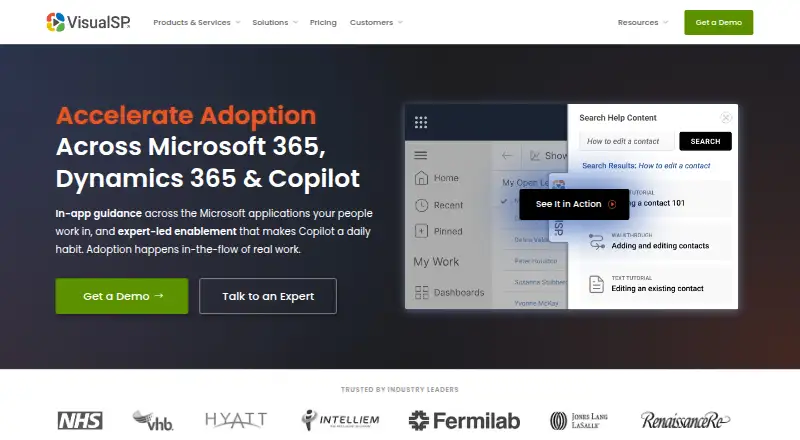
VisualSP places training, contextual assistance and announcements over enterprise web applications. It supports Microsoft products and many business systems, with browser extensions, Teams deployment and custom web installation. Its AI Assistant gives contextual replies based on an organization’s content and policies. A free plan and trial are available, while paid pricing is listed by annual plan.
Review
In a line
VisualSP places help, training, walkthroughs and messages within enterprise web applications. It runs as a browser extension or web-based deployment, with Microsoft Teams support.
What it does
Administrators can create interactive, step-by-step guides that operate within the application in use. Depending on context, assistance may be presented through inline icons, links, buttons or hidden launchers.
Organizations can supply tutorials, policies, screenshots, documents, videos, walkthroughs and messages of their own. The platform also offers searchable support, product tours, announcements and an AI Assistant that responds using company content and policies.
VisualSP lists heatmaps, session recordings, event data, plus usage and ROI reporting among its analytics features. The support FAQ says those analytics can be exported as CSV files for other reporting tools.
How it connects
VisualSP covers Microsoft 365, Dynamics 365, Copilot, Power Platform, SharePoint and Teams, along with systems including Salesforce, HubSpot, Workday, ServiceNow, Jira, NetSuite, SAP and Zendesk.
It can be deployed through Chrome or Chromium, Microsoft Edge, the SharePoint app catalog, a Dynamics managed solution, Teams, or a script added to a custom web application. It works with most browser-based apps, including in-house systems.
The platform does not work in desktop applications except Teams. One documented exception is to-do.office.com, which blocks the external scripts VisualSP needs.
Good fit
VisualSP suits organizations that need guided training and support inside business software, especially teams centered on Microsoft applications. The Enterprise tier is aimed at Microsoft-focused teams, while Platinum is for mixed application environments.
It can help administrators publish internal procedures, policy notices and walkthroughs without sending users to a separate help site. Microsoft GCC and GCC High environments are listed as compatible.
Watch for
Coverage depends on the application being browser-based. Desktop software and mobile apps are outside the stated scope, and some sites may block the scripts needed for help features.
VisualSP says it collects and stores users’ first name, last name and email address to provide usage analytics. It states that the software has SOC 2 certification and is hosted in Microsoft Azure.
An Edge and Teams web combination can prevent the help tab from working because of Microsoft script security. Check deployment and application compatibility before choosing a plan.
Pricing
VisualSP has a free plan and a free trial.
The no-cost Adopt365 extension covers Microsoft 365 web apps with predefined prompts and step-by-step answers in Chrome and Edge. Standard is priced at $6574 per year, Enterprise at $6875 per year, and Platinum at $15345 per year.
Clarity Connect 365 does not display a starting price. It is available on monthly or annual billing, with annual payment saving 40%, and offers standalone Microsoft Clarity insights for Microsoft 365, Copilot and Dynamics 365.
Basic, Advanced and VIP support options list response targets of 3 business days, 4 hours and 2 hours, respectively.
Verdict
Choose VisualSP if your organization wants training, guidance and internal messages placed directly inside browser-based business tools. It is particularly suited to Microsoft-heavy workplaces, while the broader Platinum plan targets teams using a mix of applications.
Consider another digital adoption platform if your users rely mainly on desktop or mobile software, or if a required site blocks external scripts.
Our take
VisualSP is a practical choice for companies that want users to learn and get help without leaving their business applications. Its Microsoft coverage is broad, and custom content lets teams adapt guidance to their own policies. The main constraint is scope: the product is built for web applications, with desktop support limited to Teams. Review the deployment method for each key system, confirm data and security requirements, and request a paid quote if the free Adopt365 offering is too limited.
- Free Adopt365 extension for Microsoft 365 web apps
- Interactive walkthroughs and context-sensitive help
- Supports many Microsoft and business applications
- AI answers based on company content and policies
- CSV export for analytics reporting
- Desktop and mobile applications are generally not supported
- Some sites can block required external scripts
- Paid pricing is listed by annual plan or request
- Edge and Teams web can have a help-tab security issue
- Pick it ifMicrosoft-focused organizations training users in web apps; Teams needing in-app policies, walkthroughs and announcements; Companies building guidance for custom browser applications
- Skip it ifYour main software is desktop or mobile rather than browser-based; A required application blocks external scripts; You need transparent monthly pricing for the full platform
Pricing
Adopt365 is free. Standard is $6574 a year, Enterprise is $6875 a year, and Platinum is $15345 a year. Clarity Connect 365 has no displayed starting price, with monthly or annual billing and a 40% annual saving.
- Adopt365Free · Microsoft 365 web apps · Predefined prompts and step-by-step answers · Chrome and EdgeFree
- Standardflat rate per year · cloud deployment · package tier$6,574/yr
- Enterpriseper year · cloud deployment · Microsoft-focused DAP$6,875/yr
- Platinumper year · cloud deployment · full functionality$15,345/yr
- Clarity Connect 365Monthly or annually (save 40%); starting price not displayed · Standalone Microsoft Clarity insights for Microsoft 365, Copilot, and Dynamics 365On request
As visualsp.com lists them, checked 7 Oct 2026.
Questions
Does VisualSP have a free plan?
Yes. The free Adopt365 extension serves Microsoft 365 web apps with predefined prompts and step-by-step answers in Chrome and Edge.
Which applications does VisualSP support?
Supported applications include Microsoft 365, Dynamics 365, Copilot, Power Platform, SharePoint, Teams, Salesforce, HubSpot, Workday, ServiceNow, Jira, NetSuite, SAP and Zendesk, among others.
Can VisualSP work with a custom web app?
Yes. A custom application can use a script tag or a line of JavaScript added to its header.
Does it support desktop software?
No, except for Teams. VisualSP is intended for browser-based applications, including in-house web apps.
What data does VisualSP collect?
The company says it collects and stores users’ first name, last name and email address for usage analytics.
What are the paid plan prices?
Standard is $6574 per year, Enterprise is $6875 per year and Platinum is $15345 per year. Clarity Connect 365 has no displayed starting price.