
Inferse is reader-supported. When you buy through links on our site, we may earn an affiliate commission. As an Amazon Associate I earn from qualifying purchases. Learn more
Data loss scenarios can strike any one of us without warning system crashes, accidental deletions, virus attacks, formatted drives, or hardware failures that threaten to wipe out valuable files and memories. RecoveryFox AI positions itself as a comprehensive solution for these critical situations, leveraging artificial intelligence to enhance traditional data recovery methods. But does this relatively new player in the data recovery market deliver on its promises?
Our comprehensive review examines RecoveryFox AI’s real-world performance, user interface, compatibility, and value proposition to help you determine if it’s the right choice for your data recovery needs.
Quick Overview
What works well:
- Clean, intuitive interface that simplifies the recovery process
- Strong performance across common file types and storage devices
- AI-enhanced scanning claims to improve recovery success rates
- Competitive pricing structure with flexible licensing options
- Read-only operation ensures no further damage to existing data
Areas for improvement:
- Limited advanced configuration options for power users
- Preview functionality has file size and type restrictions
- Newer software with less established track record compared to industry veterans
- Marketing claims about 98% recovery rate may vary significantly based on specific scenarios
- No free data recovery for users without a license
Core Features and Capabilities
RecoveryFox AI organizes its functionality around three primary areas that matter most to users facing data loss situations:
Free tools Windows power users keep installed
One-click scans. No signup required.
User Experience
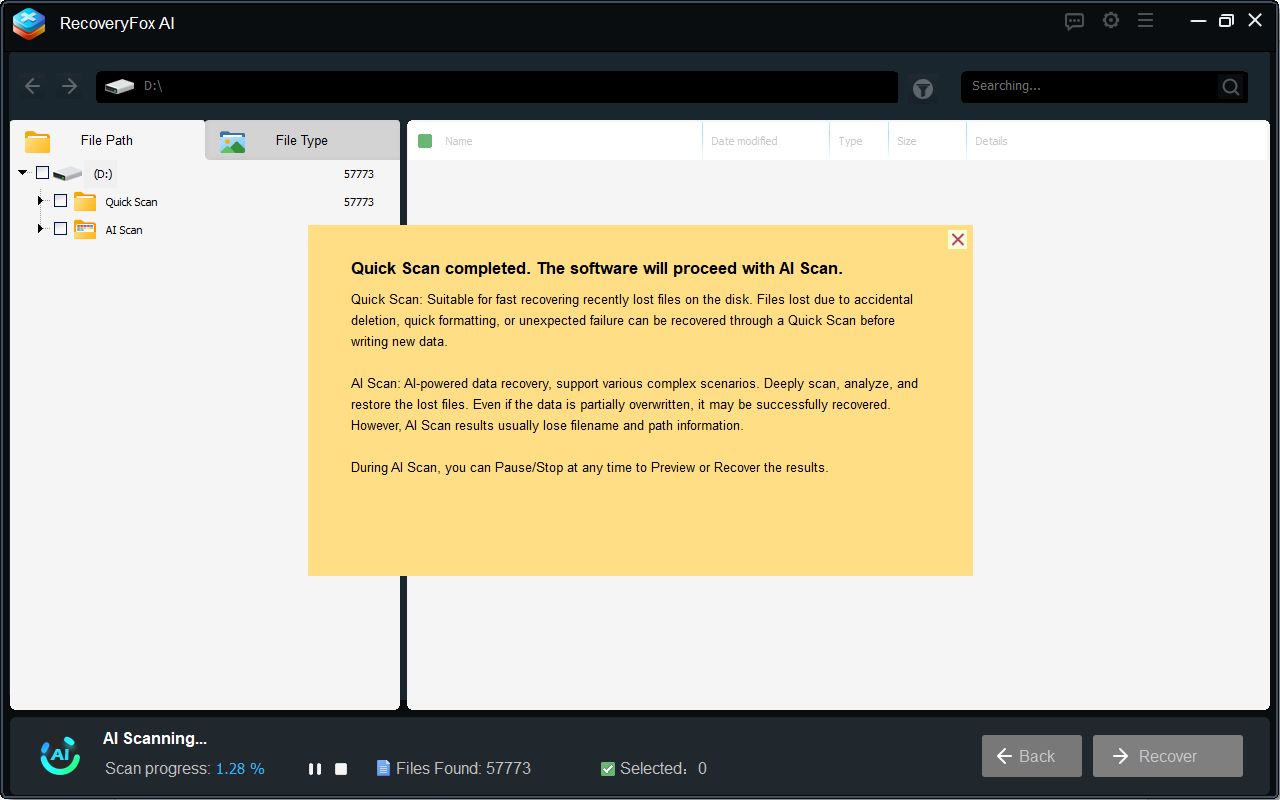
The software prioritizes accessibility with a streamlined three-step process: select location, scan, and recover. Upon launching, users encounter a clean interface that avoids overwhelming newcomers with technical details. The location selection is straightforward, displaying available drives and partitions clearly.
Shopping ad

- Easily store and access 2TB to content on the go with the Seagate Portable Drive, a USB external hard drive
- Designed to work with Windows or Mac computers, this external hard drive makes backup a snap just drag and drop
- To get set up, connect the portable hard drive to a computer for automatic recognition no software required
- This USB drive provides plug and play simplicity with the included 18 inch USB 3.0 cable
- The available storage capacity may vary.
The scanning process combines a Quick Scan for recently deleted files with what the company calls “AI Scan” for deeper analysis. Users can pause or resume scans, which proves useful for large drives or when computer resources are needed elsewhere. File organization post-scan groups results by type and provides filtering options by date, size, and file extension.
Recovery Performance
RecoveryFox AI supports major file systems including NTFS, exFAT, and FAT32, covering most Windows-based storage scenarios. The software handles various file types from documents and images to videos, audio files, and archives. It works with internal drives, external hard drives, USB flash drives, SD cards, and camera storage.
The preview functionality allows users to examine recoverable files before committing to recovery, though this feature has limitations with larger files and certain formats. The software maintains original folder structures, when possible, which helps preserve file organization after recovery.
What’s actually slowing this PC down?
Pick the symptom - the matching free tool is one click away.
Shopping ad
- Easily store and access 5TB of content on the go with the Seagate portable drive, a USB external hard Drive
- Designed to work with Windows or Mac computers, this external hard drive makes backup a snap just drag and drop
- To get set up, connect the portable hard drive to a computer for automatic recognition software required
- This USB drive provides plug and play simplicity with the included 18 inch USB 3.0 cable
- The available storage capacity may vary.
Device Compatibility
The software supports Windows systems from Windows 7 through Windows 11, including Windows Server editions. Hardware requirements are modest a 1 GHz processor, 4 GB RAM minimum (8 GB recommended), and 1 GB installation space. This broad compatibility ensures the software can run on both older systems and modern machines.
Real-World Testing
To evaluate RecoveryFox AI’s actual performance, we conducted controlled tests using a 32 GB USB drive containing a mix of file types: 50 photos (including RAW formats from different camera manufacturers), 20 videos (various codecs and resolutions), 30 documents (Word, PDF, Excel), and 25 audio files.
Test Scenario 1: Accidental Deletion
After deleting all files normally, RecoveryFox AI’s Quick Scan completed in approximately 8 minutes and successfully identified 89 of the original 125 files. The AI Scan continued for an additional 15 minutes, ultimately recovering 108 files with their original names intact. Success rates varied by file type: documents and JPEG photos showed near-perfect recovery, while some proprietary RAW formats and video files with less common codecs were partially recovered or missing.
Shopping ad
- Easily store and access 1TB to content on the go with the Seagate Portable Drive, a USB external hard drive.Specific uses: Personal
- Designed to work with Windows or Mac computers, this external hard drive makes backup a snap just drag and drop. Reformatting may be required for Mac
- To get set up, connect the portable hard drive to a computer for automatic recognition no software required
- This USB drive provides plug and play simplicity with the included 18 inch USB 3.0 cable
- The available storage capacity may vary.
Test Scenario 2: Formatted Drive
Following drive formatting, the recovery process took longer, approximately 35 minutes for the complete scan. Results were more mixed, with 76 files successfully recovered. Folder structure preservation was inconsistent after formatting, though the software did restore many files to appropriately named recovery folders.
Outdated Drivers Are Slowing You Down
One free scan finds every outdated or missing driver and matches the right update for your exact hardware.Free scan · exact hardware matchWindows Errors? Fix Them Before They Spread
Repair common Windows errors and clear accumulated junk for a smoother, more stable PC - no reinstall needed.Free scan · no reinstallPricing and Value Analysis
RecoveryFox AI offers four licensing options:
- 1-Week: $49.95 (emergency use)
- 1-Month: $59.95 (short-term projects)
- 1-Year: $69.95 (regularly $89.95, 22% savings)
- Lifetime: $99.95 (regularly $149.95, 33% savings)
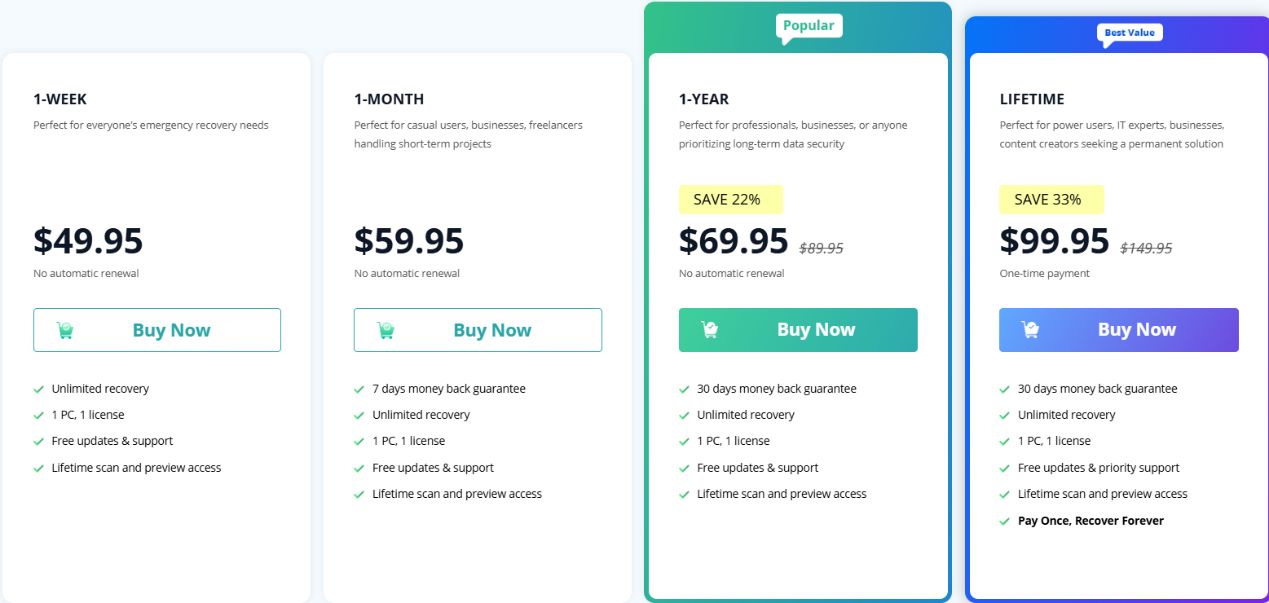
Compared to established competitors, RecoveryFox AI’s pricing sits in the mid-range. The lifetime option at $99.95 offers reasonable value for users who anticipate ongoing recovery needs, while the shorter-term licenses provide flexibility for one-time situations.
User Feedback and Reliability
As a newer entrant backed by WonderFox Soft (established in 2009), RecoveryFox AI has a limited but growing user review base. Early adopters generally praise the software’s ease of use and reasonable recovery success rates for common scenarios. Some users report mixed results with complex data loss situations involving physical drive damage or multiple overwrite cycles.
Shopping ad
- Easily store and access 4TB of content on the go with the Seagate Portable Drive, a USB external hard drive.Specific uses: Personal
- Designed to work with Windows or Mac computers, this external hard drive makes backup a snap just drag and drop
- To get set up, connect the portable hard drive to a computer for automatic recognition no software required
- This USB drive provides plug and play simplicity with the included 18 inch USB 3.0 cable
- The available storage capacity may vary.
The company’s established presence in the software market provides some confidence, though RecoveryFox AI itself lacks the extensive user base and long-term testing of industry veterans like Disk Drill or R-Studio.
Technical Considerations
Strengths:
- Non-destructive read-only operation protects existing data
- Support for large capacity drives
- Flexible scanning with pause/resume capability
- No data collection policy addresses privacy concerns
- Regular updates and responsive customer support
Limitations:
- Preview window limitations (file size and format restrictions)
- Limited customization options for advanced users
- Recovery success heavily dependent on specific data loss scenario
- Newer software with less proven track record in complex recovery situations
Bottom Line
RecoveryFox AI delivers a solid, user-friendly data recovery solution that performs well in typical data loss scenarios. Its clean interface makes it accessible to non-technical users, while the AI-enhanced scanning provides reasonable recovery rates for common file types and storage devices.
Quick wins for a faster PC:
Repair Windows errors before they cause bigger problemsFix Now →Fix the driver behind crashes, sound loss and screen glitchesFind Drivers →The software excels in situations involving accidental deletion, recent formatting, or logical file system errors. However, users facing complex data loss scenarios or requiring recovery of specialized file formats might find better results with more established alternatives.
Shopping ad

- [Upgraded Version] - This external hard drive features a mirrored logo stripe combined with a striped anti-slip design, and the rounded corners of the casing make it easier to grip. The stripes also have a heat dissipation function, ensuring stable and fast data transfer.
- 【Ultra-thin and quiet】 - The motherboard adopts JMicron 578 noise-free solution, giving you a quiet working environment. Lightweight and portable size designed to fit in your pocket for easy portability.
- 【Ultra-Fast Data Transfers】 - Pairing this external hard drive with JMicron 578 solution USB 3.0 and USB 2.0 interfaces enables blazing-fast data transfer. It boasts theoretical read speeds of up to 125MB/s and write speeds of up to 103MB/s.
- 【Plug and Play】 - With no software to install, just plug it in and the drive is ready to use.The hard disk chip is wrapped with an aluminum anti-interference layer to increase heat dissipation and protect data.
- 【What You Get】 - 1 x Portable Hard Drive, 1 x USB 3.0 Cable, 1 x User Manual, Gift-type shell packaging ,Three-year manufacturer's warranty and free technical support services.
At $99.95 for lifetime access, RecoveryFox AI offers fair value for users seeking a straightforward recovery tool without advanced features. The flexible licensing options accommodate different usage patterns, from emergency one-time recovery to ongoing professional needs.
For typical home users and small businesses dealing with standard data recovery situations, RecoveryFox AI provides an effective, approachable solution. Power users or those requiring maximum recovery success rates in challenging scenarios may want to consider more specialized alternatives with longer market presence and extensive feature sets.
Quick Recap
Product prices and availability are accurate as of the date/time indicated and are subject to change. Any price and availability information displayed on Amazon at the time of purchase will apply.
The Tool Desk
Outbyte PC Repair FREERepair Windows errors before they cause bigger problemsFix Now →Outbyte Driver Updater FREEScan for outdated or missing drivers - takes under a minuteDriver Scan →