
AutoScribble: Narrated Whiteboard Video Maker
autoscribble.com · checked 15 Oct 2026
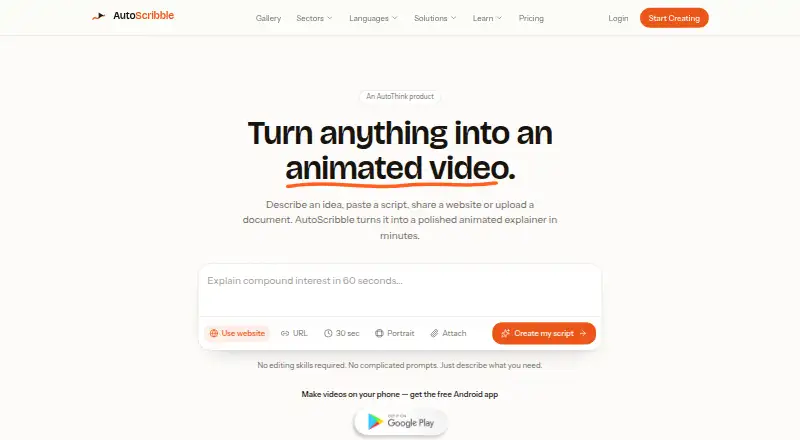
AutoScribble turns text, documents or web pages into narrated animated whiteboard videos.
How it plugs in
Signal on Whiteboard Animation Software6.4#6 of 26
AutoScribble creates narrated whiteboard explainers from prompts, scripts, documents, PDFs, blog posts or web pages. It offers free script drafting, scene planning, voice choices, branding and MP4 downloads. The hosted web service and Android app support private sharing, but there is no timeline editor, public API, LMS connection or direct social posting.
Review
In a line
AutoScribble is a hosted service and Android app for making narrated animated whiteboard explainer videos from written ideas and source material.
What it does
Start with a sentence, your own script, a blog post, PDF, document or web page. AutoScribble drafts a title, script and visual style for approval before it renders anything.
The narration is arranged into scenes with approximate timings. You can revise the script, length, voice, format, logo and images, then order another version saved beside the original. Videos run from 30 seconds to four minutes and normally take about ten minutes to finish; an email says when one is ready.
Narration is offered in 15 languages with voice choices. Outputs can be landscape, portrait or square, with drawing animation, scene templates, logo placement and brand colors. Finished files download as MP4s and can be shared by private link or email.
How it connects
AutoScribble runs on the web and Android. It has no public API or SDK, and the reviewed pages do not state a self-hosted option.
There is no LMS, SCORM or record-system integration. You download the MP4 and upload it where you need it, and the service does not publish directly to social accounts. This makes it a more manual choice than some whiteboard animation software.
Videos are private to your account by default and enter the public gallery only if you opt in. The maker says personal information is not sold, card numbers do not reach its servers, and account data can be exported, corrected or deleted. Systems and suppliers are in the UK, EEA and US, with safeguards for transfers outside the UK or EEA.
Good fit
AutoScribble suits teaching, training and explanation work, including healthcare, education, workplace learning and SaaS. It is useful when you want a storyboard and script prepared before video generation.
The Android app supports prompt or script input, scene planning, narration edits, orientation and logo selection, MP4 download and sharing. Commercial use is allowed for adverts, sales, training and client work.
Watch for
There is no timeline or drawing editor. You choose settings such as length, shape, voice and logo rather than editing individual drawing movements.
Check your workflow if you need learning-system records, social publishing, an API or self-hosting, because those options are not provided. Rendering is billed by delivered seconds when a result is shorter than requested; the difference is returned.
Purchased one-off credits never expire, while monthly credits refresh each month. Privacy questions and data-rights requests go to [email protected]; the policy says requests are answered within one month.
Pricing
AutoScribble has a free plan and a free trial. Free includes 100 welcome credits, enough for one one-minute video or two 30-second videos, plus script writing, one finished video, download and sharing.
A 100-credit pack costs $12 one-time, and those credits do not expire. Monthly plans are $25 a month for 300 credits, $65 a month for 1,000 credits, $129 a month for 2,500 credits and 25 finished minutes, or $389 a month for 10,000 credits and 100 finished minutes.
One finished minute uses 100 credits; 30 seconds uses 50 credits and two minutes uses 200 credits. Script writing and rewriting do not use credits before generation.
Verdict
Choose AutoScribble if you need short, branded whiteboard explainers and prefer approving a script and scene plan before rendering. Its free allowance lets you try the workflow, while commercial rights cover client and training work.
Look elsewhere if your process depends on a timeline-style drawing editor, direct social publishing, LMS or SCORM reporting, an API, or hosting the software yourself.
Our take
AutoScribble is a practical option for educators and trainers that can work with downloaded MP4 files. The free plan gives a low-risk way to check its script approval and scene workflow. Ongoing costs depend on finished seconds, so frequent revisions can consume credits quickly. Buyers needing deep manual animation control, automated system connections or direct social publishing should choose a different tool.
- Free plan includes 100 welcome credits and one finished video
- Turns documents, PDFs and web pages into storyboarded videos
- 15 narration languages, voice choices and brand settings
- Commercial use is allowed
- One-off credits never expire
- No timeline or drawing editor
- No LMS, SCORM or record-system integration
- No public API, SDK or stated self-hosting option
- Does not post directly to social accounts
- Monthly plan credits refresh each month
- Pick it ifTeaching and workplace training explainers; Branded client or sales videos; Creators working from an Android phone
- Skip it ifYou need timeline-level drawing control; Your workflow requires LMS, SCORM or API connections; You want automatic social publishing or self-hosting
Pricing
A free plan includes 100 welcome credits. Credits are charged by finished video time.
- Free£0 · 100 welcome credits · one 1-minute video or two 30-second videos · full script writing · one finished video · download and shareFree
- 100-credit packOne-off · 100 credits · credits never expire$12 one-time
- StarterMonthly · 300 credits per month$25/mo
- ProMonthly · 1,000 credits per month$65/mo
- BusinessMonthly · 2,500 credits per month · 25 finished minutes$129/mo
- StudioMonthly · 10,000 credits per month · 100 finished minutes$389/mo
As autoscribble.com lists them, checked 15 Oct 2026.
Questions
How long can an AutoScribble video be?
Videos can run from 30 seconds to four minutes.
What inputs can I use?
You can begin with a sentence, script, blog post, PDF, document or web page.
How are credits charged?
One finished minute costs 100 credits. Thirty seconds costs 50 credits, and two minutes costs 200 credits. A shorter render is billed by delivered seconds.
Can I use videos commercially?
Yes. The terms allow finished videos in adverts, sales, training and client work.
Does AutoScribble connect to an LMS?
No. It has no LMS, SCORM or record-system integration, so you download the MP4 and upload it yourself.
Are videos private?
Videos are private by default and appear in the public gallery only if the owner opts in.
Is there an Android app?
Yes. The Android app supports prompts or scripts, scene planning, narration edits, orientation, logos, MP4 downloads and sharing.
Near it
All alternatives →- AAnimaker#5 on this board
- GAGolpo AI#7 on this board
- WV
 Whiteboard Video Maker#4 on this board
- RW
 Renderforest Whiteboard Animation#8 on this board
- M
 mySimpleshow#3 on this board
- WAWink AI Whiteboard Video Generator#9 on this board
- E
 Explideo#2 on this board
- ODOpen Doodler#10 on this board
- E
 Excalimate#1 on this board
- A
 Animator#11 on this board