
BDRShield Endpoint Backup
bdrshield.com · checked 15 Oct 2026
Endpoint file and disk-image backup with cloud, local, and self-hosted management.
How it plugs in
Signal on Endpoint Backup Software6.7#2 of 22
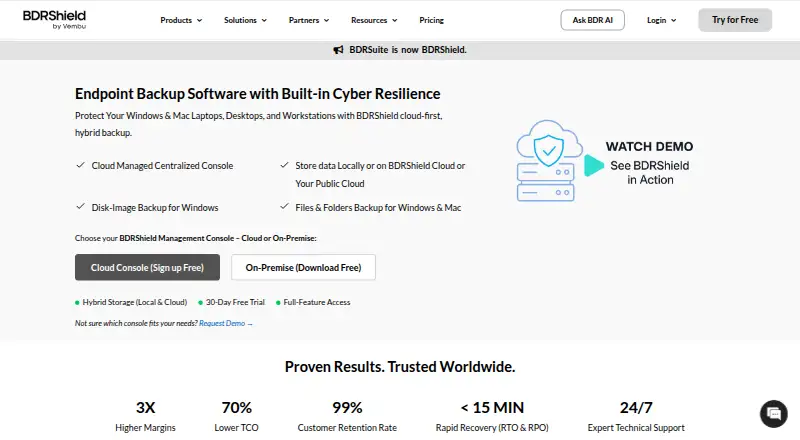
BDRShield Endpoint Backup protects Windows, Linux, and Mac computers with file and folder backups. Windows devices can also receive full disk-image backups. You can store copies locally, in BDRShield Cloud, or in several customer cloud services. Recovery includes bare-metal, file, disk, and instant virtual-machine options.
Review
In a line
BDRShield Endpoint Backup is a backup service for organizational computers. It covers files and folders on Windows, Linux, and Mac, plus full disk images on Windows.
What it does
You can select files and folders for backup, or capture a Windows computer's operating system, applications, settings, and other data as a disk image. Scheduled incremental and synthetic full backups are supported, with an advertised 15-minute recovery point objective.
Recovery choices include bare-metal recovery, individual files and folders, disks or partitions, instant recovery, and exporting to VHD, VHDX, VMDK, Flat-VMD, or RAW files. A backed-up endpoint can boot as a virtual machine on VMware, Hyper-V, or KVM.
Retention can be set by version count or time period. Job reports and email alerts show successful, failed, or missed tasks.
How it connects
Backups can go to local disks, NAS or SAN, BDRShield Cloud, or customer storage such as S3, Azure Blob, Google Cloud, MinIO, and Wasabi. Windows and Mac backups can be managed from a cloud console or a self-hosted centralized console.
Hosts can be added in bulk by CSV or through Active Directory and LDAP. The product supports environments including VMware, Hyper-V, Proxmox, KVM, oVirt, AWS, Azure, Microsoft 365, Google Workspace, SQL Server, PostgreSQL, MySQL, Exchange, and SharePoint.
An HTTP web-services API handles backup actions, job monitoring, recovery status, and configuration automation. Documentation includes Postman guidance and Python scripts.
Good fit
BDRShield is aimed at organizations, including small and midsize businesses, enterprises, and managed service providers. It suits teams that need mixed Windows, Linux, and Mac coverage, with whole-system recovery for Windows.
Security controls include immutable and air-gapped copies, malware scans before backup and restore, multi-factor authentication, and AES-256 encryption in transit and at rest. Keys can be system-generated or customer-selected.
The self-hosted console has Windows, Linux, and Docker installers. Its stated requirements include supported Windows Server, Windows 10 or 11, and Ubuntu versions, with at least 8 GB of memory, a quad-core processor, and 1 Gbps networking.
Watch for
Restore workflows may feel unintuitive, and restores can be slow. Cleanup of older data and some backup jobs may also require attention. Clustered Hyper-V support has been reported as weak.
The licensing choices can be confusing, so confirm which endpoint, user, storage, and workload limits apply before buying. Paid subscriptions include 24/7 technical support; the Free Edition uses community or forum support.
Pricing
A 30-day free trial provides full-featured Enterprise access. The Free Edition is free forever and covers 10 endpoints, 10 VMs, 10 Microsoft 365 users, 10 Google Workspace users, 10 AWS EC2 instances, and 10 Azure VMs, with community support.
Endpoint/Workstation Backup costs $12 a year for one endpoint. Standard Cloud BDRShield costs $30 a year per user and includes 50 GB of cloud storage. Enterprise Cloud BDRShield costs $48 a year per user and also includes 50 GB.
Enterprise Edition — Endpoint/Workstation Backup is price on request, with subscription and perpetual licenses available per Windows, Linux, or Mac endpoint.
Verdict
Choose BDRShield if you need one system for file backups across mixed desktop operating systems and disk-image recovery for Windows. Its local, hosted, and customer-cloud storage choices can fit different infrastructure plans, while the API helps automate administration.
Check restore procedures, Hyper-V needs, licensing limits, and support coverage before committing. The free edition is useful for small limits and basic evaluation, but organizations needing broader capacity or direct technical support will need a paid plan.
Our take
BDRShield Endpoint Backup fits organizations that want file protection across Windows, Linux, and Mac, with full-machine recovery for Windows. It offers several storage destinations, self-hosted or cloud management, and an API for automation. The main cautions are the potentially awkward restore process, reported slow or failed jobs, cleanup concerns, and unclear licensing. Start with the free edition or 30-day trial to verify recovery steps and workload limits, then compare paid plans against your endpoint, user, and storage needs.
- Covers Windows, Linux, and Mac file and folder backups
- Windows disk images support whole-system recovery
- Stores backups locally, in BDRShield Cloud, or customer cloud storage
- Offers cloud and self-hosted management consoles
- Includes immutable copies, malware scanning, MFA, and AES-256 encryption
- Restore workflows may be unintuitive or slow
- Licensing choices can be confusing
- Free Edition support is limited to community or forum channels
- Clustered Hyper-V support may be weak
- Older-data cleanup can be difficult
- Pick it ifOrganizations with mixed Windows, Linux, and Mac endpoints; Managed service providers and teams needing Windows disk-image recovery; Buyers wanting local, hosted, or customer-cloud storage choices
- Skip it ifYou need a simple restore workflow without a trial or pilot; You rely heavily on clustered Hyper-V environments; You need unlimited capacity on a free plan
Pricing
There is a free-forever edition with fixed workload limits and a 30-day full-featured Enterprise trial.
- 30-Day Free Trial30 days · Full-featured Enterprise accessFree
- Free Editionfree forever · 10 endpoints · 10 VMs · 10 Microsoft 365 users · 10 Google Workspace users · 10 AWS EC2 instances · 10 Azure VMs · community supportFree
- Endpoint/Workstation Backup1 endpoint per year · Endpoint backup module$12/yr
- Standard Cloud BDRShieldper user per year · 50 GB cloud storage included$30/yr
- Enterprise Cloud BDRShieldper user per year · 50 GB cloud storage included$48/yr
- Enterprise Edition — Endpoint/Workstation BackupCustom quote; subscription and perpetual licenses are available. · Per endpoint · Windows, Linux, or Mac endpointOn request
As bdrshield.com lists them, checked 15 Oct 2026.
Questions
Which computers can BDRShield back up?
File and folder backup covers Windows, Linux, and Mac computers. Windows also supports disk-image backup for whole-system recovery.
Where can backups be stored?
Backups can be kept on local disks, NAS or SAN, BDRShield Cloud, or customer storage such as S3, Azure Blob, Google Cloud, MinIO, and Wasabi.
Does it offer a free plan?
Yes. The Free Edition is free forever for 10 endpoints, 10 VMs, 10 Microsoft 365 users, 10 Google Workspace users, 10 AWS EC2 instances, and 10 Azure VMs.
Is there a trial?
Yes. The 30-day free trial includes full-featured Enterprise access.
Can it recover a complete Windows machine?
Yes. Windows disk-image backups can support bare-metal recovery, disk or partition recovery, and instant virtual-machine boot.
Does BDRShield have an API?
Yes. Its HTTP web-services API supports backup actions, job monitoring, recovery status, and configuration automation.
What support comes with each plan?
Paid subscriptions include 24/7 technical support. The Free Edition provides community or forum support.
Near it
All alternatives →- UUrBackup#1 on this board
- I
 IDrive#3 on this board
- ETEaseUS Todo Backup#4 on this board
- NNinjaOne#5 on this board
- CECrashPlan Endpoint Backup#6 on this board
- BFBackblaze for Business#7 on this board
- DE
 Druva Endpoint Data Protection#8 on this board
- CDCove Data Protection#9 on this board
- AX
 Axcient x360Recover#10 on this board
- XOXopero ONE#11 on this board