CrashPlan Endpoint Backup
crashplan.com · checked 21 Oct 2026
Managed endpoint backup and recovery for business files on Windows, macOS, and Linux.
How it plugs in
Signal on Endpoint Backup Software6.3#6 of 22
CrashPlan Endpoint Backup automates incremental backups for employee devices and lets users or administrators restore files. It supports mixed operating systems, managed or customer-owned cloud storage, identity integrations, policy controls, audit trails, and immutable copies. Plans range from a small-business edition to enterprise pricing on request, with a 14-day trial and no free plan.
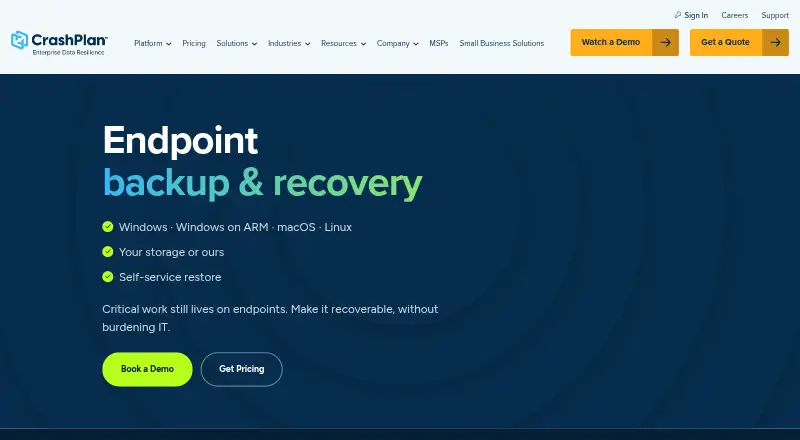
Review
In a line
CrashPlan Endpoint Backup is a centrally managed service for backing up and recovering business files stored on employee computers.
It runs across Windows, macOS, and Linux, with administration through a web console.
What it does
Administrators set backup intervals, file rules, versioning, retention, quotas, and optional CPU or network limits. The service then makes automatic incremental backups. Employees can restore chosen files when self-service recovery is enabled, or administrators can perform the restore.
File stubbing can expose selected files before a complete restore finishes. For supported cloud-to-cloud workflows, CrashPlan says this can be two to five times faster than downloading the full data set over an employee connection.
Backups can use CrashPlan-managed Azure or CrashPlan data centers. Customer-managed choices include Azure, AWS, Wasabi, Backblaze, and other S3-compatible storage.
How it connects
The service supports SAML single sign-on and SCIM provisioning, with documented connections for Okta, Google, Ping, Microsoft Entra ID, OneLogin, and Microsoft AD FS. Microsoft Entra ID can also handle provisioning and single sign-on.
A REST API uses token authentication to work with users, organizations, computers, and other resources. API access needs an eligible plan, local authentication, and the right role; third-party single sign-on credentials cannot make API calls.
CrashPlan publishes the MIT-licensed pycpg Python SDK for Python 3.11 or newer, plus crashplancli documentation for command-line profiles and scripting. The product is not open source.
Good fit
This product is aimed at enterprise and institutional IT teams managing distributed or mixed-operating-system devices. It suits organizations that need central policies, delegated administration, role-based access, reports, alerts, and audit logs.
Governance features include policy-based retention, defensible deletion, legal hold, and immutable backup copies. CrashPlan lists AES-256 encryption at rest, TLS 1.2 or later in transit, and customer-controlled key options.
It supports file-level, point-in-time restores and lists Exchange Online, SharePoint Online, OneDrive for Business, Teams, Gmail, and Google Drive among supported SaaS apps.
Watch for
The desktop app requires a 2 GHz 64-bit processor, 2 GB of memory, 2 GB of disk space, a 960x780 display, and an internet connection. Headless configurations are not supported.
API use is restricted by plan and permissions, and local authentication is required. Check which storage option, identity connection, retention rule, and device allowance match your setup before buying.
The enterprise endpoint offering is purchased through the sales team. Its page distinguishes that process from the separate small-business self-service trial.
Pricing
Essential Edition costs $2.99 a month, billed monthly. It includes 200GB per user, one user, one device, Windows, Mac, and Linux support, 30-day deleted-file retention, and a 14-day trial.
Professional Edition costs $8 a month, billed monthly, or $7.33 per user per month billed annually. It includes unlimited storage, multiple users, one device per user, 90-day deleted-file retention, SAML 2.0, and a 14-day trial.
Enterprise Edition costs $10 a month, billed annually. It requires at least five users and includes up to two devices per user, legal hold, role-based access, customer-held encryption keys, SAML 2.0, SCIM provisioning, API access, and a 14-day trial.
CrashPlan Platform endpoint backup is price on request, with a customized quote. It is licensed per user and includes 50GB of pooled managed storage per licensed user; extra and customer-managed storage options are available. There is no free plan.
Verdict
Choose CrashPlan Endpoint Backup if your IT team needs centrally controlled file backup across Windows, macOS, and Linux, with self-service recovery, governance controls, and several storage destinations.
It is a stronger match for organizations that can use one of the listed plans, meet the desktop requirements, and accept plan-based limits on devices, storage, API access, or users.
Look elsewhere if you need a free plan, unsupported headless machines, or API access without local authentication and an eligible plan. Compare it with other endpoint backup software options before committing.
Our take
CrashPlan Endpoint Backup makes sense for organizations that need one place to set backup policies and recover files from employee devices running different operating systems. Its storage choices, identity connections, audit features, legal hold, and immutable copies cover a broad range of IT requirements. The main checks are practical: device and user limits vary by edition, API work requires the right plan and local authentication, desktop systems need specific resources, and enterprise buyers must request a customized quote. It is not a fit for teams seeking a free service or headless deployments.
- Automatic incremental backups at administrator-defined intervals
- Windows, macOS, and Linux endpoint coverage
- Self-service or administrator-controlled file restores
- Customer-managed storage and immutable backup copies
- Identity, audit, retention, and legal-hold controls
- No free plan
- Headless configurations are unsupported
- API access requires an eligible plan and local authentication
- Enterprise endpoint pricing requires a customized quote
- Device and storage limits differ by edition
- Pick it ifEnterprise IT teams managing distributed devices; Organizations with mixed Windows, Mac, and Linux fleets; Teams needing retention, audit, and legal-hold controls
- Skip it ifYou need a free backup plan; You must protect headless systems; You need API calls through third-party SSO credentials
Pricing
Higher editions add users, storage, governance, and API features. Enterprise platform pricing is on request.
- Essential Editionmonthly · 200GB per user · 1 user · 1 device · Windows, Mac, Linux · 30-day deleted-file retention · 14-day trial$2.99/mo
- Professional Editionmonthly; $7.33 per user/month billed annually · Unlimited storage · multiple users · 1 device per user · Windows, Mac, Linux · 90-day deleted-file retention · SAML 2.0 · 14-day trial$8/mo
- Enterprise Editionbilled annually · Unlimited storage · minimum 5 users · up to 2 devices per user · legal hold · RBAC · customer-held encryption keys · SAML 2.0 · SCIM/provisioning · API · 14-day trial$10/mo
- CrashPlan Platform endpoint backupCustomized quote; licensed per user · 50 GB pooled managed storage per licensed user · additional storage and customer-managed storage options availableOn request
As crashplan.com lists them, checked 21 Oct 2026.
Questions
Is CrashPlan Endpoint Backup free?
No. It has paid editions and a 14-day trial, but no free plan.
Which operating systems does it support?
The endpoint service supports Windows, macOS, and Linux. The desktop app requires a 64-bit processor, memory, disk space, display resolution, and an internet connection.
Can employees restore their own files?
Yes, when an administrator enables self-service restore. Administrators can also control and perform restores.
What storage destinations are available?
Backups can use CrashPlan-managed Azure or CrashPlan data centers, or customer-managed Azure, AWS, Wasabi, Backblaze, and other S3-compatible storage.
Does it have an API?
Yes. The REST API uses token authentication. An eligible plan, local authentication, and a role with required permissions are needed; third-party SSO credentials do not work for API calls.
How much does Professional Edition cost?
Professional Edition costs $8 a month billed monthly, or $7.33 per user per month billed annually. It includes unlimited storage and a 14-day trial.
Does it support ransomware protection?
The endpoint offering includes immutable backup copies intended to protect recoverable data from tampering and ransomware.
Near it
All alternatives →- NNinjaOne#5 on this board
- BFBackblaze for Business#7 on this board
- ETEaseUS Todo Backup#4 on this board
- DE
 Druva Endpoint Data Protection#8 on this board
- I
 IDrive#3 on this board
- CDCove Data Protection#9 on this board
- BE
 BDRShield Endpoint Backup#2 on this board
- AX
 Axcient x360Recover#10 on this board
- UUrBackup#1 on this board
- XOXopero ONE#11 on this board