Cleanfox email cleanup review
join.cleanfox.io · checked 14 Oct 2026
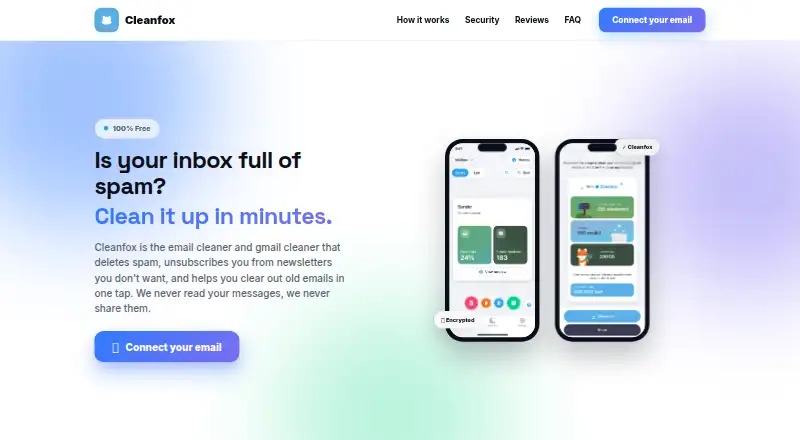
Cleanfox scans mailboxes to remove unwanted emails and unsubscribe from newsletters.
How it plugs in
Signal on Email Cleanup Software6.6#6 of 31
Android, iOS, and web users can use Cleanfox without paying. It checks connected mailboxes for newsletters and order confirmations, then offers ways to tidy them, including keeping, deleting, or ending subscriptions. It supports many email providers and multiple mailboxes. The initial check averages 30 minutes to three hours, and anonymized, aggregated statistics support the service.
Review
In a line
Cleanfox cleans connected mailboxes by removing unwanted messages and ending newsletter subscriptions. Android, iOS, and web versions are available.
What it does
The service identifies recurring newsletters and commercial messages, then shows each sender for review. For each newsletter, users may retain it, erase earlier messages without leaving the list, or unsubscribe while clearing those older messages.
Bulk actions can remove thousands of messages at once. Cleanfox places deleted mail in the mailbox trash and can automatically route later messages from unwanted senders there. Subscription sorting is available in card or list form, with bulk controls in list view.
How it connects
Cleanfox lists Gmail, Yahoo, Outlook, Hotmail, Orange, SFR, La Poste, GMX, Apple, iCloud, and additional providers among its supported services. Some listings also name AOL, Exchange, and IMAP accounts. It connects through IMAP with provider-created app passwords, or OAuth2 when a provider supports it.
Settings lets you attach another mailbox, so several can be sorted together. Personalized-domain addresses and some providers are not processed, and Free.fr accounts cannot be used because Free blocks third-party access.
Good fit
Cleanfox suits people who want to review recurring senders, clear old mail, and unsubscribe without handling each message separately. It also fits users managing more than one mailbox.
It may help anyone comparing Email Cleanup Software who needs mobile and web access, automatic cleanup rules, and a free plan.
Watch for
A mailbox's first scan generally takes between 30 minutes and three hours. Removed messages go to the provider's trash, where they normally remain restorable until that folder is cleared, commonly within five to 30 days.
Cleanfox says it does not read or sell emails and uses end-to-end encryption, while its privacy notice describes processing commercial-email data for deidentified or aggregated reports. Its business model sells anonymized, aggregated statistics from transactional emails. The attachment download-and-delete feature is marked “Soon.”
Removing a mailbox through settings deletes the Cleanfox account and related data and can interrupt an unfinished cleanup. The iOS app requires version 15.6 or later, as does iPadOS.
Pricing
Cleanfox has one Free plan priced at zero, with no ads or stated limits and unlimited use. Since access is already free, a separate trial is not provided.
Verdict
Choose Cleanfox if you want one place to sort newsletters across supported accounts, remove large batches of old messages, and manage subscriptions on phone or web without paying.
Check provider support before connecting an account, especially for a personalized domain or Free.fr address. Also allow time for the initial scan and decide whether the handling of anonymized commercial-email data fits your privacy needs.
Our take
Cleanfox is a practical choice for people with crowded inboxes who want newsletter cleanup, bulk deletion, and unsubscribe controls in one free service. Its coverage spans major mail providers and several device types, while multiple-mailbox support helps households or users with separate accounts. The main trade-offs are a potentially long first scan, provider exclusions, and data processing for aggregated statistics. Review the privacy terms and recovery window before starting a large cleanup.
- No-cost plan with unlimited use, no ads, and no stated restrictions
- Android, iOS, and web access
- Supports multiple mailboxes and bulk deletion
- Can unsubscribe or keep newsletters while clearing old messages
- Deleted mail goes to trash for possible recovery
- The initial scan can take roughly 30 minutes to three hours
- Personalized-domain addresses and certain providers are unsupported
- Free.fr mailboxes are currently unavailable
- Commercial-email data is used for anonymized statistics
- Attachment cleanup is marked “Soon”
- Pick it ifPeople clearing newsletters and old messages in bulk; Users managing several supported mailboxes
- Skip it ifYou use a personalized-domain or Free.fr mailbox; You do not accept processing of anonymized commercial-email data
Pricing
The Free plan costs nothing, has no ads or stated restrictions, and permits unlimited use. Cleanfox does not offer a separate trial.
- Freeno ads · no restrictions · unlimited useFree
As play.google.com lists them, checked 14 Oct 2026.
Questions
Which email providers does Cleanfox support?
Cleanfox's lists name Gmail, Yahoo, Outlook, Hotmail, Orange, SFR, La Poste, GMX, Apple, iCloud, and more. Some listings also name AOL, Exchange, and IMAP accounts.
Can Cleanfox handle more than one mailbox?
Yes. Use settings to add another mailbox, then sort multiple mailboxes together.
How long does the first scan take?
The first mailbox usually needs about 30 minutes to three hours to scan.
Can deleted emails be recovered?
Removed messages are sent to the mailbox trash and can usually be restored until the provider clears it, generally after five to 30 days.
Does Cleanfox have a free plan?
Yes. Its Free plan has no ads or stated restrictions and allows unlimited use, with no separate trial.
How does Cleanfox use email data?
Cleanfox says newsletter and commercial-transaction data is anonymized to create market statistics. Its privacy notice also describes deidentified or aggregated reports.
What happens when I remove a mailbox?
Removing one in settings deletes the Cleanfox account and associated data and may stop a cleanup that is still running.
Near it
All alternatives →- CE
 Clean Email#5 on this board
- GUGmail Unsubscribe#7 on this board
- PPaperweight#4 on this board
- SDSmart Delete for Gmail#8 on this board
- GUGmail Unsubscriber#3 on this board
- GGMClean#9 on this board
- IInboxSweeper#2 on this board
- UMUnroll.Me#10 on this board
- GBGmail Bulk Unsubscribe & Cleanup Tool#1 on this board
- Mmailtrim#11 on this board