
CyberLink PowerDirector: features and pricing
cyberlink.com · checked 15 Oct 2026
AI-assisted video editor for desktop and mobile, with timeline tools, stock media, effects and social publishing.
How it plugs in
Signal on Video Editing Software7.5#3 of 153
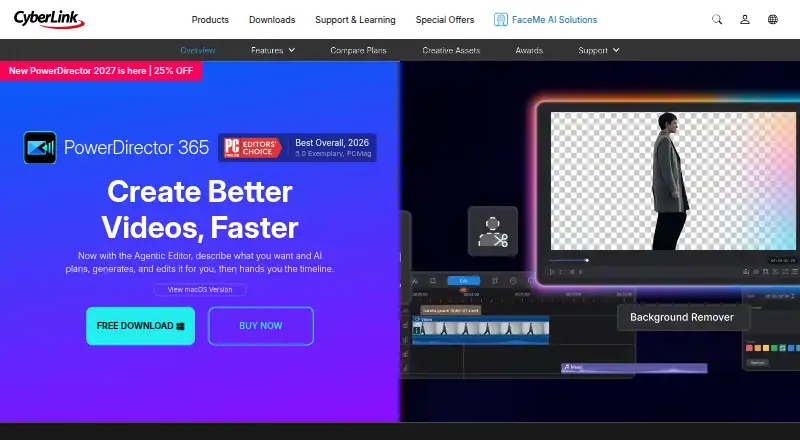
PowerDirector is CyberLink’s editor for Windows, macOS, Android and iOS, with AI assistance throughout the workflow. Its multi-track workspace combines generated footage, captions, narration, audio repair, effects and stock assets. The no-cost Essential edition is available, while subscriptions provide AI credits, online storage and broader content collections. Projects can be rendered at up to 4K and sent directly to major social services.
Review
In a line
PowerDirector is CyberLink’s video editor for desktop and mobile. Its creative effects, AI functions and stock media accompany conventional timeline controls.
What it does
Frame-accurate trimming, multiple video tracks, markers, snapping and ripple edits are supported, with keyframes for motion and effects. Multicamera synchronization, color matching and audio finishing are included.
The Agentic Editor responds to ordinary-language instructions, making or cleaning clips, adding effects and inserting the results into the timeline. AI Storytelling sorts footage, drafts narration and assembles an initial cut; Auto Edit works with as many as 100 clips, selects highlights, matches music and produces a first version.
Other tools transcribe footage, edit video from text, create captions, synthesize narration, reduce unwanted noise, remove objects or backgrounds, enhance footage and reframe projects. Video generation includes text-to-video, image-to-video, cinematic shorts and character motion transfer; AI Music Generator creates background tracks.
How it connects
PowerDirector runs on Windows, macOS, Android and iOS, with both desktop and mobile apps. Windows exports include MP4, MKV, WMV and MPEG-2, and can reach 4K resolution.
The built-in stock collection includes videos, photos and music from Getty Images and Meta Sound Collection. Direct uploads and platform-specific export settings cover YouTube, TikTok, Facebook and Vimeo. Webcam, screen and gaming-device feeds can also be streamed live to Twitch, YouTube and Facebook.
CyberLink’s PowerDirector materials do not identify a public API or SDK. The product is proprietary rather than open source. Subscription use depends on an internet connection and recurring billing, and access can be disabled after expiry.
Good fit
CyberLink describes PowerDirector as suitable for beginners and enthusiasts making videos quickly, as well as content creators producing social clips and YouTube videos.
It is a fit for projects needing multi-track control, stock assets, AI-assisted editing, captions, narration, audio cleanup or direct social publishing.
Watch for
The Essential edition remains available without a time limit, though advanced AI and some export selections are restricted. Paid memberships supply monthly AI credits, with additional credits sold separately.
The Windows edition requires 64-bit Windows 10 or 11. AI features need newer processors and Windows components such as AVX2. PowerDirector 2026 turns imported 10-bit HDR into 8-bit SDR; HDR editing arrives in PowerDirector 365 with its January 2026 release.
CyberLink offers tutorials, guides, updates, a Support Center and ticket tracking. Its license prohibits reverse engineering and reserves ownership of the software and documentation.
Pricing
PowerDirector Essential costs nothing and includes core editing plus basic AI features. No free trial is offered.
The separate macOS subscription, PowerDirector 365 for Mac, is $24.99 per month. PowerDirector 365 is $59.99 annually and provides 1,200 AI credits, 50GB of cloud storage, and expanded titles, transitions, effects and stock assets. Director Suite is $109.99 per year and adds PhotoDirector and AudioDirector, 3,000 AI credits and 100GB of cloud storage.
PowerDirector 2027 is a $139.99 one-time purchase with a perpetual license, 4K export and 25GB of cloud storage for one year.
Verdict
PowerDirector suits people seeking a single editor on desktop and mobile that combines conventional timeline work with AI-assisted creation. The no-cost edition has no time limit, while subscriptions bring credits, cloud capacity and expanded content libraries.
Check the Windows hardware requirements, HDR behavior and credit limits before paying. Mac buyers need the separate Mac plan, and anyone requiring an open-source editor or public API should look elsewhere.
Our take
PowerDirector is a broad option for people who want conventional editing controls alongside automated creation, captions, narration and cleanup. Its Windows, macOS, Android and iOS coverage helps households and creators work across devices. The free plan is useful for basic projects but limits advanced AI and some exports. Paid choices vary from a Mac subscription to yearly bundles and a perpetual Windows license. Review hardware needs, HDR conversion, internet requirements and AI-credit allowances before choosing a plan.
- Works on Windows, macOS, Android and iOS
- Free plan has no time limit
- Timeline editing includes multicam and keyframes
- The media library incorporates Getty Images and Meta Sound Collection
- YouTube, TikTok, Facebook and Vimeo receive direct publishing and tailored exports
- The free tier limits advanced AI tools and selected exports
- Windows AI functions call for newer CPUs and AVX2
- PowerDirector 2026 converts imported 10-bit HDR to 8-bit SDR
- Subscriptions require internet access and recurring payments
- No public PowerDirector API or SDK is identified
- Pick it ifBeginners and enthusiasts seeking quick video creation; Creators making social content and YouTube videos; Editors wanting AI tools plus detailed timeline control
- Skip it ifYou require open-source software or a public editing API; You depend on 10-bit HDR editing in PowerDirector 2026; You need subscription access without an internet connection
Pricing
Essential provides core editing and basic AI at no cost.
- PowerDirector EssentialCore editing tools and basic AI features; advanced AI tools and select export options restrictedFree
- PowerDirector 365 for MacUS$24.99/month · macOS subscription; separate from Windows subscription; free download available$24.99/mo
- PowerDirector 365$79.99 list price, shown as $59.99 sale ($5.00/month) · monthly updates · 1,200 AI credits (100/month) · 1,400+ titles · 650+ transitions · 3,300+ effects · millions of stock assets · 50GB cloud$59.99/yr
- PowerDirector 365 for MacUS$79.99/year · macOS subscription; separate from Windows subscription; free download available$79.99/yr
- Director Suite$149.99 list price, shown as $109.99 sale ($9.17/month) · PowerDirector, PhotoDirector and AudioDirector · 3,000 AI credits (250/month) · 100GB cloud$110/yr
- PowerDirector 2027perpetual license · 4K export · 280+ titles/motion graphics · 290+ transitions · 500+ effects/LUTs/stickers · 25GB cloud for 1 year$140 one-time
As cyberlink.com lists them, checked 9 Oct 2026.
Questions
Is PowerDirector free?
Yes. PowerDirector Essential has no time limit and costs nothing, although advanced AI tools and selected export options are restricted.
What devices run PowerDirector?
Desktop applications are available for Windows and macOS, with mobile applications for Android and iOS.
Can PowerDirector export 4K video?
Yes. On Windows, MP4, MKV, WMV and MPEG-2 exports can reach 4K. The PowerDirector 2027 license also lists 4K export.
Which services can PowerDirector publish to?
Direct publishing and export settings are available for YouTube, TikTok, Facebook and Vimeo. Live streaming supports Twitch, YouTube and Facebook.
Does PowerDirector have an API?
CyberLink’s PowerDirector pages do not identify a public API or SDK. The software is proprietary and not open source.
What happens to 10-bit HDR imports?
In PowerDirector 2026, imported 10-bit HDR becomes 8-bit SDR. PowerDirector 365 supports HDR editing from its January 2026 release.
How much cloud storage is included?
PowerDirector 365 includes 50GB, Director Suite includes 100GB, and PowerDirector 2027 includes 25GB for one year.