Wideo: Animated Video and Presentation Maker
wideo.co · checked 21 Oct 2026
Create animated videos and presentations in your browser with Wideo's AI features and API.
How it plugs in
Signal on Video Editing Software7.6#1 of 153
Wideo gives small and midsize businesses, marketers, and agencies an online workspace for animated marketing videos and presentations. It combines templates, scene animation, uploaded and stock media, text styling, AI-assisted scripts, voices, visuals, and avatars. Projects support horizontal, square, and vertical layouts, while paid tiers add export and sharing tools.
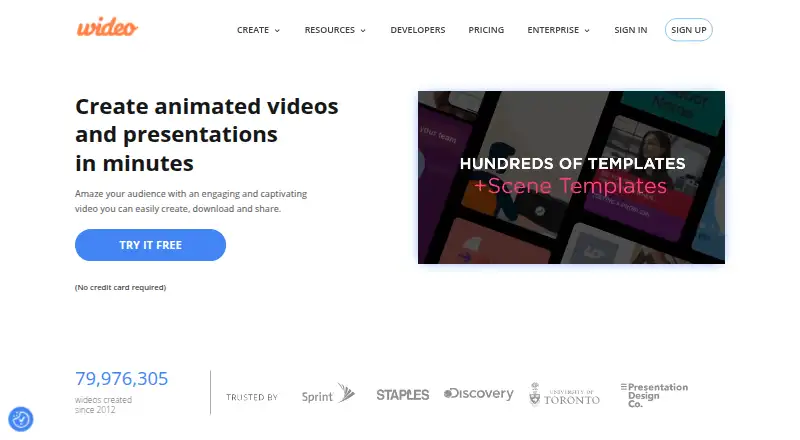
Review
In a line
Wideo provides a web editor for animated presentations and marketing videos. Because it operates in the browser, no software installation is needed.
What it does
Begin with an empty scene or adapt one of more than 100 templates. Animation controls cover intro and outro effects, keyframes, frame-level timing, and transitions between scenes.
Bring in images, logos, video files, stock footage, music, and voiceover audio. Text editing includes over 100 fonts and controls for brand colors. Social projects can use horizontal, square, or vertical canvases.
AI options cover script creation through OpenAI or Gemini, voiceovers in over 50 languages, generated imagery, avatars, and custom automations.
How it connects
Uploads can go to YouTube, Facebook, or HubSpot. Paid tiers add MP4 and GIF exports, URL sharing, embeds, presentation mode, and full-screen playback. Folders, shared folder links, duplication, and privacy controls help organize projects.
Through web requests, the public API substitutes template variables and renders videos, returning their URLs. Updated documentation describes batch jobs, status queries, webhooks, signed URLs, and x-api-key authentication. Animated Presentation Software
Wideo's code and content are proprietary. The Pro+ plan provides Zapier automation for up to 50 videos each month.
Good fit
Small and midsize businesses, marketers, and digital agencies can use Wideo to produce animated promotions or presentations without installing an app.
Templates, a media library, branding settings, and three canvas orientations support rapid social, marketing, and presentation projects. Teams seeking template-driven generation can also use the API. Explainer Video Software
Watch for
Some corporate users may find the template range narrow, while filmed-footage work has fewer professional effects and editing controls than a full video editor. Video Editing Software
As projects grow, performance can become laggy or choppy. Check the storage, duration, download, and automation allowances attached to your plan.
An internet browser is required. Wideo's privacy policy describes security measures but does not promise that disclosed information will be secure. Platform code and Wideo content stay proprietary, and user rights are limited and revocable.
Pricing
A free tier and a 7-day trial are available. The free tier adds Wideo branding, limits videos to one minute, includes 10 templates, and provides 50 MB of storage.
Basic is $19 per month with annual billing; it allows 10 downloads monthly, 1.5-minute videos, 33 templates, and 2 GB of storage. Pro is $39 per month on annual billing and offers unlimited downloads, 10-minute videos, the full template gallery, and unlimited storage.
The Pro+ tier is $79 monthly, offering unlimited downloads, 30-minute videos, three extra seats, premium support, and Zapier automation for 50 videos monthly. API Basic is $299 monthly for 500 generated-video credits; API Pro is $560 for 1,000; API Pro+ is $1064 for 2,000. Each credit represents 60 seconds.
Verdict
Wideo is worth considering for browser-based animated videos, ready-made scenes, AI assistance, social dimensions, or API rendering. Its free tier demonstrates the workflow, while paid plans expand duration, storage, downloads, and automation.
Consider another tool for detailed recorded-footage editing, extensive corporate templates, or offline work. Check plan limits and privacy terms before committing, particularly for large projects or automated generation.
Our take
Wideo works well for teams producing animated marketing videos and presentations online. The free tier is limited, while paid plans raise length, storage, download, seat, and automation allowances. It is a weaker match for intricate recorded-video editing, specialized corporate designs, or offline use, and larger projects should be tested for performance.
- Browser editor with no installation
- Over 100 templates plus extensive font and brand-color controls
- AI-assisted scripts, voices, visuals, and avatars
- Three canvas orientations for social publishing
- Public API supporting batch jobs and webhooks
- Free exports include Wideo branding
- Free videos are limited to one minute and 50 MB of storage
- Filmed-footage editing and professional effects are limited
- Corporate template coverage may feel narrow
- Large projects can become laggy or choppy
- Pick it ifSmall businesses and marketers creating animated promotions; Agencies producing videos from templates; Teams generating videos through an API
- Skip it ifYou need sophisticated editing for recorded footage; You require offline software or open-source code; You need a large selection of corporate templates and animation presets
Pricing
The free tier and 7-day trial offer an inexpensive entry, but free exports are branded and capped at one-minute videos. Editor subscriptions cost $19 to $79 monthly, with Basic and Pro billed annually. API subscriptions cost $299 to $1064 monthly and use credits based on generated-video seconds.
- Pro+Unlimited downloads · 30 minute video length · Unlimited storage · 3 additional seats · 50 automated videos per monthOn request
- FREEbranded videos · 1-minute videos · 10 video templates · 50 MB storageFree
- BASICUSD 228 billed annually · 10 downloads/month · 1.5-minute videos · 33 templates · 2 GB storage$19/mo
- PROUSD 468 billed annually · unlimited downloads · 10-minute videos · full template gallery · unlimited storage$39/mo
- PRO +USD 948 billed annually · unlimited downloads · 30-minute videos · 3 additional seats · Zapier Automation for 50 videos/month · premium support$79/mo
- API Basicmonthly · 500 generated-video credits/month · 1 credit equals 60 seconds$299/mo
- API Promonthly · 1,000 generated-video credits/month · 1 credit equals 60 seconds$560/mo
- API Pro+monthly · 2,000 generated-video credits/month · 1 credit equals 60 seconds$1,064/mo
As wideo.co lists them, checked 20 Sept 2026.
Questions
Is there a free Wideo tier?
Yes. It provides branded, one-minute videos, 10 templates, and 50 MB of storage; Wideo also has a 7-day trial.
Can Wideo make AI videos?
Yes. AI capabilities include scripts made with OpenAI or Gemini, voiceovers in more than 50 languages, generated visuals, avatars, and custom automations.
Does Wideo provide an API?
Yes. Template variables and web requests drive rendering, with documentation for batch jobs, status checks, webhooks, signed links, and x-api-key authentication.
Which video orientations does Wideo support?
Projects can use horizontal, square, or vertical layouts. Paid features include Full HD MP4 downloads, GIF export, embeds, and presentation playback.
Can teams collaborate in Wideo?
Folders, shared folder links, duplication, and privacy controls support collaboration. Pro+ includes three additional seats.
Can Wideo run without an internet connection?
No offline mode is listed. Wideo says it runs in internet browsers and needs no software download.
Is Wideo open source?
No. It is proprietary, and its terms grant users limited, revocable rights to use the platform.