
AI Photo Colorization Software
DeepAI Image Colorizer
deepai.org · checked 15 Oct 2026
Browser and API tool that adds color to black-and-white photos.
How it plugs in
Signal on AI Photo Colorization Software6.6#5 of 26
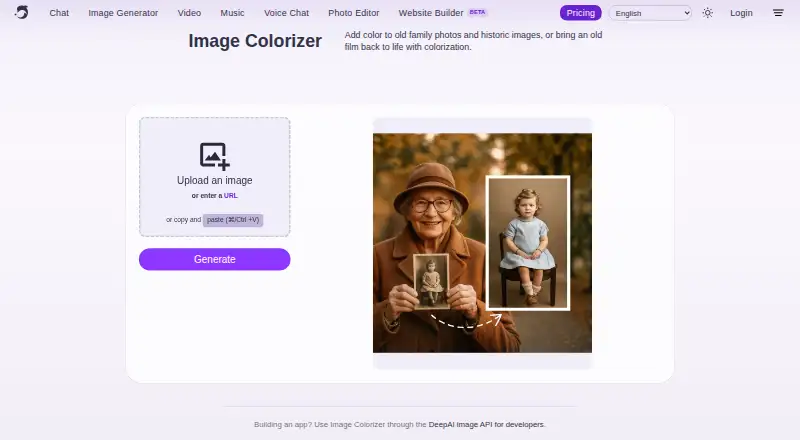
DeepAI Image Colorizer turns old family photos, historic images, and film scans into color images. You can submit a file, image URL, or pasted image in a browser. A REST API is available with a Pro subscription. A free option exists, while paid plans start at $9.99 per month.
Review
In a line
DeepAI Image Colorizer is a web-based tool for adding color to black-and-white photos and historic images. It is available through DeepAI's browser tools, Android and iOS apps, and an API.
What it does
Upload an image, provide its web address, or paste image data. The colorizer then creates a color version of the picture. It is aimed at old family photos, historic images, and old film.
How it connects
The web tool runs in a browser. DeepAI also offers a REST API, which is a web address that programs can call, for automatic color restoration. It uses an API key, plain HTTP, and JSON, so no special software package is required. Examples are provided for several programming languages. API access requires an active Pro subscription. Successful calls return a result link and job ID.
Good fit
This suits people restoring personal or historical black-and-white images without editing them by hand. It can also fit teams that need colorization inside another service through an API.
Watch for
The upload screen says files larger than 100MB are not accepted. Some images, especially faces, may come out distorted, so check results before sharing or publishing them.
Pricing
A free plan is available with limited HD images and editing, limited standard chat, limited music and photo-editor use, and 60 seconds of voice chat per day. DeepAI says its browser tools can be explored free without an account, although an account may be required for some services. There is no free trial.
DeepAI Pro monthly costs $9.99 a month, billed monthly and renewed until canceled. It includes 500 HD images per month, 60 Genius images, 10 Super Genius 2K images, 2,000 standard chats, 25 HD-video seconds, 100 songs, API access, and no ads.
Verdict
Choose it if you want a straightforward way to colorize old photos or need a documented API for automated jobs. The free option is useful for trying the service, but paid API use requires Pro. Check the file-size cap, possible face distortion, and privacy settings before uploading sensitive pictures. You retain rights to your input and output, and you can opt out of using personal information to train AI models.
Our take
DeepAI Image Colorizer is a reasonable pick for quick photo colorization in a browser, with mobile apps and a programmatic API for Pro subscribers. Its free plan lets you try limited use, while the $9.99 monthly plan adds larger allowances and removes ads. Results can be unreliable on faces, and uploads may be used to improve DeepAI's services unless you change the privacy choice. Check the 100MB file limit and data handling before committing.
- Browser, Android, iOS, and API access
- Upload a file, image URL, or pasted image data
- Free plan and free browser access without an account
- Commercial use of generated content is allowed
- API calls require an active Pro subscription
- Files over 100MB exceed the upload limit
- Some faces may be distorted in the colorized result
- Uploaded images may be used to improve services unless you opt out
- Pick it ifColorizing family and historic black-and-white photos; Teams adding photo colorization through an API
- Skip it ifYou need consistently accurate results on faces; You cannot allow uploaded images to be processed in the United States
Pricing
Free access is limited. Pro costs $9.99 monthly or $89.99 annually, with the same listed monthly allowances; API access is included. After allowances run out, extra images use a prepaid wallet: $0.01 per HD image, $0.08 per Genius image, or $0.25 per Super Genius 2K image.
- Freelimited HD images and editing · limited standard chat · limited music and photo editor · 60 seconds/day voice chatFree
- DeepAI Pro monthlymonthly; renews automatically until cancelled · 500 HD images/month · 60 Genius images · 10 Super Genius 2K images · 2,000 standard chats · 25 HD-video seconds · 100 songs · API access · ad-free$9.99/mo
- ProBilled monthly · cancel any time · 500 HD images, 60 Genius images, 10 Super Genius 2K images per month; API access; overages charged from prepaid wallet$9.99/mo
- DeepAI Pro annualannually upfront; renews annually · 500 HD images/month · 60 Genius images · 10 Super Genius 2K images · 2,000 standard chats · 25 HD-video seconds · 100 songs · API access · ad-free$89.99/yr
- ProBilled annually at $89.99 · 500 HD images, 60 Genius images, 10 Super Genius 2K images per month; API access; overages charged from prepaid wallet$89.99/yr
As deepai.org lists them, checked 15 Oct 2026.
Questions
Can I use DeepAI Image Colorizer for free?
Yes. DeepAI offers a free plan with limited image and editing use, and its browser tools can be explored free without an account. Some services may still require an account.
What inputs does the colorizer accept?
The web tool accepts an uploaded image, an image URL, or pasted image data. The API accepts a remote image URL or a local file.
Does it have an API?
Yes. The Colorizer API uses REST requests with an API key. It requires an active DeepAI Pro subscription and returns JSON with an output URL and job ID when successful.
How much does DeepAI Pro cost?
Pro is $9.99 per month when billed monthly or $89.99 per year when billed annually upfront. Both plans include API access and listed monthly image allowances.
Is there a file-size limit?
Yes. The upload interface reports that files over 100MB exceed its maximum size.
Can I use generated images commercially?
DeepAI's terms say users own generated content and may use it commercially or for other lawful purposes.
Are uploaded images used to train AI models?
DeepAI says it may use uploaded content to provide, maintain, develop, and improve its services, including training models. A Your Privacy Choices link lets you opt out of model-training use.
Near it
All alternatives →- I
 ImageColorizer#4 on this board
- CB
 Colorize by Photomyne#6 on this board
- PPPicWish Photo Colorizer#3 on this board
- P
 Palette#7 on this board
- CI
 Colorize Images#2 on this board
- CA
 Coloroid AI#8 on this board
- CPCutout.Pro#1 on this board
- HA
 Hotpot AI Photo Colorizer#9 on this board
- TTrueColorizer#10 on this board
- VP
 VanceAI Photo Colorizer#11 on this board