
Image Background Removal Software
Erase.bg: AI Background Removal, Features, and Pricing
erase.bg · checked 14 Oct 2026
AI background removal with bulk tools, editing, and an API.
How it plugs in
Signal on Image Background Removal Software7.9#1 of 28
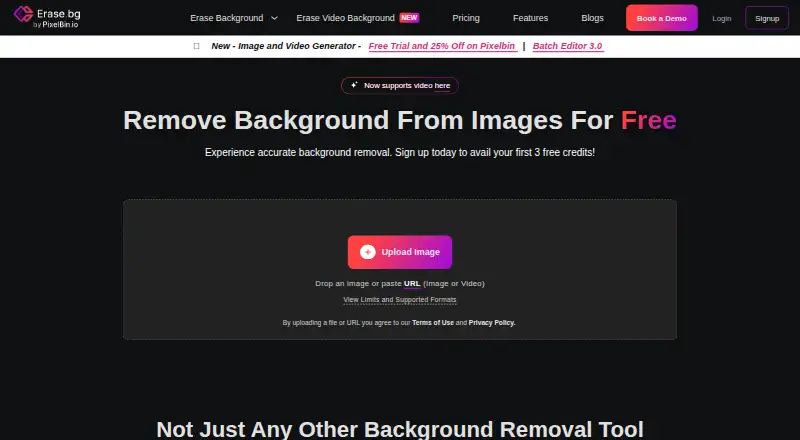
Erase.bg uses AI to separate subjects from their image backgrounds, then lets you place colors, patterns, or other images behind them. It supports common image formats, short videos, batch jobs, and files as large as 10,000 by 10,000 pixels. Access is available through web, Android, iOS, macOS, and Windows apps, with an API and Pixelbin SDKs for developers.
Review
In a line
Erase.bg is a background-removal service that uses AI to separate subjects from image backgrounds. It also offers editing, background replacement, and a passport-photo workflow.
What it does
Images in PNG, JPG, JPEG, WEBP, or HEIC format are supported, as are MP4, MOV, and WEBM videos no longer than 30 seconds. After upload, the background is removed; the maker says a typical image takes roughly three to five seconds to process.
Once the subject is isolated, the editor lets you place a solid color, pattern, or image behind it. Aspect-ratio resizing and PNG or JPG downloads are available, and batches can be processed together.
How it connects
You can use Erase.bg through web, Android, iOS, macOS, and Windows. Its single-call background-removal API has examples for React, JavaScript, Python, Node.js, Kotlin, Go, C#, and PHP.
Pixelbin SDKs wrap its hosted APIs for uploads, transformations, optimization, and delivery. A public Python SDK is MIT licensed. The documentation describes hosted APIs and CDN links, not self-hosting.
The service is not open source. Each background removal uses one credit; new API users receive three free credits that reset daily.
Good fit
Erase.bg suits individuals, agencies, online stores, developers, and enterprise teams that need quick cutouts or repeated processing. Bulk tools help with batches, while the API supports adding removal to an app or workflow.
For related tools, see Image Background Removal Software and AI Background Removers.
Watch for
Uploads cannot exceed 10,000 × 10,000 pixels for images or 30 seconds for video, so verify both size and format first.
The privacy policy says images may be collected, stored anonymously, and processed in other countries. Erase.bg lists firewalls and transport-layer security, and users can request data deletion or amendment by email.
A trial period is not offered. API work requires Pixelbin account tokens, and the available documentation does not describe self-hosting.
Pricing
The free Starter Plan provides 3 credits and 3 HD downloads; no separate trial is available.
Credit bundles are sold as one-time purchases: $6 for 10, $12 for 100, or $50 for 1,000. These credits remain valid for one year and cannot be refunded.
Enterprise pricing is by request with a personalized quote and custom solution. Pro includes 24/7 chat and email support.
Verdict
Choose Erase.bg if you need automatic cutouts across several devices, batch work, background edits, or an API. Its broad file support and high output limit cover many ordinary product and portrait jobs.
Look elsewhere if you require open-source software, self-hosting, a free trial, or prices beyond the listed credit packs.
Our take
Erase.bg works well for background removal when you want browser and mobile access rather than a desktop-only installation. It brings together batch processing, short-video handling, background replacement, and developer access. A small free Starter allowance is available, followed by one-time paid credits that expire after a year. Before using it with sensitive images, review its cross-border processing and anonymous-storage terms. Teams seeking self-hosting, open-source code, or a trial period should consider another service.
- Supports images, short videos, and bulk processing
- Maximum output dimensions reach 10,000 × 10,000 pixels
- API examples cover eight programming languages
- The free Starter Plan provides 3 credits and 3 HD downloads
- Available on web, Android, iOS, macOS, and Windows
- No free trial
- Not open source and no self-hosting option is documented
- Paid credits are non-refundable and expire after one year
- Images may be processed in other countries
- Video uploads are limited to 30 seconds
- Pick it ifOnline stores and agencies processing many product images; Developers adding background removal through an API; Individuals making cutouts or passport photos
- Skip it ifYou need self-hosted or open-source background removal; You require a free trial or refundable credits; Your videos exceed 30 seconds
Pricing
Start free with 3 credits and 3 HD downloads. One-time packs are $6 for 10 credits, $12 for 100, or $50 for 1,000; credits last one year and are non-refundable. Enterprise plans require a quote.
- Starter Plan3 free credits · 3 free HD downloadsFree
- One-time payment — 10 credits10 creditsOn request
- One-time payment — 100 credits100 creditsOn request
- One-time payment — 1000 credits1000 creditsOn request
- One-time credits — 10 credits$6.00 billed once · 10 credits · $0.60/credit · credits valid for 1 year · non-refundable$6 one-time
- 10 Creditsbilled once · 10 credits · credits valid 1 year · non-refundable$6 one-time
- One-time credits — 100 credits$12.00 billed once · 100 credits · $0.12/credit · credits valid for 1 year · non-refundable$12 one-time
- 100 Creditsbilled once · 100 credits · credits valid 1 year · non-refundable$12 one-time
As erase.bg lists them, checked 14 Oct 2026.
Questions
Which file types and sizes are supported?
PNG, JPG, JPEG, WEBP, and HEIC images up to 10,000 × 10,000 pixels are accepted. Video uploads may be MP4, MOV, or WEBM and can run for up to 30 seconds.
Does Erase.bg have a free plan?
Yes. The Starter Plan costs nothing and provides 3 credits plus 3 HD downloads. A separate free trial is not offered.
Can I process several images at once?
Yes. Erase.bg describes bulk background removal for handling multiple images in a single batch.
Does Erase.bg offer an API?
Yes. A single API call can remove a background, using Pixelbin account tokens. Integration examples are provided for React, JavaScript, Python, Node.js, Kotlin, Go, C#, and PHP.
Is Erase.bg open source or self-hosted?
Erase.bg is not open source. Its documentation covers hosted Pixelbin APIs and CDN links, and does not provide a self-hosting option.
How much do paid credits cost?
The one-time options are $6 for 10 credits, $12 for 100, and $50 for 1,000. Credits last one year and are non-refundable.
How does Erase.bg handle images?
Its policy says images may be collected, stored anonymously, and processed in countries other than the one where you use the service. You can email [email protected] to request deletion.