Kilo Code: Features, Integrations, and Pricing
kilo.ai · checked 28 Sept 2026
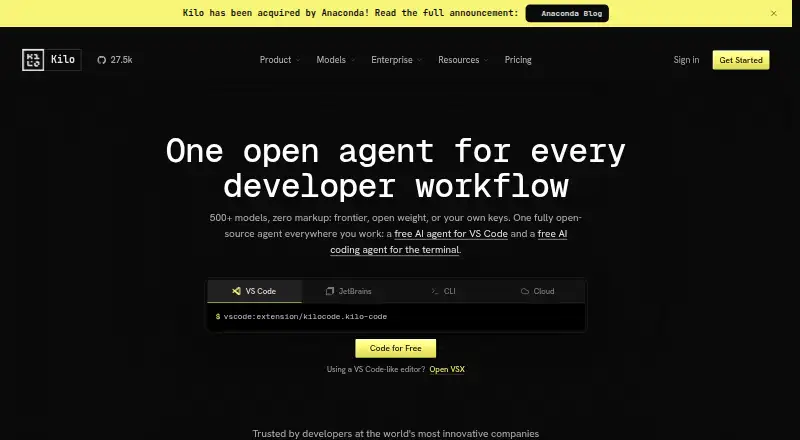
An open-source AI coding helper, Kilo Code spans IDEs, terminals, cloud agents, and mobile devices.
How it plugs in
Signal on AI Coding Assistants6.9#18 of 103
Kilo Code can generate, refactor, and debug code, assist with reviews, and deploy applications. It works as an extension for VS Code and JetBrains editors, a terminal tool, or through cloud agents. Users can choose from more than 500 AI models across more than 60 providers, including free and local options. The software is free to access, while AI usage and cloud compute may cost extra.
Review
In a line
Kilo Code brings open-source AI coding assistance to IDEs, terminals, cloud agents, and mobile devices. Its features span code completion, chat, and coding agents.
What it does
Kilo can write, revise, and troubleshoot code, automate reviews, and assist with deployment. Its agent modes include Code, Architect, Debug, Custom, and Auto.
Cloud Agents operate remotely, can create repository branches, and may commit and push changes. Through Kilo for Slack, users can ask repository questions, request code changes, create branches, and open pull requests.
How it connects
Use Kilo through VS Code or JetBrains extensions, its CLI, or cloud agents. Listed editor surfaces include IntelliJ IDEA, PyCharm, and WebStorm. It also lists Slack, Code Reviewer, and integrations with GitHub, GitLab, DoltHub, and Bitbucket Cloud for organizations.
Its source code uses the MIT license, so people can inspect, change, fork, or host it themselves. Kilo offers over 500 models from more than 60 providers, including local models and bring-your-own-key options. AI coding assistants
good-fit
Kilo may suit people who want AI coding help inside VS Code or JetBrains, or who prefer a terminal or remote agent. Its team plan adds shared agent modes, usage analytics, centralized billing, and team management.
Organizations can evaluate Enterprise features during a 14-day trial. Enterprise includes security and privacy controls, audit logs, single sign-on, and support commitments.
Watch for
Platform access, AI inference, and cloud compute have separate charges; cloud compute is usage-based. Check which models and provider charges you plan to use before estimating the total cost.
Slack use requires both a paid Slack plan and available Kilo credits. Enterprise security features and priority or dedicated support depend on the plan.
Pricing
The Free plan costs nothing for access to the open-source extensions and assistant; usage is billed separately. Auto Free works without hosted credits and can select free models when available, or use personal provider keys or local models.
Teams costs $15 a user a month. Enterprise pricing is available on request. Kilo Gateway passes through provider rates for hosted AI inference without markup; cloud compute is charged by the second, with no rounding up or minimum usage charge.
Kilo Pass subscriptions start at $19 a month. Monthly AI credits are included in Starter, Pro, and Expert, priced at $19, $49, and $199 respectively, with up to 50% in bonus credits.
Verdict
Consider Kilo Code if you want open-source coding assistance available in VS Code, JetBrains, the terminal, or via cloud agents. Its free access, local-model support, and choice of providers offer different ways to manage AI costs. Teams should compare the $15-per-user plan with their needs for shared billing and support. Verify provider charges separately, and remember that Slack use requires both a paid Slack plan and Kilo credits.
Our take
Kilo Code is a reasonable option for people who want an AI coding assistant in VS Code or JetBrains, with command-line and remote-agent choices too. Free access, personal provider keys, or local models can let buyers use it without needing hosted credits. Team buyers should weigh the added management and support features against the per-user fee. Before choosing, account for AI inference and cloud compute as separate costs, and check Slack requirements if that integration matters.
- MIT-licensed source can be self-hosted.
- Available through VS Code and JetBrains extensions, CLI, and cloud agents.
- Access spans 500+ models from more than 60 providers.
- Free options include free-model routing, BYOK, and local models.
- Teams plan adds shared agent modes and centralized billing.
- AI inference and cloud compute are charged separately from platform access.
- Kilo for Slack requires a paid Slack plan and available Kilo credits.
- Enterprise price is available only on request.
- Pick it ifPeople who want AI coding help in VS Code, JetBrains, or a terminal; Teams looking for shared agent modes and centralized billing
- Skip it ifYou need one bundled price for the platform, AI usage, and cloud compute; Slack access without a paid Slack plan or Kilo credits is essential
Pricing
The core Free plan has separately billed usage. Teams costs $15 a user a month; Enterprise pricing is on request. Kilo Gateway uses exact provider rates for hosted inference, without markup.
- FreeUsage is billed separately · Open-source VS Code, JetBrains, and CLI extensions · Agentic coding assistant · Code completion and generation · Works with any AI modelFree
- Teams$15/user/month · Usage analytics · Shared agent modes · Centralized billing · Shared BYOK · Priority support$15/mo
- EnterpriseCustom · SSO, OIDC & SCIM · Audit logs · Model/provider limits · SLA commitments · Dedicated supportOn request
- Auto FreeNo hosted credit required · Free-model routing where available · Bring your own provider keys · Local models with Ollama or LM StudioFree
- Kilo Gateway$0 /mo + usage · Pay-as-you-go hosted inference · 500+ models across 60+ providers · No markup on provider ratesFree
- Kilo Pass StarterPay monthly, cancel anytime · Monthly AI credit subscription · Up to $26.60 per month in credits · Up to 50% bonus credits$19/mo
- Kilo Pass ProPay monthly, cancel anytime · Monthly AI credit subscription · Up to $68.60 per month in credits · Up to 50% bonus credits$49/mo
- Kilo Pass ExpertPay monthly, cancel anytime · Monthly AI credit subscription · Up to $278.60 per month in credits · Up to 50% bonus credits$199/mo
As kilo.ai lists them, checked 20 Sept 2026.
Questions
Does Kilo Code have a free plan?
Yes. The Free plan includes the extensions and coding assistant; usage is charged separately. Auto Free needs no hosted credit and can route to free models where available, or use provider keys or local models.
How much does Kilo Code cost for teams?
Teams costs $15 a user a month. Enterprise pricing is available on request.
Which editors does Kilo Code support?
VS Code and JetBrains extensions are available, including for IntelliJ IDEA, PyCharm, and WebStorm. Kilo is also offered through a CLI and cloud agents.
Which AI models can it use?
The selection includes 500+ models from more than 60 providers, with free, local, and bring-your-own-key options.
Does Kilo Code work with Slack?
With Kilo for Slack, users can ask repository questions, implement changes, create branches, and open pull requests. A paid Slack plan and available Kilo credits are required.
Is Kilo Code open source?
Yes. The MIT-licensed source is available to inspect, modify, fork, or self-host.
Is there a trial?
The 14-day trial gives users an opportunity to evaluate Enterprise features.