Livestorm for Webinars and Virtual Events
livestorm.co · checked 28 Sept 2026
Livestorm brings webinars, virtual gatherings, and online meetings to the browser.
How it plugs in
Signal on Webinar Software6.3#9 of 62
Teams can use Livestorm to arrange and host webinars, online meetings, and virtual events in a browser. It offers live, automated, and on-demand formats, alongside registration pages, recordings, polls, and Q&A. It connects with marketing tools such as HubSpot and Salesforce and offers an API for linking other systems. A free option is available, while paid subscriptions require annual billing.
Review
In a line
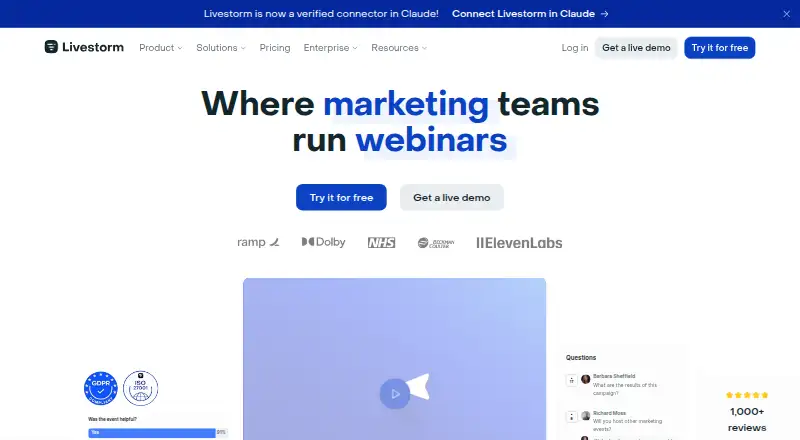
Livestorm provides browser-based tools for webinars, online meetings, and virtual events. Participants can join without downloading software.
What it does
Teams can use Livestorm to organize events, invite people, engage attendees, and review event activity. Its formats include live, automated, and on-demand webinars, with recordings, polls, and Q&A available.
Event pages, rooms, emails, logos, colors, and backgrounds can be customized. Livestorm also offers restreaming, AI transcription, and live translations.
How it connects
Marketing integrations include HubSpot, Salesforce, Marketo, Pardot, Zapier, and other tools. The API and webhooks let teams connect events to internal systems and third-party applications.
With its MCP connection, Claude, ChatGPT, and AI agents can create events, register attendees, and analyze engagement through plain-language requests. People can also dial into an event by phone when they lack internet access.
Good fit
Livestorm presents product demos, customer training, online conferences, summits, and company communications as possible uses. Paid plans include unlimited team members and workspace roles for managing access.
Its event tools bring registration, invitations, audience interaction, and analysis together.
Watch for
The free plan has limited attendee credits and event lengths, and it does not include premium features. Once the attendee credit limit is reached, new attendees cannot join upcoming sessions.
Pro and Enterprise subscriptions require annual billing; monthly options are not offered. After cancellation, event data is permanently deleted in 15 days, and there is no refund after renewal.
Livestorm says it is GDPR compliant and ISO 27001 certified. It says data is hosted in EU databases and backed up every 24 hours.
Pricing
Free access comes with 30 attendee credits each year, a 30-minute event cap, 10 events per organization, 20 sessions per event, and 10 automated actions per event. It requires no credit card and has no premium features.
Pro is available from €1,000 annually for 400 attendee credits. Other listed Pro credit packages have different annual prices. Enterprise pricing is on request and includes custom credit packages and added governance options.
Verdict
Consider Livestorm if your team needs a browser-based way to run webinars and virtual events, and its annual billing and attendee-credit model fit your expected audience. Its free plan can help with small or limited events, while paid plans add more credits and team features.
Look elsewhere if you need monthly billing, or if the free plan's event limits do not suit your sessions.
Our take
Livestorm is worth considering for teams that run webinars, online meetings, or virtual events and want registration, audience interaction, and follow-up in one service. Browser access and marketing integrations may make it a practical fit for event programs. The free plan offers a way to start, but its short event limit and small annual credit allowance constrain its use. Before signing up for an annual subscription, teams should assess expected credit usage and renewal dates.
- Attendees can participate directly in a browser, with no software download.
- The service offers live, automated, and on-demand formats, and recordings.
- Includes polls and Q&A for audience participation.
- Marketing integrations include HubSpot, Salesforce, Marketo, Pardot, and Zapier.
- Paid subscriptions provide unlimited team members and workspace roles.
- Free events have a 30-minute maximum.
- Free access is capped at 30 attendee credits per year.
- Pro and Enterprise subscriptions are annual rather than monthly.
- New attendees cannot join upcoming sessions after credits run out.
- Event data is deleted 15 days after cancellation.
- Pick it ifTeams running webinars, demos, training, or virtual conferences.; Organizations connecting events to marketing tools.
- Skip it ifYou need a paid plan with monthly billing.; Your events exceed the free plan's time or attendee-credit limits.
Pricing
Free access comes with 30 attendee credits each year and strict event limits. Enterprise pricing is on request. Pro and Enterprise subscriptions are annual rather than monthly.
- Free30 attendee credits/year · 30-minute maximum event duration · 10 events/organization · 20 sessions/event · 10 automated actions/event · pre-recorded event · no premium features · no credit cardFree
- ProBilled annually · 400 attendee credits · Up to 4 hours per session · Unlimited events · Unlimited team members€1,000/yr
- Enterprisecustom attendee credit packages · centralized billing across teams and workspaces · advanced analytics and compliance controls · dedicated Customer Success Manager · SLAOn request
- Pro — 400 attendee creditsannual · 400 attendee credits/year · unlimited team members and events · standard integrations · email and chat support$1,200/yr
- Pro — 1,000 attendee creditsannual · 1,000 attendee credits/year · unlimited team members and events · standard integrations · email and chat support$2,900/yr
- Pro — 1,500 attendee creditsannual · 1,500 attendee credits/year · unlimited team members and events · standard integrations · email and chat support$4,125/yr
- Pro — 2,500 attendee creditsannual · 2,500 attendee credits/year · unlimited team members and events · standard integrations · email and chat support$6,500/yr
- Pro — 4,000 attendee creditsannual · 4,000 attendee credits/year · unlimited team members and events · standard integrations · email and chat support$9,600/yr
As support.livestorm.co lists them, checked 28 Sept 2026.
Questions
Can attendees join without installing an app?
Yes. Participants can join directly in a browser without a software download.
What kinds of events does Livestorm support?
It handles live, automated, and on-demand webinars, along with online meetings and virtual events.
What does the free plan include?
Free access provides 30 attendee credits a year, events of up to 30 minutes, 10 events per organization, 20 sessions per event, and 10 automated actions per event. No credit card is required.
Which apps does Livestorm connect to?
Connections include HubSpot, Salesforce, Marketo, Pardot, Zapier, and other marketing tools.
Can people join by phone?
Yes. Participants can dial into an event by phone when internet access is unavailable.
Are paid plans available month to month?
No. Pro and Enterprise subscriptions are billed annually, with no monthly option.
What happens to event data after cancellation?
Event data is permanently deleted 15 days after cancellation. There is no refund after renewal; canceling before renewal prevents another charge.