Mapbox Studio: Custom Map Design and Data Tools
mapbox.com · checked 15 Oct 2026
Design custom map styles, add your data, and publish hosted maps with Mapbox Studio.
How it plugs in
Signal on GIS Software6.6#3 of 64
A browser-based set of tools for custom map styling and location-data management, Mapbox Studio accepts Shapefiles, GeoJSON, and CSV files, turns them into visual layers, supports branded fonts and icons, and publishes styles for web, iOS, and Android apps. A free Studio plan and free trial are available, while some related usage is billed separately.
Review
In a line
Mapbox Studio brings together applications for custom map design and location-data management. It runs on the web and supports publishing styles for applications.
What it does
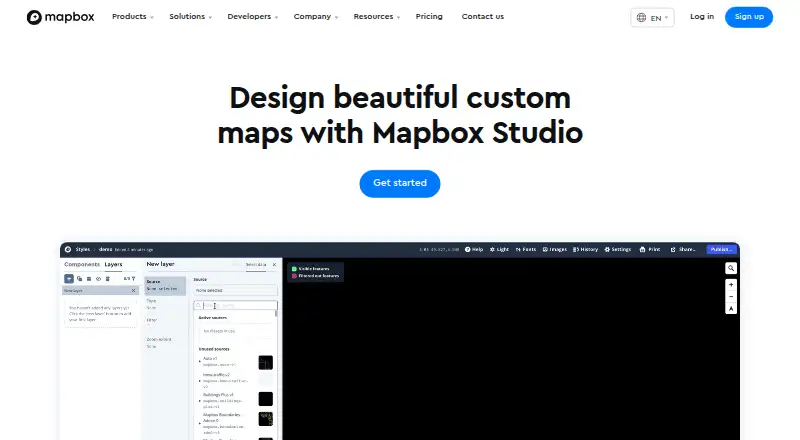
Curated controls cover map colors, typography, road width, point-of-interest density, sky styling, 3D buildings, and terrain. Basemaps can be 2D or 3D, including Mapbox Standard, with options for adding personal fonts, icons, and textures.
Data Workbench handles uploading, editing, previewing, and publishing custom geospatial data. Your point, line, and polygon data can become choropleths or scaled point maps.
How it connects
Shapefiles, GeoJSON, and CSV files can be imported and converted into vector tiles. After publication, styles are available through Mapbox APIs and JavaScript, iOS, and Android SDKs; stylesheet downloads and high-resolution print-image exports are also available.
The Styles API reads and changes styles, fonts, and images. Styles are hosted on Mapbox and published through Mapbox style URLs rather than a self-hosted setup. Studio is not generally open-source. It offers iframe embeds and private access controls.
Component styles support Maps SDK for Web v1.0+, iOS v5.0+, and Android 8.0+. The browser needs WebGL and a supported Safari, Chrome, Firefox, or Edge version.
Good fit
Studio suits teams that need branded maps, custom geographic layers, or maps inside web and mobile products. Its controls cover appearance, data visualization, and 3D map details without requiring you to build every map element yourself.
It is aimed at work in areas such as logistics, delivery, automotive, retail, travel, manufacturing, and enterprise software.
Watch for
Your own Style Components cannot be created, and ejecting components from a style is irreversible.
Data refresh is manual. Styles follow a Mapbox-hosted workflow, so check that this arrangement fits your deployment needs. Studio also requires WebGL in the browser.
Mapbox provides self-serve resources, account help, and technical assistance. The interface includes 100 free high-resolution image exports per account.
Pricing
Mapbox Studio has a free plan for all Mapbox users and a free trial. Related API use and custom tileset use can cost extra.
Mapbox GL JS includes up to 50,000 monthly map loads free, then costs $5 per 1,000 loads for 50,001 to 100,000. Mobile Maps SDKs include up to 25,000 monthly active users free, then cost $4 per 1,000 for 25,001 to 125,000.
The Static Images API includes up to 50,000 monthly requests free, then costs $1 per 1,000 for 50,001 to 500,000. Pay-as-you-go usage is invoiced monthly, with free tiers resetting each billing period.
Verdict
Choose Mapbox Studio if you need detailed control over map appearance, custom geographic data, and publishing to web or mobile apps. Its import formats, APIs, SDKs, and branding options cover a wide range of mapping projects.
Look elsewhere if you need self-hosting, automatic data refresh, or the ability to author and restore your own Style Components. Budget separately for API, map-load, mobile-user, image-request, and custom-tileset usage beyond the listed free allowances.
Our take
Mapbox Studio is a sensible choice for organizations building branded maps around their own geographic data. The free Studio access lowers the barrier to starting, while the browser editor, Data Workbench, SDKs, and Styles API support a full publishing workflow. Costs can rise when maps gain traffic or when related services are used, so usage estimates matter. It is a poor match for teams that require open-source software, self-hosted styles, automatic refreshes, or reusable custom Style Components.
- Free Studio plan and free trial
- Supports Shapefiles, GeoJSON, and CSV imports
- Detailed controls for colors, type, terrain, and 3D buildings
- Publishes through web, iOS, and Android SDKs
- Styles API can read and change styles
- Styles are hosted on Mapbox rather than self-hosted
- Manual data refresh
- Cannot author custom Style Components
- Ejecting components is irreversible
- Related API and tileset usage may cost extra
- Pick it ifTeams making branded maps with their own location data; Web and mobile apps needing published Mapbox styles; Projects that need 2D and 3D map styling
- Skip it ifYou need open-source or self-hosted map styles; Your data must refresh automatically; You need to create and restore custom Style Components
Pricing
Mapbox Studio itself is free, with a free trial. Map loads, mobile users, and static-image requests have listed free tiers; related API and custom tileset usage may be billed separately.
- Mapbox GL JS (Map Loads)Up to 50,000 monthly map loads free; then $5.00 per 1,000 loads for 50,001–100,000 · Each map load includes unlimited Vector Tiles and Raster Tiles API requests · sessions last up to 12 hoursFree
- Mapbox StudioAvailable to all Mapbox users · related API and custom tileset usage may be billed separatelyFree
- Maps SDKs for MobileUp to 25,000 monthly active users free; then $4.00 per 1,000 for 25,001–125,000 · Monthly-active-user billing · iOS and Android SDKs · higher-volume tiers reach $3.20 and $2.40 per 1,000Free
- Pay-as-you-goMonthly usage invoice; free tiers reset each billing period · Free tiers for most products · volume discounts as usage grows · annual-commitment discountsFree
- Static Images APIUp to 50,000 monthly requests free; then $1.00 per 1,000 for 50,001–500,000 · PNG images generated from Mapbox styles · higher-volume tiers reach $0.80 and $0.60 per 1,000Free
As mapbox.com lists them, checked 15 Oct 2026.
Questions
Is Mapbox Studio free?
Yes. The Mapbox Studio plan is free for all Mapbox users, and a free trial is available. Related API and custom tileset usage may be billed separately.
What files can I import?
Studio accepts Shapefiles, GeoJSON, and CSV files, converting imported data into vector tiles.
Can I use my own branding?
Yes. Studio supports adding personal fonts, icons, and textures while adjusting map colors and typography.
Where can I publish Studio styles?
Styles can be delivered through Mapbox APIs and JavaScript, iOS, or Android SDKs. A stylesheet can also be downloaded, and high-resolution images can be exported.
Does Mapbox Studio have an API?
Yes. The Styles API reads and changes styles, fonts, and images. Mapbox also documents APIs and SDKs for embedding maps.
Can I host styles myself?
The documented workflow keeps styles on Mapbox and publishes them through Mapbox style URLs, rather than offering a self-hosted setup.
What are Studio's main limitations?
Studio does not let users author their own Style Components, and ejecting components prevents their restoration. Data refresh is manual.