Mindsmith: AI eLearning Authoring Tool
mindsmith.ai · checked 15 Oct 2026
Browser-based AI authoring for interactive eLearning lessons and courses.
How it plugs in
Signal on Interactive Lesson Makers6.6#8 of 31
Mindsmith is a browser-based AI eLearning authoring platform. It turns documents, videos and other source material into interactive lessons, then lets authors share and track them. It supports imports, SCORM, LTI, API, embeds, exports and more than 70 languages. Plans range from free to enterprise pricing on request.
Review
In a line
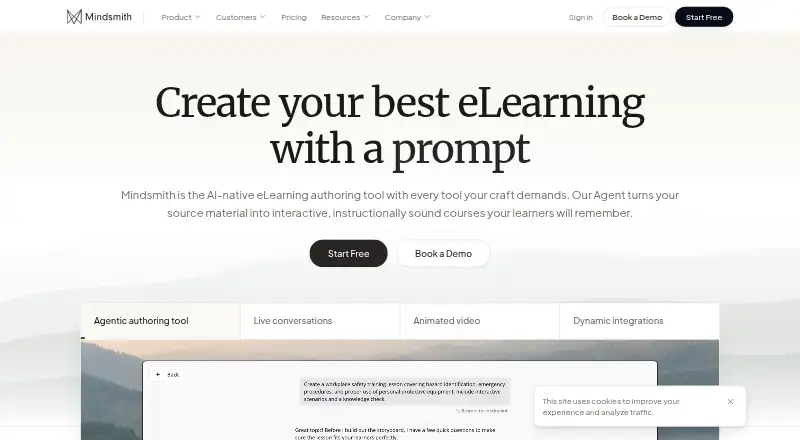
Mindsmith is a browser-based AI course authoring tool for creating interactive lessons and courses from supplied material. It needs no installation, plugins or desktop player.
What it does
Mindsmith Agent can draft or revise lessons from prompts, PDFs, Word files, PowerPoint files, text, videos and supported SCORM files. Existing video can be turned into a structured lesson.
A tile-based editor and built-in AI support interactive course creation without design skills. The library has more than 30 interactive elements, including quizzes, conversations, branching scenarios and simulations.
Authors can create and edit content in more than 70 languages. Mindsmith also reports completion rates, score details and answer distributions, with PDF export for results.
How it connects
Lessons can be delivered through links, QR codes, iframe embeds, PDF, website export, SCORM, xAPI, LTI 1.3 and an API. Dynamic and static SCORM packages are supported.
LTI 1.3 can launch lessons from Canvas, Blackboard, Moodle and other compatible learning systems, while sending scores to the gradebook. SCORM 1.2 and 2004 packages are documented.
The public API handles projects, folders, lesson reading, Markdown export, XLIFF translation exchange, copied lessons and webhook settings. It does not offer general headless lesson-generation or lesson-editing endpoints.
Regional remote MCP servers connect through OAuth to tools such as Copilot, Claude and ChatGPT for lesson creation, editing, management and analytics. The learner experience is described as WCAG 2.2 AA compliant, with keyboard, screen-reader, contrast and media support.
Good fit
Professional is aimed at individual creators and small teams. Business adds collaboration features for teams, while Enterprise is intended for large organizations.
Mindsmith suits people who need to turn existing material into interactive training, publish it in several formats, connect it to an LMS, and review learner results.
Watch for
The public API does not provide general-purpose endpoints for generating or editing lessons without the main platform. A built-in accessibility checker is still listed on the roadmap.
Free-plan sharing includes a badge. Check the AI-credit limits and collaboration features against your team’s needs before choosing a plan.
Pricing
Mindsmith has a free plan billed at $0/year when billed annually. It includes 450 one-time AI credits, unlimited content and sharing with a badge, link, embed and SCORM sharing, plus basic chat and email support.
Professional costs $39 a month, billed at $468/year annually. It includes 2,000 AI credits per author each month, text-to-speech, ElevenLabs, branding and theming, scenarios and engagement metrics.
Business costs $65 a month, billed at $780/year annually. It adds 5,000 AI credits per author each month, extra credits, live collaboration, version history and staging, PDF analytics export and priority support.
Enterprise pricing is on request. It includes unlimited AI generation, SAML/SSO, multiple workspaces, custom permissions, multilingual modules, an SLA and personalized priority support.
Verdict
Choose Mindsmith if you want browser-based course authoring with AI assistance, multiple publishing routes and LMS connections. It is a reasonable fit for solo authors, growing teams and larger organizations with different support and administration needs.
Look elsewhere if you require a general headless API for lesson generation or editing, or if a built-in accessibility checker is essential today. Professional and Business are billed annually; Enterprise pricing is on request.
Our take
Mindsmith fits organizations that need to transform existing files or video into interactive training without installing desktop software. Its publishing options cover links, embeds, SCORM, LTI, xAPI, PDF and web output, and its LMS connections include Canvas, Blackboard and Moodle. Teams should weigh the API’s scope and the absence of a built-in accessibility checker against their workflow. The free tier allows evaluation, while Professional and Business add author credits, collaboration and reporting; Enterprise requires a custom quote.
- Browser-based; no installation, plugins or desktop player
- Imports PDF, Word, PowerPoint, text and supported SCORM files
- Publishes through SCORM, LTI, xAPI, embeds, PDF and web export
- Creates content in more than 70 languages
- MCP connections support lesson work with Copilot, Claude and ChatGPT
- Public API lacks general headless lesson-generation and editing endpoints
- Built-in accessibility checker is still on the roadmap
- Free sharing includes a Mindsmith badge
- Professional and Business plans include monthly AI-credit allowances; Enterprise includes unlimited AI generation
- Pick it ifIndividual course creators and small teams; Teams needing LMS publishing and collaboration; Organizations turning source files or videos into training
- Skip it ifYou need a fully headless API for lesson creation and editing; You require a built-in accessibility checker now; You need pricing without an annual billing commitment
Pricing
A free annual plan is available. Professional is $39 a month ($468/year billed annually), and Business is $65 a month ($780/year billed annually). Enterprise pricing is on request.
- Free$0/year when billed annually · 450 one-time AI credits · unlimited content/sharing with badge · link/embed/SCORM sharing · basic chat/email supportFree
- Professional$468/year billed annually · 2,000 AI credits per author/month · text-to-speech · ElevenLabs · branding/theming · scenarios · engagement metrics$39/mo
- Business$780/year billed annually · 5,000 AI credits per author/month · extra credits · live collaboration · version history/staging · PDF analytics export · priority support$65/mo
- Enterpriseunlimited AI generation · SAML/SSO · multiple workspaces · custom permissions · multilingual modules · SLA · personalized priority supportOn request
As mindsmith.ai lists them, checked 15 Oct 2026.
Questions
Does Mindsmith require installation?
No. Mindsmith runs in a web browser and does not require software installation, plugins or a desktop player.
Which LMS platforms can launch Mindsmith lessons?
LTI 1.3 launches are documented for Canvas, Blackboard and Moodle, plus other LTI-compatible learning systems. Scores can sync to the gradebook.
Can Mindsmith import existing content?
Yes. It can import PDF, Word, PowerPoint, text and supported SCORM files, and can turn existing video into structured lessons.
What does the free plan include?
The Free plan costs $0/year when billed annually. It includes 450 one-time AI credits, unlimited content and sharing with a badge, link, embed and SCORM sharing, and basic chat and email support.
Does Mindsmith have a public API?
Yes. The API supports project and folder management, lesson reading, Markdown export, XLIFF translation exchange, copied lessons and webhook settings. General headless generation and editing are not provided.
How many languages does it support?
Authors can create and edit courses in more than 70 languages and share multilingual dynamic packages.
Does Mindsmith use customer data to train AI?
Its Trust Center states that no AI training happens from ingested data.