Miru: Open-Source Time Tracking and Invoicing
miru.so · checked 20 Oct 2026
A time-and-billing toolkit for hourly teams, with its source code available to run yourself.
How it plugs in
Signal on Time Billing Software7.7#1 of 31
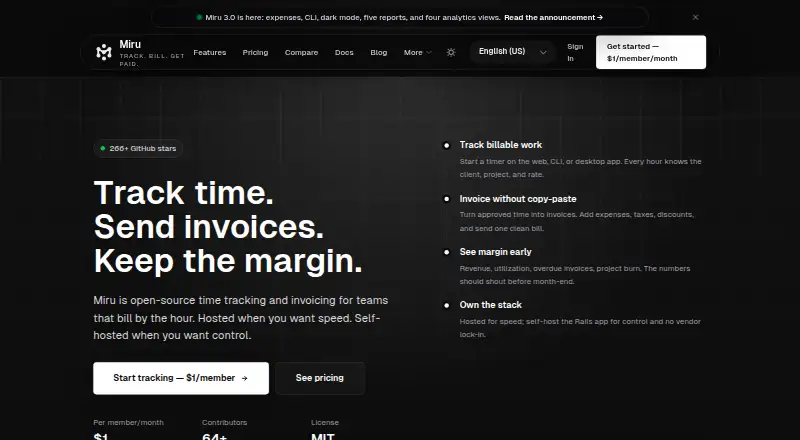
Miru brings billable time tracking, invoicing, expense handling, payments, and reporting into one service. It runs on the web, desktop, mobile, or a self-hosted server, with an open-source MIT-licensed Rails app. You can self-host at no cost; hosted membership starts at $1 per month.
Review
In a line
Miru is an open-source timer and billing tool built for teams charging by the hour. Its core combines time records, invoices, expenses, payment collection, and reporting.
What it does
Use a browser timer or enter time yourself; entries support billable flags and notes, weekly approval, and rates set per team member. Timesheets can be viewed by day, week, or month.
Invoices can be made from approved or tracked work. Miru handles expenses, receipts, taxes, discounts, invoice delivery, and client payments through Stripe Checkout. Customers can see invoice details and pay via a secure client-portal link without signing up for Miru.
Reports show paid, pending, overdue, and forecast revenue, as well as project and team activity. Expense workflows include approvals and categories, and project costs can be added to invoices.
How it connects
Listed connections include Stripe, Google Calendar, SMTP email, Zapier, Make, and n8n. CSV files can be imported, and CSV or PDF files exported; clients, invoices, and recorded payments can also be sent to QuickBooks Online in a one-way sync.
The REST API relies on bearer-token authentication for operations on time entries, invoices, clients, projects, expenses, and payments. A command-line tool works with those records and imports Harvest CSV files. Miru also publishes MCP and OpenAPI descriptions for integration workflows.
The MIT-licensed source is available to self-host. Desktop timer apps for macOS, Linux, and Windows synchronize with Miru Web. The iOS and Android apps remain beta, distributed through TestFlight and Google Play internal testing.
Good fit
Miru is designed for agencies, consultants, freelancers, startups, and service teams that log billable hours and invoice clients. It can serve teams wanting timers, member rates, approvals, expenses, client payments, and revenue views in a single system.
Its desktop timer is local-first, with menu-bar controls, timer stacking, idle recovery, and syncing. Teams can operate the Rails app themselves; hosted customers get managed service and priority email support.
Watch for
Recurring invoices and calendar connections are roadmap items, not shipped capabilities. The mobile applications are also still in beta.
Miru does not target enterprises that need SSO, SAML, or numerous detailed role levels. Self-hosting leaves operations, backups, upgrades, and security upkeep to you.
For hosted data, Miru describes encryption in transit and at rest, using TLS 1.3 and AES-256. It says its SOC 2 Type II work is in progress and that it is GDPR compliant; an enterprise data-processing addendum is available on request.
Pricing
The self-hosted edition costs nothing and includes all features, unlimited members, Docker deployment, and community help through Discord.
Miru Cloud is priced at $1 per member each month. The plan covers time tracking, invoicing with Stripe payments, expenses, client and team management, leave, reports, API and CLI access, invoice branding, and priority email support. The yearly billing choice is $10 per member for the year and includes the same features.
Managed Miru is $1000 monthly, plus usage. It provides a dedicated deployment, upgrades, backups, monitoring, integration assistance, security-review support, and SLA options. A free trial is offered.
Verdict
Consider Miru when you bill by the hour and want source-code access, self-hosting, or a low-cost hosted option. The mix of approvals, expenses, invoices, Stripe collection, and client access supports the path from recorded work to payment.
It may not suit you if recurring billing, mature calendar connections, enterprise login controls, or highly granular permissions are must-haves. Mobile users should be comfortable with beta software. For comparisons with other time and billing tools, see Time Billing Software, Avaza, or Invoice Ninja.
Our take
Miru is a workable option for small service businesses that need billable timers and invoicing while retaining the choice to run the software themselves. The open-source edition includes the hosted feature set; cloud plans add managed delivery and support. Its main gaps are recurring billing, finished mobile apps, and enterprise identity controls. Teams that need those capabilities should compare alternatives such as Paymo or solidtime before deciding.
- MIT-licensed source and a free self-hosted edition
- Timer and manual entry options, approvals, and member-specific rates
- Invoices support expenses, taxes, discounts, and Stripe payments
- REST API, CLI, CSV/PDF exchange, and QuickBooks Online export
- Desktop timers synchronize with Miru Web
- Recurring invoices have not shipped
- Calendar connections remain on the roadmap
- iOS and Android apps are in beta
- Not targeted at SSO, SAML, or many granular role levels
- Self-hosting requires you to handle backups, upgrades, and security upkeep
- Pick it ifAgencies and consultants billing clients hourly; Teams seeking open-source or self-hosted billing software; Service businesses combining time, expenses, invoices, and payment collection
- Skip it ifYou need recurring invoices or mature calendar connections; Your organization requires SSO, SAML, or detailed role controls; You prefer not to maintain a self-hosted installation
Pricing
Self-hosting is free. Miru Cloud is $1 per member monthly or $10 per member yearly. Managed Miru is $1000 per month plus usage. A free trial is available.
- Self-hosted$0 · all features · unlimited members · Docker deployment · community Discord supportFree
- Miru Cloud$1/member/mo · time tracking · invoicing and Stripe payments · expenses and client management · team management and leave · advanced reports and analytics · API and CLI · custom invoice branding · priority email support$1/mo
- Miru Cloud Annual$10/member/year · same features as Miru Cloud$10/yr
- Managed Miru$1K/month plus usage · dedicated deployment · upgrades, backups and monitoring · integration help · security review support · SLA options$1,000/mo
As miru.so lists them, checked 20 Oct 2026.
Questions
Does Miru have a free plan?
Yes. The self-hosted edition is free, includes all features and unlimited members, and supports Docker deployment. Community help is available through Discord.
How much does Miru Cloud cost?
Monthly billing is $1 per member; yearly billing is $10 per member for the year, with the same features.
Can clients pay Miru invoices?
Yes. Stripe Checkout processes payments, and customers can view invoice information and pay through secure client-portal links without a Miru account.
Does Miru integrate with QuickBooks?
Yes. Clients, invoices, and recorded payments can be exported to QuickBooks Online through a one-way sync.
What platforms does Miru support?
Miru supports web, Android, iOS, Linux, macOS, Windows, and self-hosted setups. Desktop timers are available for macOS Apple Silicon and Intel, Linux x64, and Windows x64.
Does Miru offer an API?
Yes. Its bearer-token REST API supports time entries, invoices, clients, projects, expenses, and payments. A CLI is also available.
Are recurring invoices available?
No. They appear on the roadmap rather than among the shipped features.