Morphic: AI tools for video, images, and sound
morphic.com · checked 28 Sept 2026
Make and edit video, images, and sound with Morphic’s browser-based AI tools.
How it plugs in
Signal on AI Sound Effect Generators6.3#5 of 29
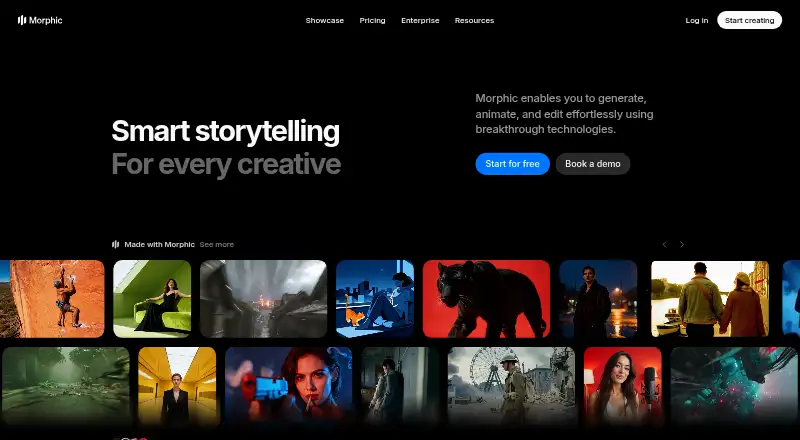
Morphic works in a browser, with tools to generate, animate, edit, and add sound to creative work. It offers text-to-video, image-to-video, and AI avatars; videos can be up to 0.5 minutes long and 4K resolution. A free plan is available, alongside paid subscriptions and credit packs. Credit consumption depends on the operation.
Review
In a line
Morphic brings AI-assisted creation and editing for video, images, and sound into a browser. Its tools include text- and image-based video generation as well as AI avatars.
What it does
Users can generate and animate creative work, add sound, and make edits by selecting objects, separating parts of an image, enlarging images, or describing a change in a prompt.
Morphic lets users reuse characters and styles between scenes to maintain a coherent look and tone. Ready-made workflows cover video, images, effects, and other creative production. Videos may be up to 0.5 minutes long, at resolutions up to 4K.
How it connects
Morphic is accessed on the web, without downloading or installing software. Its site lists video, image, and audio models from multiple providers.
Teams can invite members, collaborate, exchange ideas, and align across workspaces. Help is available through a help center, Discord, X, Instagram, and contact options. Paid plans list email support, creative advisory, and private workshops.
Good fit
Morphic may suit people looking to create or edit short videos and images, add sound, and carry characters or styles across scenes using a browser-based platform.
Some plans include shared credits and options for additional seats, while others are limited to one user. Commercial use is listed as allowed.
Watch for
Credit consumption depends on the operation, so a balance does not correspond to a set number of projects. The free tier provides up to 20 credits for one user and limits access to models and workflows.
Review seat allowances when comparing plans: several are restricted to one user, while some let you add users for an extra cost. Credit packs are valid for 180 days.
Pricing
Free includes up to 20 credits for one user, with limited models and workflows. Education costs $4 a month and requires a valid school email address. Basic is $19 a month and Standard is $24 a month.
Pro costs $45 a month and Pro Max is $170 a month; Enterprise pricing is available on request. Credit packs are offered as Growth for $25, Pro for $100 one time, Plus for $250 a month, and Ultra for $500 a month. Packs are valid for 180 days.
Verdict
Morphic is worth considering for browser-based creation and editing of video, images, and sound, provided its credit system fits your workflow. Reusable characters and styles, along with prepared workflows, can support consistency across related work.
Compare the included credits and seat rules with your expected use before paying. Credit consumption differs by operation, and packs are valid for 180 days.
Our take
Morphic may work for people looking to create and edit short videos, images, and sound in a browser, with tools for guided edits and recurring characters or styles. You can start free, while paid options range from an education plan to shared-credit tiers and custom enterprise pricing. Consider how your workflow uses credits, since consumption varies by operation and packs are valid for 180 days. Check seat allowances if several people need access.
- Browser access with no software download or installation
- Text-to-video, image-to-video, and AI avatar tools
- Reuse characters and styles across scenes
- Commercial use is listed as allowed
- Ready-made workflows for video, images, effects, and creative production
- Free access is limited to 20 credits, one user, and selected models and workflows
- Credit consumption varies by operation
- Credit packs are valid for 180 days
- Some plans allow only one user
- Pick it ifCreators working on video, image, or sound projects in a browser; Teams looking for workspace collaboration and shared-credit options
- Skip it ifYou need to predict a fixed number of projects from a credit balance; You need multiple users on a single-user plan
Pricing
Plans differ in credits and seat allowances. Credit packs are an additional purchase, are valid for 180 days, and usage depends on the operation.
- Freeforever free · 20 credits · 1 userFree
- EducationRequires a valid school email address · 610 monthly credits$4/mo
- Basicbilled monthly · 1,100 monthly credits · 1 user$19/mo
- Standardbilled monthly · 3,625 monthly credits · 1 user$24/mo
- Probilled monthly · 6,350 shared monthly credits · 1 user · Up to 4 additional users at extra cost$45/mo
- Pro Maxbilled monthly · 24,650 shared monthly credits · 1 user · Up to 9 additional users at extra cost$170/mo
- EnterpriseHigh-volume credits · Custom seat limits · All models · WorkflowsOn request
- Growth credit packValid for 180 days · 2,500 credits$25/mo
As morphic.com lists them, checked 28 Sept 2026.
Questions
Is there a free plan?
Yes. Free provides up to 20 credits for one user, with limited models and workflows.
What are Morphic's plan prices?
Plans include Free, Education at $4 a month with a valid school email, Basic at $19 a month, Standard at $24 a month, Pro at $45 a month, and Pro Max at $170 a month. Enterprise pricing is available on request.
What kinds of work can Morphic create?
It offers text-to-video, image-to-video, and AI avatar tools, along with image generation and editing and the ability to add sound to creative work.
What is the maximum video length?
Videos can be up to 0.5 minutes long, with resolution up to 4K.
Do credit packs expire?
Credit packs are valid for 180 days. Credit consumption varies by operation.
Can teams work together in Morphic?
Teams can invite members and collaborate across workspaces. Pro and Pro Max have shared credits and allow additional users at extra cost; seat allowances differ by plan.