
OmniFocus: Task Management for Apple and Web
omnigroup.com · checked 7 Oct 2026
Task management for professionals on Apple devices and the web.
How it plugs in
Signal on To-do list apps6.7#20 of 150
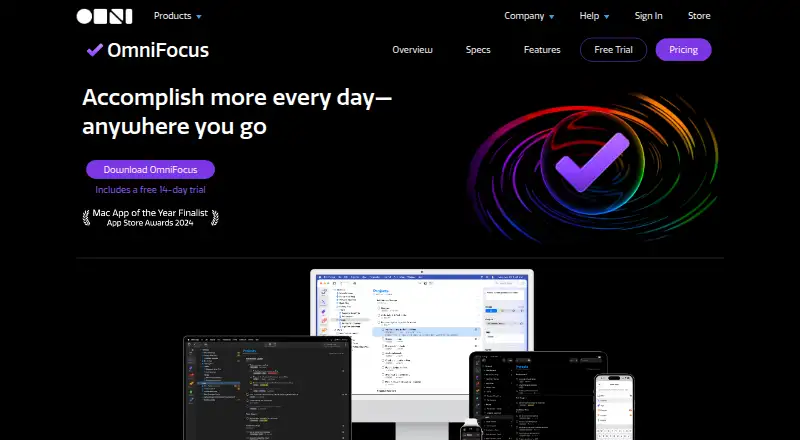
OmniFocus is a paid task manager designed for busy professionals. It captures actions in an Inbox, arranges them through projects, folders, tags and dates, and places tasks beside calendar events. macOS, iOS and web versions include reminders, recurring tasks, subtasks and calendar sync. Users can try it for 14 days, but no free tier exists.
Review
In a line
OmniFocus is task-management software aimed at busy professionals. It runs on macOS, iOS and the web.
What it does
From anywhere, Quick Entry records actions, which remain in the Inbox until you sort them. Actions can be arranged in projects or folders, given several tags, and assigned due or deferred dates.
Forecast puts actions and calendar events into a reorderable list. Calendar events are not available in Forecast on the Web version. Recurring tasks, reminders and subtasks are supported.
A Review feature prompts regular checks of projects and actions, with a way to mark projects reviewed. Custom Perspectives, which filter and group projects and tags, are available only with Pro.
How it connects
Supported Apple platforms expose Shortcuts actions, Siri AI in beta, widgets, Spotlight interaction, notifications and calendar integration. OmniFocus also supports cross-platform Omni Automation plug-ins and Mac-only AppleScript automation; Pro is required for Omni Automation.
Free syncing uses end-to-end encryption, and users may instead connect a personal WebDAV server. Omni’s Sync Server is required when OmniFocus for the Web is used with cross-device sync.
Omni says it does not share app or website data with social media or advertising services and does not use Google Analytics on its website.
Good fit
Busy professionals who want structured task capture, project planning and regular reviews across Apple devices and the web may find OmniFocus suitable.
It belongs among task management software and time management apps.
Watch for
There is no free plan. Pro is required for Custom Perspectives and Omni Automation. Forecast on the Web version also lacks calendar event integration.
Check operating-system requirements before purchasing. The download page lists OmniFocus 4.9.2 for macOS 15.2 and an older 4.8.13 release for macOS 14. Web use with cross-device sync depends on Omni’s Sync Server.
Perpetual Standard and Pro licenses include Mac, iPhone, iPad, Apple Watch and Apple Vision Pro, while the Web companion needs an existing OmniFocus setup using a version 3 or newer database format.
Pricing
OmniFocus has paid plans and offers a 14-day trial. Pricing information starts at $4.99 per month, and no free plan is available.
The listed v4 Standard and Pro licenses are $74.99 and $149.99 per month, respectively; each is a universal purchase for Mac, iPhone, iPad, Apple Watch and Apple Vision Pro. Standard includes all 4.x updates, while Pro includes Pro features.
The OmniFocus Subscription costs $99.99 per year and renews automatically unless canceled. It includes the latest Pro version for Mac, iPhone, iPad, Apple Watch, Apple Vision Pro and Web, subject to supported operating systems.
For perpetual-license owners, the OmniFocus for the Web Subscription is $49.99 annually, renews automatically unless canceled, and acts as a Web companion. One-time v4 licenses cost $74.99 for Standard or $149.99 for Pro; both include all 4.x updates, with Pro features in the Pro edition.
Verdict
OmniFocus is a choice for people seeking detailed capture, project structure, reviews and Apple-focused automation in a paid product.
A different to-do list app may be preferable if you require a free plan or depend on calendar events in Web Forecast. Buyers should also confirm that their devices meet the required operating-system versions and decide whether a subscription or one-time license fits their setup.
Our take
OmniFocus makes sense for professionals who want one structured place for tasks, projects and reviews across Apple hardware and a browser. Reminders, recurring work, calendar display and encrypted sync cover core planning needs, while Pro adds filtered views and automation. The trade-offs are the lack of a free plan, paid Pro features and a Web Forecast limitation. Check your operating-system versions, WebDAV or Sync Server preference, and whether you need the Web companion before choosing a license.
- Quick Entry sends actions to an Inbox so they can be sorted later.
- Projects and folders, together with tags and date fields, organize work.
- On supported versions, Forecast places tasks and calendar events together.
- Free encrypted synchronization is available, with WebDAV as an alternative.
- The software supports recurring tasks, reminders and subtasks.
- The offering has a 14-day trial but no free plan.
- Pro is required for Custom Perspectives and Omni Automation.
- Calendar events do not appear in Forecast on the Web.
- The Web’s cross-device synchronization depends on Omni’s Sync Server.
- Some licenses require recent operating-system versions.
- Pick it ifBusy professionals managing detailed projects; Apple users who want cross-device task capture; People who need recurring tasks and review prompts
- Skip it ifYou require a free plan instead of paid software.; You rely on calendar events inside Web Forecast.; Your devices cannot meet the listed system requirements.
Pricing
The paid offering includes a 14-day trial and has no free plan. Options shown include a $99.99 annual Pro subscription, a $49.99 annual Web companion, one-time licenses priced at $74.99 or $149.99, and monthly v4 licenses at $74.99 or $149.99.
- v4 Standard LicenseUniversal purchase for Mac, iPhone, iPad, Apple Watch, and Apple Vision Pro · Includes all 4.x updates$74.99/mo
- v4 Pro LicenseUniversal purchase for Mac, iPhone, iPad, Apple Watch, and Apple Vision Pro · Includes Pro features$150/mo
- OmniFocus for the Web SubscriptionAuto-renews until canceled · Web companion for perpetual license owners; requires existing OmniFocus setup and v3+ database format$4.99/mo
- OmniFocus SubscriptionAuto-renews until canceled · Latest Pro version; Mac, iPhone, iPad, Apple Watch, Apple Vision Pro, and Web; supported OS versions required$99.99/yr
- OmniFocus for the Web SubscriptionAuto-renews until canceled · Web companion for perpetual license owners; requires existing OmniFocus setup and v3+ database format$49.99/yr
- OmniFocus 4 Standard LicensePurchase once; includes all 4.x updates · Mac, iPhone, iPad, Apple Watch, Apple Vision Pro; requires macOS 15.2, iOS/iPadOS 18.2, or visionOS 2.2 or newer$74.99 one-time
- OmniFocus 4 Pro LicensePurchase once; includes all 4.x updates · Mac, iPhone, iPad, Apple Watch, Apple Vision Pro; Pro features; requires macOS 15.2, iOS/iPadOS 18.2, or visionOS 2.2 or newer$150 one-time
As omnigroup.com lists them, checked 21 Sept 2026.
Questions
Is a no-cost OmniFocus plan available?
No. OmniFocus requires payment, though a 14-day trial is available and there is no free tier.
Which devices can run OmniFocus?
OmniFocus runs on macOS, iOS and the web. Licenses also list iPhone, iPad, Apple Watch and Apple Vision Pro support where system requirements are met.
Can OmniFocus sync without Omni’s service?
Yes. Omni offers free end-to-end encrypted syncing, and a personal WebDAV server is another option. Omni’s Sync Server is needed for Web cross-device sync.
Does OmniFocus connect to calendars?
Supported Apple platforms include calendar integration. Forecast displays calendar events, but its Web version does not integrate those events.
Which features are included with OmniFocus Pro?
Pro is required for Custom Perspectives, which filter and group projects and tags, as well as Omni Automation plug-ins.
Is a plan limited to the Web available?
Yes. OmniFocus for the Web is $49.99 per year, renews automatically unless canceled, and needs an existing OmniFocus setup with a version 3 or newer database format.