
Planable: Social Media Planning, Collaboration and Pricing
planable.io · checked 15 Oct 2026
Planable is a social-media planning and collaboration platform with approvals, publishing, inbox tools and analytics.
How it plugs in
Signal on Social Media Management Tools7.1#5 of 145
Teams use Planable to develop, review, approve, schedule and measure social and marketing content. It supports nine social networks, four views, comments, approval steps, a unified inbox and optional analytics or listening add-ons. Plans range from a free 50-post limit to paid workspace plans, with a public API and integrations such as Canva, Slack and Zapier.
Review
In a line
Planable brings social-media and marketing-content planning, review and management into one collaborative workspace. Teams can prepare posts, collect feedback, approve work, publish it and review results.
What it does
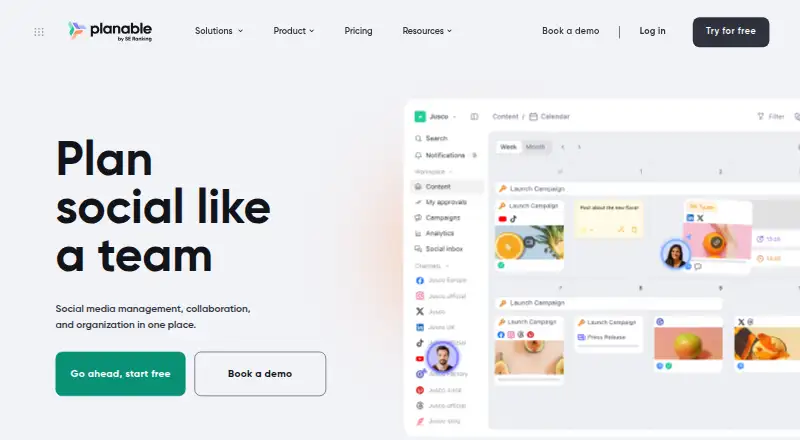
For each network, creators can adjust copy and media, using formats and options such as carousels, GIFs, links, stories, reels, hashtags, targeting, tags and previews. Feed, calendar, grid and list layouts are available; Pro and Enterprise include grid, whereas list is an Enterprise feature.
Teams can comment, propose changes, mark up content, send one-time review links and keep selected posts hidden from clients. Depending on the plan, approvals may be skipped, optional, required or arranged as sequential multi-level steps.
Planable AI can write new captions or rework existing ones, read caption text in images and videos, suggest hashtags and surface posts based on previous content. The mobile app supports post creation and editing, review, approval, comments, grid/calendar/feed browsing and scheduling.
Social Inbox brings together comments from Facebook, Instagram, LinkedIn and TikTok, along with Facebook and Instagram direct messages. Social listening monitors public mentions on X, YouTube, Reddit, TikTok, Facebook, Instagram, LinkedIn and websites, with sentiment and export options.
How it connects
Planable connects to Facebook Pages, LinkedIn profiles and pages, Instagram professional accounts, X, Google Business Profiles, YouTube, TikTok, Pinterest business accounts and Threads. A workspace supports four social accounts on the listed account limit.
Canva, Slack, Zapier, viaSocket and iCal calendars are official integrations. Planable also offers a public API and an MCP connector for AI assistants. Social Media Management Tools can help compare other connection options.
Through the v1 REST API, you can manage workspaces, pages, analytics syncs, posts, comments, media, labels and Instagram stories. Tokens may be read-only or writable, limited to workspaces, given expiry periods and capped at 10 active tokens per company.
Good fit
Planable suits teams and clients that need shared review, structured approvals and a visual publishing schedule. Its tools cover content production, scheduling, engagement and reporting across several social channels.
Organizations seeking a public API, mobile access or optional inbox, analytics and social-listening capabilities may also find it suitable. Marketing Project Management Software is a related category for broader campaign work.
Watch for
Reviewers point to missing advanced network-specific functions, limits on Instagram story auto-publishing and occasional publishing failures. An Apple App Store reviewer says repeated video-upload failures made desktop use necessary.
Costs can rise when you need multiple workspaces or add-ons. Check which approval modes, views, social-page limits and analytics coverage your plan includes before buying.
Pricing
Planable has a Free option capped at 50 total posts, and a free trial is available. Annual billing puts paid access at $33 a month and up.
The Basic workspace tier is $390 annually and provides 60 posts per month, unlimited users, four social pages, two approval types, Feed and Calendar views and three campaigns. Pro is $590 per workspace yearly, with 150 posts, 10 social pages and three approval types.
Enterprise uses custom pricing from roughly $2,500 annually. It offers unlimited posts and campaigns, multi-level approvals, single sign-on and a dedicated account manager.
Workspace add-ons are monthly: Social Inbox costs $9, Analytics $14 and Social Listening $99. Analytics reports on Facebook, Instagram, LinkedIn, TikTok, YouTube, Google Business Profile and X; X and Google Business Profile are single-channel only.
Verdict
Choose Planable if your work depends on review cycles, client feedback and scheduled publishing across several networks. The Free tier handles a small volume, while Basic and Pro increase post and page capacity. The API and integrations suit teams connecting content work to other services.
Look elsewhere if you need deep, platform-specific publishing controls, dependable Instagram story automation or a lower total cost with many workspaces and add-ons. Also check mobile video handling if phone-based publishing is important.
Our take
Planable is a practical choice for teams that organize social content around calendars, comments and approval steps. It supports major networks, provides mobile and web access, and lets buyers add inbox, analytics or listening features as needed. The free plan handles limited volume, while annual workspace plans raise capacity and collaboration limits. Budget carefully if you need several workspaces or add-ons. Teams requiring advanced network-specific controls, reliable Instagram story automation or consistently dependable mobile video uploads should assess other tools first.
- Works with nine social networks, among them Facebook, Instagram, LinkedIn, TikTok and Threads
- Approval workflows can use optional reviews or sequential multi-level approvals
- Provides a public API alongside Canva, Slack, Zapier, viaSocket and iCal integrations
- Free plan allows 50 total posts
- Mobile app allows creating, reviewing, approving and scheduling
- Advanced platform-specific functions are absent
- Instagram story auto-publishing is limited
- Reviewers note occasional publishing failures
- Add-ons and multiple workspaces can make pricing feel high
- An Apple App Store reviewer reports frequent mobile video-upload failures
- Pick it ifTeams coordinating social posts with clients and approval steps; Organizations needing shared calendars, publishing and feedback; Buyers wanting API access and optional inbox or analytics tools
- Skip it ifYou need deep platform-specific publishing controls or full Instagram story automation; Your budget cannot absorb per-workspace add-ons; Mobile video uploading must work reliably every time
Pricing
Inbox, Analytics and Social Listening are additional per-workspace monthly charges.
- Free50 total postsFree
- Basicper workspace/month · 60 posts/workspace/month · unlimited users · 4 social pages/workspace · 2 approval types · Feed and Calendar views · 3 campaigns/workspace$39/mo
- Proper workspace/month · 150 posts/workspace/month · unlimited users · 10 social pages/workspace · 3 approval types$59/mo
- Social Inbox add-onper workspace/month · comments and direct messages · unified inbox$9/mo
- Analytics add-onper workspace/month · cross-channel statistics · page-level insights · post-level metrics · audience insights$14/mo
- Social Listening add-onper workspace/month · brand, topic and competitor monitoring · sentiment and mention data$99/mo
- Basicper workspace/year · 60 posts/workspace/month · unlimited users · 4 social pages/workspace · 2 approval types · Feed and Calendar views · 3 campaigns/workspace$390/yr
- Proper workspace/year · 150 posts/workspace/month · unlimited users · 10 social pages/workspace · 3 approval types$590/yr
As help.planable.io lists them, checked 20 Sept 2026.
Questions
Which networks can Planable connect?
Available connections cover Facebook Pages, LinkedIn profiles and pages, Instagram professional accounts, X, Google Business Profiles, YouTube, TikTok, Pinterest business accounts and Threads.
Is there a no-cost Planable tier?
Yes. Planable's Free option allows 50 total posts, and a free trial is available.
What can the Planable API manage?
The v1 REST API manages workspaces, pages, analytics syncs, posts, comments, media, labels and Instagram stories. Tokens support read or write access and workspace restrictions.
What are the prices for Planable add-ons?
Social Inbox costs $9 monthly, Analytics $14 and Social Listening $99, with each charge applying per workspace.
Are approval workflows available for teams?
Yes. Plans may offer optional, required or sequential multi-level approval. Teams can also comment, suggest edits and annotate content.
Which conversations appear in Social Inbox?
The inbox shows comments from Facebook, Instagram, LinkedIn and TikTok, plus direct messages from Facebook and Instagram.