
Field Service Management Software
ServiceM8: Field-Service Software Review
servicem8.com · checked 28 Sept 2026
Tools for contractors to schedule work, manage jobs, bill customers, take payments, and coordinate teams.
How it plugs in
Signal on Field Service Management Software6.9#3 of 94
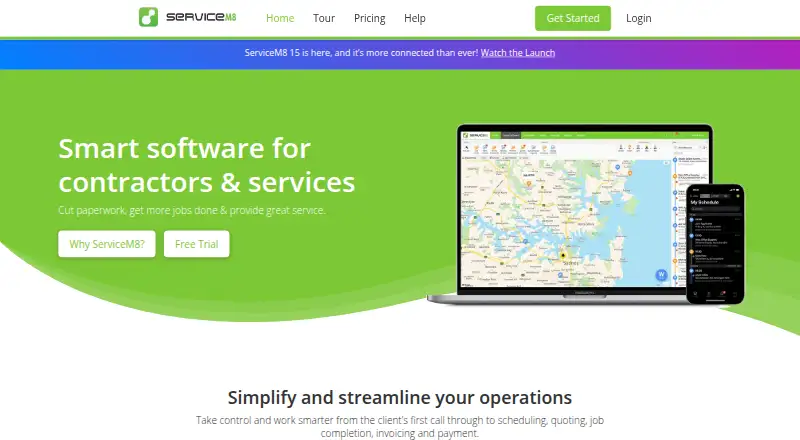
ServiceM8 comes from a company headquartered in Darwin, Australia. Android, iOS, and macOS apps are offered, plus a desktop program for Mac or PC. The service covers jobs, routes, recurring work, invoices, payments, customer access, and team coordination. It connects with accounting tools such as Xero, QuickBooks Online, and MYOB, along with Mailchimp, Deputy, n8n, Zapier, add-ons, and a REST API.
Review
In a line
Contractors can use ServiceM8 to arrange field work and keep staff, customers, billing, and payments together. ServiceM8 is headquartered in Darwin, Australia.
What it does
The platform lets you schedule jobs, optimize routes, handle recurring work, and monitor progress. Team oversight covers staff locations, job progress, messaging, activity feeds, and timesheets.
Invoices and payment collection are supported, with cards accepted on site, online, or via Tap to Pay on iPhone. Customers have portal access, and offline operation is available.
How it connects
Xero, QuickBooks Online, and MYOB are available as accounting integrations. ServiceM8 also works with Mailchimp, Deputy, n8n, Zapier, add-ons, and a REST API for data exchange with other systems.
You can use ServiceM8 on Android, iOS, or macOS, and its desktop app runs on Mac or PC.
Good fit
ServiceM8 suits contractors who need scheduling, route planning, recurring jobs, customer access, invoicing, and payment collection. Every paid plan permits unlimited users.
Watch for
On the free plan, one user can handle 30 jobs per month, and each SMS costs 10 cents. Compare those allowances with your expected workload.
Paid tiers have different monthly job allowances, so verify the limit for the plan you need and confirm that your integrations and platform are supported.
Pricing
You can start with the free option or use the 14-day trial. Monthly paid pricing runs from $29 to $349, with amounts stated in Australian dollars and including GST.
The free plan covers one user, 30 monthly jobs, 10 AI uses per day, and SMS charged at 10 cents each. Paid plans include unlimited users and daily AI uses, subject to each plan's job allowance.
The paid lineup is Starter at $29 monthly, Growing at $79, Premium at $149, and Premium Plus at $349. The homepage states that there are no hidden fees or contracts. Paid customers receive 24/7 chat and email support, alongside help videos and partners.
Verdict
ServiceM8 fits contracting operations that need job management on mobile and desktop, accounting connections, route planning, customer access, and payment collection. Its free option may suit a solo operator with a modest monthly workload.
Our take
ServiceM8 brings scheduling, field updates, invoicing, payments, and staff coordination into one contractor-focused system. Android, iOS, macOS, and Mac or PC desktop support provide multiple working options, while accounting and automation connections can align with existing processes. The free option is restricted to one user and a limited job count. Growing teams should budget from $29 monthly and review job allowances, SMS charges, and needed integrations before subscribing.
- A free option comes with a 14-day trial
- Supports Android, iOS, macOS, Mac, and PC
- Includes invoicing, payments, route optimization, recurring jobs, and offline mode
- Links with Xero, QuickBooks Online, MYOB, Zapier, and a REST API
- Paid subscriptions permit unlimited users
- The free option permits one user and 30 jobs each month
- Free-plan SMS costs 10 cents per message
- Each paid tier has a monthly job allowance
- Prices are stated in Australian dollars and include GST
- Pick it ifContractors handling field jobs and recurring work; Teams needing accounting connections and on-site card payments; Businesses seeking mobile and desktop access
- Skip it ifYou need more than 30 free jobs in a month; You require a monthly job allowance outside the paid tiers
Pricing
The trial lasts 14 days. The free plan covers one user and 30 monthly jobs; paid subscriptions allow unlimited users with larger, plan-specific job allowances.
- Freebilled monthly · 1 user · 30 jobs per month · 10 AI uses per dayFree
- Starterbilled monthly · Unlimited users · 50 jobs per month · Unlimited AI uses per day$29/mo
- Growingbilled monthly · Unlimited users · 150 jobs per month · Unlimited AI uses per day$79/mo
- Premiumbilled monthly · Unlimited users · 500 jobs per month · Unlimited AI uses per day$149/mo
- Premium Plusbilled monthly · Unlimited users · 1500+ jobs per month · Unlimited AI uses per day$349/mo
As servicem8.com lists them, checked 28 Sept 2026.
Questions
Is there a no-cost ServiceM8 option?
Yes. The free plan covers one user and 30 jobs monthly, includes 10 AI uses per day, and charges 10 cents per SMS.
What are ServiceM8's monthly prices?
Paid plans cost $29, $79, $149, or $349 per month. Amounts are in Australian dollars and include GST.
Can I try ServiceM8 before paying?
Yes. You can use a 14-day trial.
Which devices and computers support ServiceM8?
ServiceM8 apps run on Android, iOS, and macOS, while the desktop app is available for Mac or PC.
Which accounting applications integrate with ServiceM8?
Xero, QuickBooks Online, and MYOB connect as accounting integrations.
Does ServiceM8 provide a REST API?
Yes. Alongside its REST API, ServiceM8 offers add-ons and connections for n8n, Zapier, Mailchimp, and Deputy.
Can customers pay by card through ServiceM8?
Yes. Cards can be accepted on site, online, or with Tap to Pay on iPhone.
Near it
All alternatives →- Z
 Zuper#2 on this board
- S
 ServicePower#4 on this board
- SFSalesforce Field Service#1 on this board
- OF
 Odyssee Field Service#5 on this board
- FFORM#6 on this board
- CCrisphive#7 on this board
- SServiceWorks#8 on this board
- RSReachOut Suite#9 on this board
- SSpoors#10 on this board
- IC
 IFS Cloud Field Service Management#11 on this board