
SpineBones: Free 2D Skeletal Animation Editor
spinebones.agara.id · checked 15 Oct 2026
A free desktop editor for building 2D bone rigs, animating them with keyframes, and exporting game-ready assets.
How it plugs in
Signal on 2D Game Animation Software6.4#4 of 25
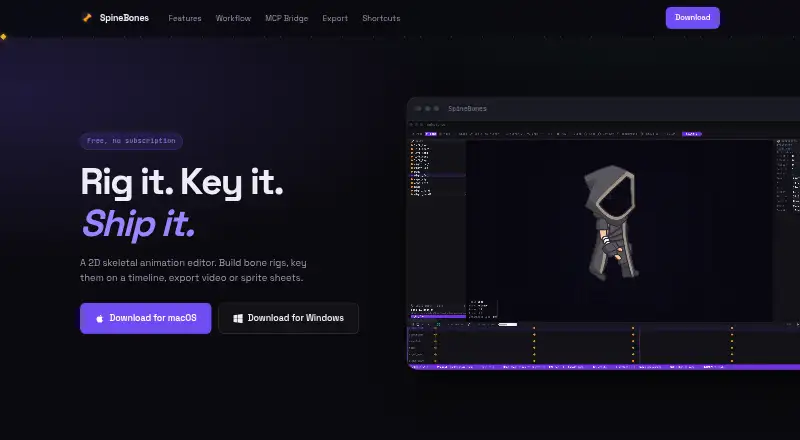
SpineBones is a free 2D skeletal animation editor for Windows and macOS. It builds bone hierarchies, attaches image artwork, keys motion on a timeline, and exports WebM video, PNG sequences, sprite sheets, or portable project packages. Its MCP bridge lets Claude and other MCP clients control rigging, timeline edits, frame rates, and exports.
Review
In a line
SpineBones is a desktop editor for constructing 2D skeletal rigs and animating them with keyframes. It is free to download and use without an account, license key, or trial timer.
What it does
You create bone chains and parent-child structures, then pose them in SETUP mode or animate position, rotation, and scale in ANIMATE mode. Re-parenting, grouping, inverse kinematics, and mesh deformation support more detailed rigs.
The timeline can insert, move, copy, select, and loop keyframes. Each key can use easing, and audio tracks are supported. Slots accept PNG, JPG, SVG, or WebP artwork, including multiple attachments and frame-by-frame swaps.
Onion skin shows nearby poses around the current frame. The preview uses a 16:9 frame, with pan, zoom, and playback up to 120 FPS.
How it connects
SpineBones runs locally on Windows 10 or newer and macOS 12 or newer. Projects can be saved as portable .sbn packages containing bones, slots, keys, and bundled images. Older JSON projects can also be opened.
Exports include WebM video, transparent PNG frame sequences, sprite sheets with atlas data, and portable project packages. Sprite sheets are described as suitable for game engines and 2D frameworks, while PNG sequences can go to compositing tools.
Its MCP bridge works with Claude and other MCP clients. These commands can create and edit rig elements, batch keyframes, change frame rates and playback settings, and start exports.
Good fit
SpineBones suits people making 2D game or framework assets who want skeletal animation, runtime exports, and a local workflow. It can also fit users who want MCP clients to read or change bones, keyframes, slots, attachments, groups, and timeline state.
For broader options, compare it with 2D game animation software or game animation software.
Watch for
Published downloads and platform details cover only Windows and macOS. Check that your computer meets the listed Windows 10 or macOS 12 minimum before choosing it.
The facts describe skeletal animation alongside frame-by-frame attachment swapping and mesh vertex keying, but do not list other animation methods or runtime integrations beyond the stated exports and MCP bridge.
Pricing
SpineBones is free. The Free plan includes a 300-frame timeline, playback up to 120 FPS, WebM export, PNG frame-sequence export, and sprite-sheet export.
There is no free trial because the app itself is free, with no account, per-seat license, license key, or trial timer required.
Verdict
Choose SpineBones if you need a no-cost desktop tool for bone-based 2D animation and exports aimed at game engines, 2D frameworks, or compositing. Its portable project files and local operation suit work that should move between machines without a cloud round trip.
Users comparing character-focused tools can also review 2D character animation software.
Our take
SpineBones is a sensible choice for animators and game makers who need a free, local editor with bone rigs, keyframes, mesh edits, and practical export formats. The MCP bridge is useful if Claude or another MCP client is part of your workflow. Its main boundary is platform coverage: the published app supports Windows and macOS only. Before committing, confirm that the 300-frame Free plan and listed export formats match your projects, especially if you need tools or integrations outside those described.
- Free plan includes WebM, PNG sequence, and sprite-sheet exports
- Supports bone hierarchies, inverse kinematics, groups, and re-parenting
- MCP bridge can edit rigs, keyframes, timing, and exports
- Portable .sbn projects bundle bones, keys, and images
- Works locally without an account or license key
- Published platform coverage is limited to Windows and macOS
- Free plan timeline is limited to 300 frames
- No trial period is offered because the app is free
- Only the listed exports and MCP connection are documented
- Pick it if2D game and framework animation assets; Local skeletal-animation work; MCP-assisted rig and timeline editing
- Skip it ifYou need a published Linux or other-platform version; Your project needs more than 300 timeline frames; You require integrations not listed in the product facts
Pricing
SpineBones is free. The Free plan allows 300 timeline frames, playback up to 120 FPS, and WebM, PNG-sequence, and sprite-sheet exports. There is no trial timer or account requirement.
- Free300-frame timeline · playback up to 120 FPS · WebM, PNG sequence, and sprite-sheet exportsFree
As spinebones.agara.id lists them, checked 15 Oct 2026.
Questions
Is SpineBones free?
Yes. SpineBones has a Free plan with a 300-frame timeline, playback up to 120 FPS, and WebM, PNG-sequence, and sprite-sheet exports.
Which computers can run SpineBones?
The listed requirements are macOS 12 or newer and Windows 10 or newer. Published downloads cover only those two platforms.
What files can SpineBones export?
It exports WebM video, transparent PNG frame sequences, sprite sheets with atlas data, and portable .sbn project packages. Legacy JSON projects can be opened.
Can SpineBones use image artwork?
Yes. Slots can use PNG, JPG, SVG, or WebP artwork, with multiple attachments and frame-by-frame swapping.
Does SpineBones work with Claude?
Its MCP bridge works with Claude and other MCP clients. MCP commands can create rig elements and keyframes, change timing, and trigger exports.
Does SpineBones need an account or internet connection?
The app is free to download without an account, license key, or trial timer. The described workflow runs locally, with projects and exports written to your computer.