
SRTGen for Video Subtitles and Translation
srtgen.com · checked 28 Sept 2026
SRTGen transcribes, translates, and styles subtitles for short and long videos.
How it plugs in
Signal on AI Video Caption Generators7.0#8 of 99
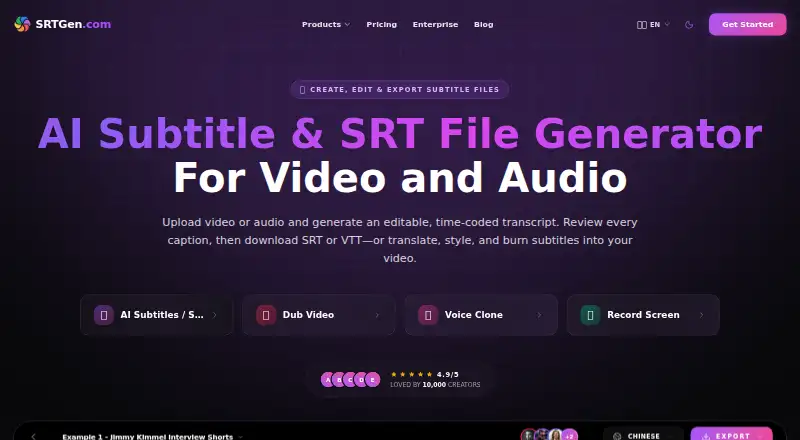
Upload video or audio to build a transcript with editable, timed captions. Review the captions, translate them into 100+ languages, style them, then export subtitle files or burn captions into the video. The service is available on the web and through its API and AI-agent features. A free tier has limited allowances; paid plans start at $4 monthly for the first two months, then $8 per month.
Review
In a line
SRTGen is a web-based service for transcribing, translating, and styling video subtitles. It supports both short- and long-form video.
What it does
Start by uploading audio or video; SRTGen produces a transcript with editable, time-stamped captions. From there, you can review and format the text, translate it into over 100 languages, export subtitle files, or embed captions in the video.
The workflow also includes voice dubbing. SRTGen lists uses including social videos, podcasts, courses, marketing videos, and news content.
How it connects
SRTGen offers subtitle files in SRT, VTT, ASS, and TXT formats, with JSON output available through agent localization. Its MCP agent connections include Codex, Claude, Gemini, Cursor, GitHub Copilot, and Windsurf. Higher plans include a developer API, and the service also offers X automation.
For videos larger than 200 MB, the agent workflow suggests extracting a compact MP3 on your computer; the original video stays there for final rendering. Uploaded files are kept in Backblaze B2. Audio processing may use AssemblyAI, Google Gemini, ElevenLabs, or Cartesia.
Good fit
SRTGen may suit creators and teams that need captions, translation, styling, and dubbing within one workflow. Its plans range from a single seat to 10 seats, with shared workspaces offering invitations, role permissions, shared templates, and synchronized projects.
Watch for
The free plan comes with 20 signup credits, 20 minutes of transcription, 40 minutes of translation, and up to 4k speech characters. Free recording is limited to five minutes and 720p.
The listed monthly prices are introductory and increase after two months. Team seats, credit allowances, and storage also vary by plan. Deleted projects are queued for cloud removal within 30 days; account deletion schedules files for permanent removal within 90 days, while AI processing logs may be kept for up to two years.
Pricing
Free is available at no charge. Starter costs $4 monthly for the first two months and $8 thereafter; Pro is $14 monthly for two months, then $24; Business is $49 monthly for two months, then $69. These are limited offers.
Monthly and yearly billing are available, with yearly billing stating a 25% saving. Non-expiring credit top-ups are $1 per 20 credits. Enterprise pricing is available on request.
Verdict
Consider SRTGen if you want one place to create, translate, style, and export subtitles, especially if you need AI-agent access or team workspaces. The free plan can help you gauge whether its workflow fits, but its transcription and translation allowances are modest. Before choosing a paid plan, compare its ongoing monthly rate and included credits, minutes, storage, and seats with your workload. If you need a different subtitle tool, see subtitle software options.
Our take
SRTGen is worth considering for creators who want transcription, subtitle translation, styling, and dubbing together, or teams that need shared projects and seats. The free plan offers a limited way to start, but its allowances are small. Paid monthly prices increase after two months, so base a decision on the later rate and the plan’s included minutes, credits, storage, and seats. Check the file-deletion and processing-log periods if those matter to your work. It may not suit someone looking only for a basic subtitle editor.
- Transcribes and translates subtitles in one workflow.
- Offers styling, review, subtitle exports, and burned-in captions.
- Supports translation in more than 100 languages.
- Supports AI agents and offers API access on higher plans.
- Team plans include shared workspaces and multiple seats.
- Free transcription and translation allowances are limited.
- Introductory monthly rates rise after two months.
- Free recording is limited to five minutes and 720p.
- AI processing logs may be retained for up to two years.
- Pick it ifCreators translating and styling captions for video; Teams coordinating subtitle localization and review; Users who need AI-agent or API access
- Skip it ifYou need more free transcription or translation than the plan allows; You want a monthly price that stays at the introductory rate
Pricing
Free plan available. Starter, Pro, and Business have limited first-two-month prices, then rise to $8, $24, and $69 a month. Yearly billing states a 25% saving; credit top-ups are $1 per 20 credits, and Enterprise is price on request.
- StarterFirst 2 months, then $8/mo · 360 credits/mo · 360 transcription mins/mo · 720 translation mins/mo · 20 GB storage · 10 voice-clone slots · 1 seat$4/mo
- ProFirst 2 months, then $24/mo · 1,500 credits/mo · 1,500 transcription mins/mo · 3,000 translation mins/mo · 100 GB storage · 30 voice-clone slots · 3 seats$14/mo
- BusinessFirst 2 months, then $69/mo · 5,000 credits/mo · 5,000 transcription mins/mo · 10,000 translation mins/mo · 500 GB storage · 100 voice-clone slots · 10 seats$49/mo
- Free20 signup credits · 20 mins AI transcription · 40 mins AI translation · up to 4k speech chars · 2 GB storage · 3 voice-clone slots · 1 seatFree
- Overage creditsper 20 Credits · Non-expiring credits after plan allowance is exhausted$1 one-time
- EnterpriseBulk processing · custom automation pipelines · dedicated agency servicesOn request
As srtgen.com lists them, checked 28 Sept 2026.
Questions
What subtitle formats can SRTGen export?
Available subtitle formats are SRT, VTT, ASS, and TXT. Agent localization also supports JSON.
How many languages does SRTGen support for translation?
Its AI subtitle translation covers more than 100 languages.
What does the free plan include?
The free tier provides 20 signup credits, 20 transcription minutes, 40 translation minutes, up to 4k speech characters, 2 GB storage, three voice-clone slots, and one seat.
How much does SRTGen cost after the introductory period?
After the first two months, Starter is $8 a month, Pro is $24, and Business is $69.
Can SRTGen work with AI agents?
It connects to MCP-compatible agents such as Codex, Claude, Gemini, Cursor, GitHub Copilot, and Windsurf.
How long does SRTGen keep deleted files?
Deleted project files are queued for cloud deletion within 30 days. Account deletion schedules files for permanent deletion within 90 days; AI processing logs may be retained for up to two years.