The Tool Desk
Outbyte PC Repair FREEClear out junk files and repair common Windows errorsFree Scan →Outbyte Driver Updater FREEFix the driver behind crashes, sound loss and screen glitchesFind Drivers →Inferse is reader-supported. When you buy through links on our site, we may earn an affiliate commission. As an Amazon Associate I earn from qualifying purchases. Learn more
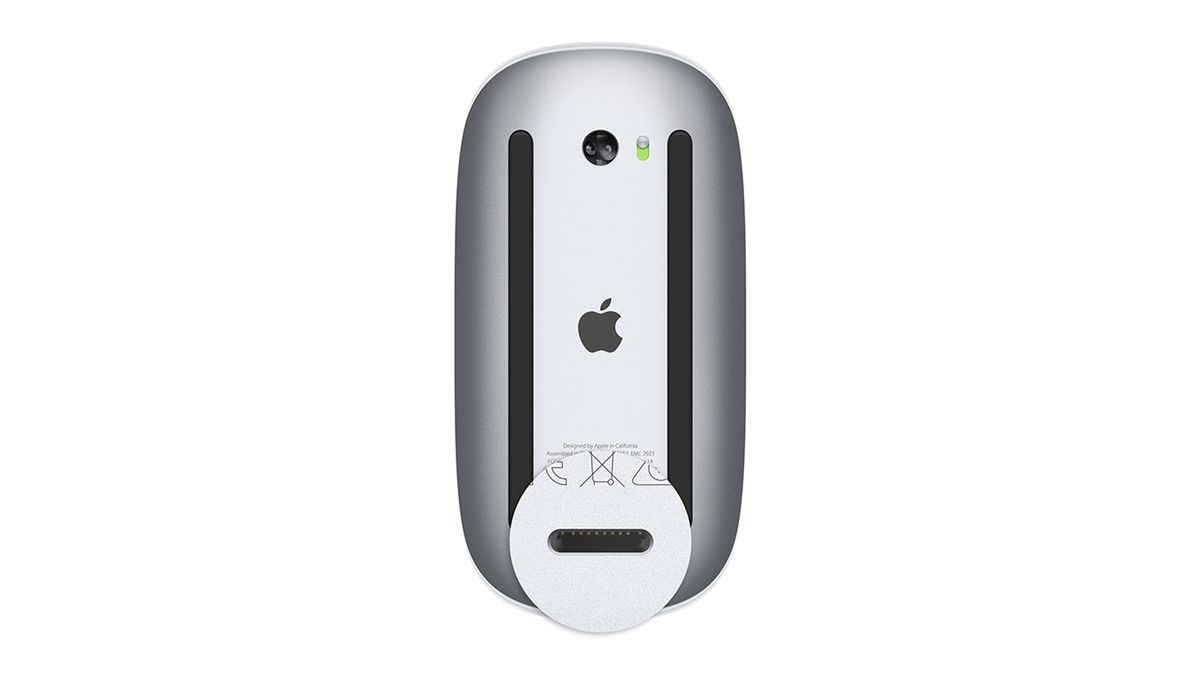
For years, Apple users have endured a perplexing design flaw in the otherwise sleek Magic Mouse: a charging port located on the underside, rendering the mouse unusable while plugged in. This seemingly trivial inconvenience has sparked countless memes, complaints, and even spawned a cottage industry of third-party adapters. But now, whispers from Cupertino suggest that Apple might finally be rectifying this ergonomic enigma in the next iteration of the Magic Mouse.
This isn’t the first time Apple has tweaked its iconic mouse. In 2021, the company transitioned from the proprietary Lightning connector to the industry-standard USB-C, a move widely lauded by the tech community. However, to the dismay of many, the port stubbornly remained on the mouse’s belly. But according to recent reports from Bloomberg, Apple is gearing up for a complete overhaul of the Magic Mouse, which will likely include relocating the charging port to a more sensible location.

Why the Outcry Over a Charging Port?
To understand the frustration, imagine this: you’re in the middle of an intense gaming session, a crucial design project, or simply trying to meet a deadline, and your Magic Mouse’s battery gives up the ghost. You grab the USB-C cable, only to realize that plugging it in transforms your sleek, wireless mouse into an expensive paperweight.
This design flaw has baffled users and tech pundits alike. It’s a classic example of form over function, where aesthetics seemingly triumphed over practicality.
Shopping ad

- Magic Mouse is wireless and rechargeable, with an optimised foot design that lets it glide smoothly across your desk.
- The Multi-Touch surface allows you to perform simple gestures such as swiping between web pages and scrolling through documents.
- The rechargeable battery will power your Magic Mouse for about a month or more between charges.
- It’s ready to go straight out of the box and pairs automatically with your Mac, and it includes a woven USB-C Charge Cable that lets you pair and charge by connecting to a USB-C port on your Mac.
The Evolution of the Magic Mouse
- 2009: The first generation Magic Mouse was introduced, featuring a multi-touch surface and a sleek, minimalist design. It relied on AA batteries.
- 2015: The second generation Magic Mouse ditched the replaceable batteries for an internal rechargeable battery, but with the now-infamous bottom-placed Lightning port.
- 2021: Apple updated the Magic Mouse with a USB-C port, but retained the controversial charging location.
Despite its ergonomic shortcomings, the Magic Mouse remains popular due to its seamless integration with macOS, its multi-touch gestures, and its undeniably stylish design. However, the charging port situation has been a persistent blemish on its otherwise impressive resume.
What Can We Expect from the Redesigned Magic Mouse?
While Apple remains tight-lipped about the specifics of the upcoming Magic Mouse, the rumored redesign has sparked a flurry of speculation. Here are some potential changes we might see:
Shopping ad

- Magic Mouse is wireless and rechargeable, with an optimised foot design that lets it glide smoothly across your desk.
- The Multi-Touch surface allows you to perform simple gestures such as swiping between web pages and scrolling through documents.
- The rechargeable battery will power your Magic Mouse for about a month or more between charges.
- It’s ready to go straight out of the box and pairs automatically with your Mac, and it includes a woven USB-C Charge Cable that lets you pair and charge by connecting to a USB-C port on your Mac.
- Relocated Charging Port: This is the most anticipated change. The charging port could be moved to the front or side of the mouse, allowing for uninterrupted use while charging.
- Improved Battery Life: Many users have complained about the Magic Mouse’s relatively short battery life. A larger battery or more power-efficient components could address this issue.
- Enhanced Ergonomics: While the Magic Mouse is undeniably sleek, its low profile can be uncomfortable for some users. A slightly more contoured shape could improve ergonomics.
- New Features: Apple could introduce new features like haptic feedback, customizable buttons, or even integration with the Apple Pencil.
The Impact of User Feedback
It’s worth noting that Apple’s decision to finally address the charging port issue likely stems from years of user feedback. The company has a history of listening to its customers, albeit sometimes slowly. The vocal criticism of the Magic Mouse’s design flaw seems to have finally reached the ears of Apple’s engineers.
Do these 3 things before closing this tab:
1Scan for outdated or missing drivers - takes under a minute2Repair Windows errors before they cause bigger problems3Fix the driver behind crashes, sound loss and screen glitchesMy Personal Experience with the Magic Mouse
I’ve been a Magic Mouse user for several years, drawn in by its sleek aesthetics and intuitive gestures. However, I’ve also experienced the frustration of the ill-placed charging port firsthand. Countless times, I’ve had to interrupt my workflow to charge the mouse, leaving me fumbling for a wired alternative. I even purchased a third-party charging dock that allows me to use the mouse while it’s charging – a testament to how deeply this design flaw has impacted users.
Shopping ad

- -Magic Mouse 2 Is Completely Rechargeable, So You’Ll Eliminate The Use Of Traditional Batteries.
- - It’s Lighter, Has Fewer Moving Parts Thanks To Its Built-In Battery And Continuous Bottom Shell, And Has An ---Optimized Foot Design — All Helping Magic Mouse 2 Track Easier And Move With Less Resistance Across Your Desk.
- -Nd The Multi-Touch Surface Allows You To Perform Simple Gestures Such As Swiping Between Web Pages And Scrolling Through Documents.
- -Lightning Port
The rumored redesign of the Magic Mouse is a welcome development. It shows that Apple is willing to listen to its customers and address even seemingly minor design flaws. By relocating the charging port, Apple can finally elevate the Magic Mouse from a design curiosity to a truly functional and user-friendly peripheral.
While we await the official announcement from Apple, one thing is certain: the next generation Magic Mouse will be under intense scrutiny. The tech world will be watching to see if Apple has finally managed to perfect its iconic mouse.
Quick Recap
Shopping ad

- Magic Mouse is wireless and rechargeable, with an optimized foot design that lets it glide smoothly across your desk.
- The Multi-Touch surface allows you to perform simple gestures such as swiping between web pages and scrolling through documents.
- The incredibly long-lasting internal battery will power your Magic Mouse for about a month or more between charges.
- It’s ready to go right out of the box and pairs automatically with your Mac, and it includes a woven USB-C to Lightning Cable that lets you pair and charge by connecting to a USB-C port on your Mac.
- System Requirements: Bluetooth-enabled Mac with OS X 10.11 or later , iPad with iPadOS 13.4 or later.
Shopping ad
Product prices and availability are accurate as of the date/time indicated and are subject to change. Any price and availability information displayed on Amazon at the time of purchase will apply.
Free tools Windows power users keep installed
One-click scans. No signup required.