COCO Annotator: Free Self-Hosted Image Annotation
github.com · checked 15 Oct 2026
Free, open-source COCO annotation software that runs on a server you manage.
How it plugs in
Signal on AI Image Annotation Tools7.6#4 of 24
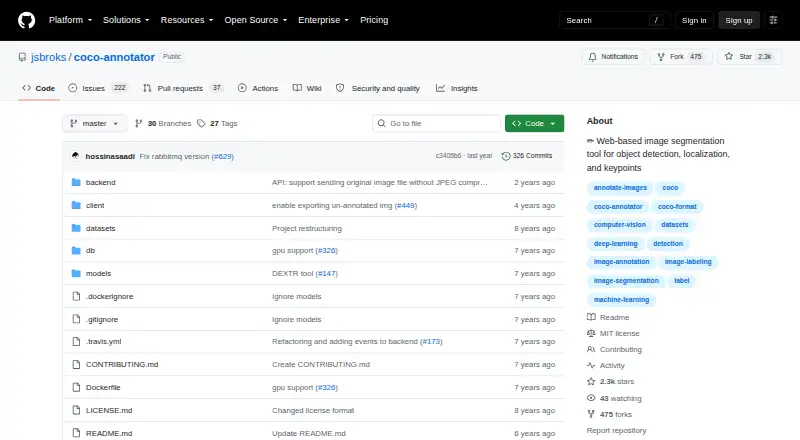
COCO Annotator is a free, open-source web application for preparing training data for object detection and localization. It handles boxes, polygons, segmentation, keypoints, points, metadata, and assisted labeling. COCO-format datasets can move into and out of the application. Docker and docker-compose are required, making it a fit for teams prepared to operate a self-hosted service.
Review
In a line
COCO Annotator is a web-based application for marking images so they can train object-detection and localization systems. It runs as a self-hosted service and is free under the MIT License.
What it does
Image segments, whether complete or partial, can receive bounding boxes, polygons, segmentation masks, keypoints, or points. Distinct visible parts may be combined into one object, and each instance can carry several labels plus custom metadata.
Assisted options include DEXTR, Mask R-CNN, a Magic Wand, and semi-trained model annotation. Google Images searches can also be used to generate datasets.
How it connects
COCO-format datasets can be brought in, while completed annotations go out as COCO JSON. Its REST interface follows resource-oriented URLs, returns JSON in most cases, and uses HTTP response codes; Swagger is available at localhost:5000/api. External models may receive an uploaded image and send back annotations in COCO format.
The code is open source and MIT-licensed, including commercial use with attribution. Docker and docker-compose are the project's documented installation route. Authentication is available with Admin, Owner, and User roles.
Good fit
It fits teams creating training data for object detection or localization, especially when COCO compatibility, local operation, or model-assisted labeling matters.
A dedicated server can centralize datasets and allow outside access for outsourced work. The project recommends a basic server with 2 CPU cores and 2 GB of RAM, with more memory for images larger than one megapixel.
Watch for
You must run Docker and docker-compose; the project documentation does not describe another supported installation path.
For deployment, the guide recommends HTTPS through Let’s Encrypt and Nginx and says server root access is required. To back up data, copy the datasets directory and Docker database volume. The repository reports no SECURITY.md policy and no published security advisories.
Pricing
COCO Annotator is free. Its listed plan is self-hosted MIT-licensed software deployed with Docker.
Verdict
Choose COCO Annotator if you need a no-cost annotation service that you can operate yourself and your workflow uses COCO data. Its range of annotation types, API, roles, and model-assisted options covers many image-labeling tasks.
Look elsewhere if you need a managed service, installation without Docker, or vendor-backed security and operations. Running it involves server administration and backups, while HTTPS is recommended by the deployment guide.
Our take
COCO Annotator suits organizations seeking free software, local control, and direct COCO JSON exchange. It can handle varied labels, grouped object parts, keypoints, and custom fields, with optional help from built-in models. The operational trade-off includes mandatory Docker, server privileges for deployment, and maintaining backups; the guide recommends HTTPS. Its public API and MIT license also make it suitable for teams connecting their own tools or models. Teams seeking a hosted product or documented security policy should consider another option.
- Free and MIT-licensed, including commercial use with attribution
- COCO datasets can be brought in and annotations sent out as COCO JSON
- Handles boxes, polygons, masks, keypoints, points, and metadata
- Includes REST API access and Swagger documentation
- Offers model-assisted labeling tools
- Docker with docker-compose is the project's sole supported installation route
- Self-hosting involves server administration and backups; HTTPS is recommended
- The repository reports neither a SECURITY.md policy nor published security advisories
- Larger images need more memory than the basic server guide suggests
- Pick it ifTeams building COCO-compatible image-training datasets; Organizations needing a free, self-hosted annotation web app; Workflows that connect external models through an API
- Skip it ifYou need a hosted service rather than operating your own Docker deployment; Your team cannot handle server access or backup tasks; You require a documented security policy before deployment
Pricing
There is no software charge, but running it requires your own server and Docker setup. The facts list no hosted or paid plan.
- MIT-licensed softwareself-hosted · Docker requiredFree
- Open-source self-hostedDocker deployment · local web interface · COCO import/exportFree
As github.com lists them, checked 1 Oct 2026.
Questions
Is there a charge for COCO Annotator?
No. It is open-source software under the MIT License and is offered as a self-hosted Docker deployment.
Which data formats does it handle?
COCO-format datasets can be imported, and annotations can be exported as COCO JSON.
Which annotation methods are available?
The tool handles bounding boxes, polygons, segmentation masks, keypoints, points, grouped disconnected objects, multiple labels, and custom metadata.
Can it be integrated through an API?
Yes. Its REST interface uses resource-oriented URLs, JSON responses, and HTTP status errors, with Swagger at localhost:5000/api.
What installation route is documented?
Docker and docker-compose are required because Docker is the project's only supported installation method.
Are there model-assisted annotation options?
Yes. DEXTR and Mask R-CNN are built in, and external models can receive an image and return COCO-formatted annotations.
What server capacity does the guide suggest?
The VPS guidance recommends 2 CPU cores and 2 GB of RAM for a basic instance, with extra memory for images above one megapixel.