Video Background Removal Software
Video Matting: Overview and Limits
github.com · checked 9 Oct 2026
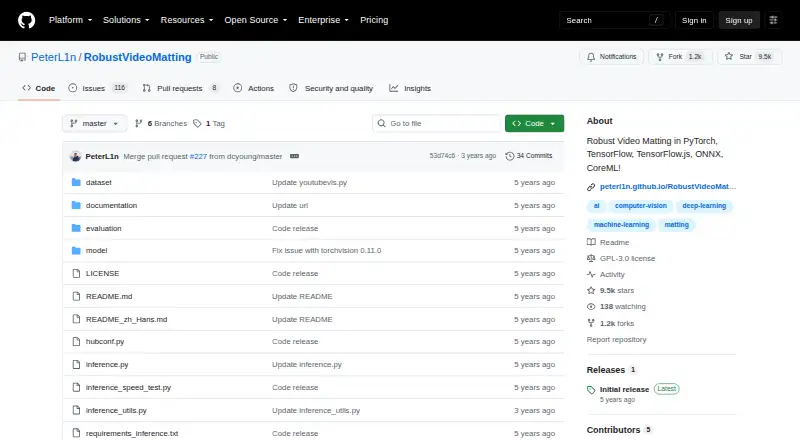
An open-source project for human video matting, offering models across several frameworks.
How it plugs in
Signal on Video Background Removal Software6.7#6 of 24
Test the model with a webcam in your browser, or use the conversion API to turn video or image sequences into composited video or PNG output. It is free under GPL-3.0, though working with the models and conversion tools may require technical setup.
Review
In a line
The repository makes its code available under GPL-3.0.
What it does
The model handles video frame by frame, using a recurrent network to carry information across frames. The project says it can matte video in real time without extra inputs.
Submit a video file or image sequence to the conversion API for a composited video or PNG sequence; alpha and foreground outputs can also be requested.
How it connects
Implementations or exports are available for PyTorch, TorchHub, TorchScript, ONNX, TensorFlow, TensorFlow.js, and CoreML. A browser webcam demo runs the model live, while a Colab demo lets you test your own videos on a free GPU.
The supplied CoreML models need iOS 13 or newer, and the README links to a third-party NCNN C++ project for Android. See video background removal software for other options.
Good fit
It may suit people adding human matting to their own video workflow, particularly those able to use one of its model formats. MobileNetv3 is the recommended starting point for most uses; ResNet50 is larger, with small performance improvements.
Use the webcam demo to see live model output; the conversion API handles video files and image sequences.
Watch for
Reported frame rates depend on the Nvidia GPU and settings used. The conversion script is expected to run much more slowly than tensor-throughput figures because it lacks hardware video encoding and decoding and parallel transfers between the GPU and other components.
CoreML cannot change resolution dynamically. The ONNX models use opset 12 and have been tested with CPU and CUDA backends. The repository links inference, training, and evaluation guidance.
Pricing
The project is free, with pretrained models and source code under GPL-3.0.
Verdict
The browser and Colab demos provide ways to try the model, while the conversion API accepts video and image sequences.
Consider other options if you want a ready-made app with a clearly described workflow or need transparent video export: the outputs listed are composited video and PNG sequences. Compare it with Cutout.Pro or unscreen.io if you are considering other background-removal tools.
Our take
Its browser webcam and Colab demos provide ways to test the model, and it is free under GPL-3.0. The conversion API outputs composited video or PNG sequences rather than transparent video. Published speed figures do not represent the slower complete conversion process, so avoid using them to estimate that workflow.
- Free source code and pretrained models under GPL-3.0.
- Models are available for several frameworks, including TensorFlow.js and CoreML.
- Accepts video files or image sequences and produces composited video or PNG output.
- Has a live browser webcam demo and a Colab demo with a free GPU.
- Video conversion is expected to run much slower than reported tensor-throughput figures.
- CoreML cannot change resolution dynamically.
- Transparent video is not a listed output.
- CoreML models require iOS 13 or later.
- Pick it ifPeople adding human matting to their own video workflows; Users able to work with one of the provided model formats
- Skip it ifYou need transparent video export.; You plan to use published frame rates as a guide to full video conversion speed.
Pricing
Free plan; code is released under GPL-3.0, with pretrained models and source code.
- Robust Video MattingGPL-3.0 · pretrained models and source codeFree
As github.com lists them, checked 9 Oct 2026.
Questions
Does it support real-time video matting?
The project says it can perform matting in real time without additional inputs. Reported rates depend on the Nvidia hardware and settings.
What can it export?
The conversion API accepts a video file or image sequence and can make a composited video or PNG sequence, with optional alpha and foreground outputs.
Does it work on iPhone?
The provided CoreML models require iOS 13 or later. CoreML does not support dynamic resolution.
Can I use it in a browser?
Yes. The webcam demo runs the model live in a browser and can visualize recurrent states.
Which model should I try first?
MobileNetv3 is recommended for most use cases. ResNet50 is larger and offers small performance improvements.
Near it
All alternatives →- F
 Fotor#5 on this board
- V
 VCam#7 on this board
- PV
 Picsart Video Background Removal API#4 on this board
- VBVideo Background Remover CLI#8 on this board
- P
 Pixelcut#3 on this board
- BV
 BGRemove.video#9 on this board
- CPCutout.Pro#2 on this board
- FVFuzzPuppy Video Background Remover#10 on this board
- B
 BackgroundRemover#1 on this board
- BV
 Bria Video Background Removal#11 on this board