
BackgroundRemover Software Review
github.com · checked 21 Oct 2026
AI-powered background cutting for images and video through CLI, web, API, or self-hosted setups.
How it plugs in
Signal on AI Background Removers9.5#1 of 94
Using AI, the tool separates subjects from still pictures and video footage. You can access it as a command-line utility, local service, hosted web app, or REST endpoint. Models target ordinary subjects, people, or faster lightweight runs, and results can be transparent, masked, or composited. The code is free and open source; hosted options add batch work, HD downloads, and API credits.
Review
In a line
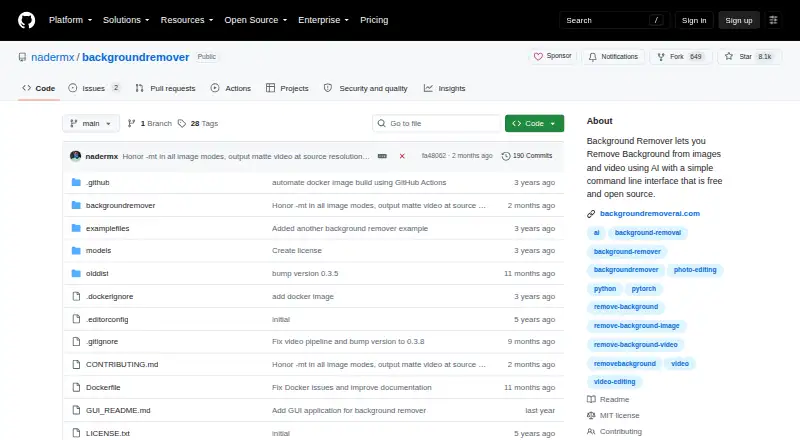
BackgroundRemover is MIT-licensed software for AI background removal in pictures and video. Access comes through command-line tools, a browser service, APIs, and self-hosted installations.
What it does
Its command-line interface handles JPG, JPEG, PNG, HEIC, and HEIF images, along with MP4, MOV, WebM, OGG, and GIF video. Files can be processed individually or in batches, with backgrounds replaced by transparency, a color, or another image.
Image processing can return a foreground mask or use alpha-matting controls to refine edges. Video can be exported as transparent MOV, matte-key MP4, transparent GIF, or a composition over an image or video. The model list includes u2net for general subjects, u2net_human_seg for people, and u2netp for faster processing.
How it connects
Run the command-line utility locally, call its Python library, or launch a local HTTP server. Its hosted REST interface handles image and video jobs, and the documentation includes Python, cURL, PHP, JavaScript, and C# examples. Pipe mode reads image bytes from standard input and writes results to standard output for Unix workflows.
Installations can come from PyPI, the source repository, or Docker. The MIT terms permit commercial use, modification, and redistribution provided notices remain. For related tools, see AI video background removers or video background removal software.
Good fit
The service is presented for portraits, people, product photos, online-store images, and short videos. It fits users who want local processing, command-line automation, a Python interface, or a hosted API.
A detected GPU is used automatically when available, with CPU processing as a fallback. Documentation reports that GPU runs may be 5–10 times faster.
Watch for
Running it locally calls for Python 3.6 or later, corresponding Python development headers, PyTorch and torchvision, plus FFmpeg 4.4 or later. pillow-heif is needed for HEIC and HEIF input. Docker video jobs may require 2GB or more of shared memory, or the --ipc=host option.
According to the hosted service, uploaded files are removed after two hours, converted files after 24 hours, and conversion IP addresses after one hour. Check which hosted limits and output options you need before choosing a plan.
Pricing
The self-hosted open-source package has no charge. Its hosted Free plan allows one image daily, standard-resolution transparent PNG output, short videos, no batch processing, and ads; no free trial is listed.
The API-credit option is a one-time $1 purchase for 1,000 credits, and each credit covers one image or video. The pricing listing also displays a $10 total, volume reductions of up to 70%, and contact-based pricing above 100,000 credits.
Pro is priced at $12 monthly or $108 annually. The plan includes HD downloads, unlimited processing, batch uploads, files as large as 100GB, a priority queue, no ads, and API access. New subscribers have a 7-day money-back guarantee.
Verdict
BackgroundRemover is worth considering when removal needs to stay on your machine, run through scripts, or connect to software via HTTP. Its open license and varied output modes also suit teams handling mixed image and video workflows.
Look elsewhere if you only want a simple consumer editor or need a different hosted service model.
Our take
BackgroundRemover fits technical users, stores, and media workflows that require automation or local control. It handles still images and video, offers several model and output choices, and can run without sending files to a hosted service. The setup has real prerequisites, and some formats need extra software. Hosted tiers are more convenient but place limits on daily use, file size, batching, and resolution, so casual users should compare those limits with simpler browser tools.
- MIT-licensed open-source code permits commercial use and modification
- Handles images and videos with multiple output formats
- Offers local and hosted HTTP APIs, a Python library, and command-line modes
- Automatically detects a GPU and falls back to CPU
- Free hosted plan available for limited use
- Local installation requires Python, PyTorch, torchvision, and FFmpeg
- HEIC and HEIF input needs pillow-heif
- The hosted Free plan permits one image daily and excludes batch work
- Docker video runs may need at least 2GB shared memory
- Hosted files follow different automatic deletion periods
- Pick it ifAutomated image and video background removal; Stores, portraits, and product-photo workflows; Users wanting self-hosting or an API
- Skip it ifYou want a no-setup editor with broad daily limits; You cannot install the required Python and media dependencies; You need hosted processing without plan restrictions
Pricing
The software is free, with a limited hosted Free plan. Paid options are a one-time $1 API-credit purchase, Pro at $12 monthly or $108 annually, and a 7-day money-back guarantee for new subscribers.
- Freefree forever · 1 image per day · AI removal · transparent PNG · standard resolution · no batch processing · short videos only · adsFree
- API credits1,000 credits; Total: US$ 10.00 · 1 credit = 1 image or video · volume discounts up to 70% off · contact for more than 100,000 credits$1 one-time
- Pro (monthly)per user / month · Full-resolution HD downloads · no limit · batch uploading · files up to 100GB · priority queue · no ads$12/mo
- Pro monthlyper user / month · HD downloads · no ads · unlimited processing · batch uploads · files up to 100GB · priority queue · API access$12/mo
- Pro (annual)per user / month; US$ 108.0 billed annually · Full-resolution HD downloads · no limit · batch uploading · files up to 100GB · priority queue · no ads$108/yr
- Pro annualUS$108.0 billed annually · HD downloads · no ads · unlimited processing · batch uploads · files up to 100GB · priority queue · API access$108/yr
As backgroundremoverai.com lists them, checked 21 Oct 2026.
Questions
Is BackgroundRemover free?
The open-source package is free. Its hosted service offers a Free plan with one image daily, standard transparent PNG output, short videos, and ads.
Can BackgroundRemover run locally?
Yes. Options include installing from PyPI, cloning the repository, using a virtual environment, running Docker, or starting the local HTTP API server.
Which file formats are accepted?
Images can be JPG, JPEG, PNG, HEIC, or HEIF, while video inputs include MP4, MOV, WebM, OGG, and GIF. pillow-heif is needed for HEIC and HEIF.
Is an API available?
Yes. You can use the hosted REST endpoint or local HTTP server; examples cover Python, cURL, PHP, JavaScript, and C#.
Can the background be replaced?
Yes. Images may stay transparent, use a custom RGB color, or receive a supplied background image. Video can be composited over an image or video.
Does it support GPU acceleration?
It uses an available GPU automatically and switches to CPU when needed. Documentation reports GPU processing may be 5–10 times faster.
Are paid plans offered with a free trial?
No free trial is listed. New subscribers can request a refund within seven days under the money-back guarantee.
Near it
All alternatives →- K
 Kavij#2 on this board
- CPCutout.Pro#3 on this board
- P
 Pixelcut#4 on this board
- S
 Slazzer#5 on this board
- L
 LocalBG#6 on this board
- U
 unbagrnd#7 on this board
- EB
 Erase.bg#8 on this board
- ZAZawa AI Background Remover (formerly X-Design)#9 on this board
- P
 PhotoScissors#10 on this board
- PBPhotoKit Background Remover#11 on this board