
AI Video Stabilization Software
Vmake Labs: Social Video Creation and Editing
vmake.ai · checked 8 Oct 2026
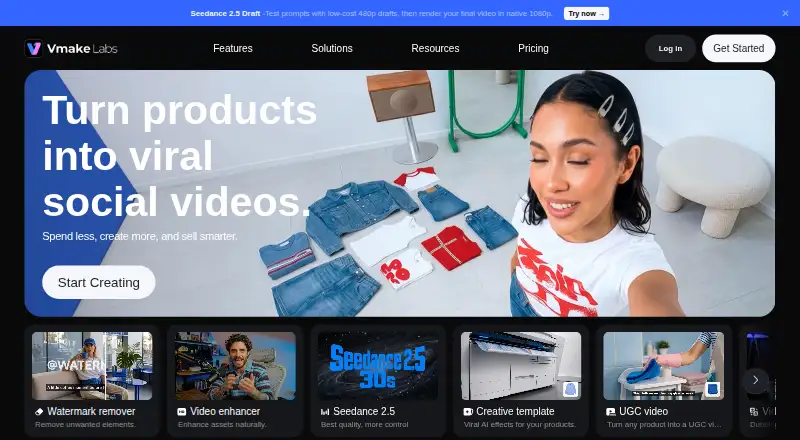
Vmake Labs offers social-video creation and editing tools for creators and small businesses.
How it plugs in
Signal on AI Video Stabilization Software7.8#2 of 33
For social media video work, Vmake Labs combines AI avatars and product showcases with editing features such as enhancement and captions. You can access it on the web, through iOS or Android apps, or via a browser extension; API access is also offered. The free tier comes with daily credits, while exported videos carry a watermark.
Review
In a line
Vmake Labs lets small companies, online sellers, and creators make and refine videos for social channels and e-commerce sites.
What it does
Text and images can be starting points for video generation; the service also makes AI avatars and product showcases. It offers viral-video recreation and user-generated-content-style clips.
Editing tools include captions, thumbnails, translation, noise reduction, video enhancement, and background or watermark removal. It can upscale video, with plans listing exports up to 4K.
How it connects
Vmake runs on the web and has iOS and Android apps. A browser extension called Remake is also linked from its site.
Its API lets prompts from AI tools drive video and image creation, enhancement, or editing. Vmake says the service is tuned for TikTok, Instagram Reels, YouTube Shorts, Shopify, and Amazon Inspire.
Good fit
The intended audience listed by Vmake includes small businesses, e-commerce sellers, affiliate marketers, social media managers, and creators making short social or product videos. Paid Plus and Pro tiers permit commercial use.
Watch for
Free access has fewer models and features, and exported videos include a watermark. Plus and Pro list monthly credit allowances and daily limits for core tools; check whether those limits fit your workload.
Using cloud editing sends photos to Vmake's servers for processing, and its privacy policy says inputs and outputs from AI features may also be handled.
Pricing
On the Free tier, users receive 20 credits each day; unused credits lapse after one day, features and models are restricted, and exports bear a watermark.
The Pro plan lists 4,500 credits per month, as many as 50 core-tool uses daily, output up to 2K or 4K, and commercial-use permission. Live chat and email support are included across the plans.
Verdict
People seeking video generation and editing alongside AI avatars and product-video features may find Vmake useful, particularly for social platforms and online shops. Free access offers a trial, though credits expire quickly and exports are watermarked. Before choosing a paid tier, confirm its price and whether the credit and daily-use limits suit your needs.
Our take
Vmake Labs may be a fit for people who want social-video, product-showcase, and AI-avatar tools together, plus editing features and mobile apps. The free tier has limits and watermarked exports. If you are concerned about how photos and AI inputs are handled, review the privacy terms before uploading them.
- Text and images can be used to generate videos, and AI avatars are available.
- Tools include captions, translation, thumbnails, and video enhancement.
- Access is available through the web, iOS and Android apps, and a browser extension.
- An API is available, while Plus and Pro tiers allow commercial use.
- Free exports are watermarked, and access to models and features is limited.
- Free credits expire after one day; paid tiers set daily caps on core-tool use.
- Cloud editing sends photos for processing, and AI inputs and outputs may be processed.
- Pick it ifSmall companies and creators making short social videos; E-commerce sellers making product showcase videos; Social media managers and affiliate marketers
- Skip it ifYou need a free tier that exports without a watermark; You need published Plus or Pro prices before evaluating a plan
Pricing
The no-cost Free tier supplies 20 credits each day that expire after one day; features are limited and exports include a watermark.
- Free20 credits daily (valid for 1 day) · Limited models and features · Exports with watermarkFree
- Plus1,000 credits/month · 10 daily uses for core tools · 1080p export · Commercial use includedOn request
- Pro4,500 credits/month · 50 daily uses for core tools · Up to 2K/4K export · Commercial use includedOn request
As vmake.ai lists them, checked 8 Oct 2026.
Questions
Does Vmake Labs offer free access?
Yes. Its Free tier grants 20 credits daily, each valid for one day, with restricted models and features. Exports carry a watermark.
What kinds of videos can Vmake Labs create?
Videos can be generated from text or images, including AI-avatar, product-showcase, and user-generated-content-style formats.
Which platforms support Vmake Labs?
The service is available on the web and through iOS and Android apps, and its site links to a Remake browser extension.
Are Vmake Labs videos licensed for commercial use?
Commercial-use rights come with the Plus and Pro plans.
What export resolutions are listed?
The Free plan does not specify an export resolution. Plus lists 1080p, while Pro lists up to 2K or 4K.
Does Vmake Labs provide API access?
Yes. Through its API workflow, prompts in AI tools can be used to create, improve, or edit videos and images.
How does Vmake Labs handle uploaded photos and AI content?
According to the privacy policy, cloud editing transfers photos to Vmake servers for processing, and inputs and outputs from AI features may be processed.
Near it
All alternatives →- CPCutout.Pro#1 on this board
- G
 Gyroflow#3 on this board
- TTensorPix#4 on this board
- CP
 CyberLink PowerDirector#5 on this board
- C
 CapCut#6 on this board
- HVHitPaw VikPea#7 on this board
- AP
 Adobe Premiere#8 on this board
- WAWink AI Video Generator#9 on this board
- WFWondershare Filmora#10 on this board
- DR
 DaVinci Resolve#11 on this board